# Supported Browsers, Handhelds, and Printers
## Supported Browsers
OperationsCommander recognizes that our users may use various Internet Browsers when working with our system. We aim for all visitors to have the best possible experience while using OPSCOM, however, we do recognize that it is impossible to develop applications that work identically, efficiently and effectively on all web browsers. We make best efforts to support support the latest versions of Internet Explorer, Firefox, Chrome, and Safari browsers.
## Mobile Devices and Tablets
This site supports browsing from most Mobile or Tablet devices. Content is sized and displayed based on the screen resolution and other display attributes of your device.
### OPSCOM Enforce for iOS & Android
A refreshed and smoother admin enforcement app currently in beta testing with select clients, compatible with both iOS and Android.
[More details can be found here.](https://opscom.wiki/books/opscom-enforce-ios-android)
### Minimum Handheld Requirements
Not all Tablets or Mobile devices are supported for use with OPSCOM, as processing power and camera functions may vary. They must have at least the requirements listed below. Before committing to a device for use with OPSCOM, you are encouraged to perform your own testing to ensure you are happy with the perform on your preferred device.
OPSCOM no longer supports versions of the Android operating system lower than 11 and iOS versions lower than 13. Clients with devices that do not support at least version 11 for Android and 13 for iOS may continue to function, however, you will not be able to download this or future versions of OPSCOM. This means you cannot take advantage of new functionality in future releases.
- OS Version - Minimum:
- Android, Version 11.0 (Red Velvet; 2020)
- iOS, Version 13.0 or later
- Minimum Processing Power - Quadcore: 4X 1.2 GHz
- Rear Camera: 8 MP Camera
- Autofocus - Yes
- LTE/4G and/or Wi-Fi Connectivity 1
1 LTE/4G or better is required if connecting with cellular providers and Wi-Fi is not available *(**required** for data sync)*.
#### Recommended Tablet Specifications
- Samsung Galaxy Tab Active Pro Tablets with LTE & data plan, 8 or 10"
- Samsung Galaxy Tab A 8 or 10” Tablet with LTE & data plan
- iPad Wi-Fi + Cellular model
- iPad mini Wi-Fi + Cellular model
The Galaxy Tab Active Pro typically comes with its own heavy-duty rugged case. iOS tablets usually don’t, though, so keep that in mind—you may want to pick one up yourself!
#### Recommended Cellphones
- Samsung Flagship Cellphones, S20 through S24 (OPSCOM Testing Devices)
- Samsung XCover 4 & data plan
- Any mid-range or better Android phone 2
2 While such devices are generally expected to work, they have not been tested and may display layout irregularities. As such, full functionality cannot be guaranteed.
### Supported Bluetooth Printers
Below is a list of supported Bluetooth printer models. Other models and makes may require custom development to support them. The printer must use 3" printer rolls in order to be compatible with our layout design.
| - Star Micronics SM-T300-DB50 3" Portable Printer or equivalent
|
- Star Micronics SM-T301-DB50 Portable Printer with Magnetic Stripe Reader or equivalent
|
| - Zebra ZQ320+ Series Bluetooth Printer No label sensor
- Outdoor edition
- Charger sold separately
|
| - Zebra ZQ511 Series Bluetooth Printer No label sensor
- Outdoor edition
- Charger sold separately
|
| - Zebra ZQ620+ Series Bluetooth Printer No label sensor
- Outdoor edition
- Charger sold separately
|
| - Zebra Charging Accessory Kit sold separately
|
| - Zebra In Vehicle Charging Accessory Kit sold separately
|
Please provide the models you are interested in purchasing prior to proceeding.
- **Bluetooth vs. Wi-Fi:** This depends on your use case. Generally, most clients can opt for the Bluetooth-only version since a Bluetooth-enabled device is used in tandem while patrolling.
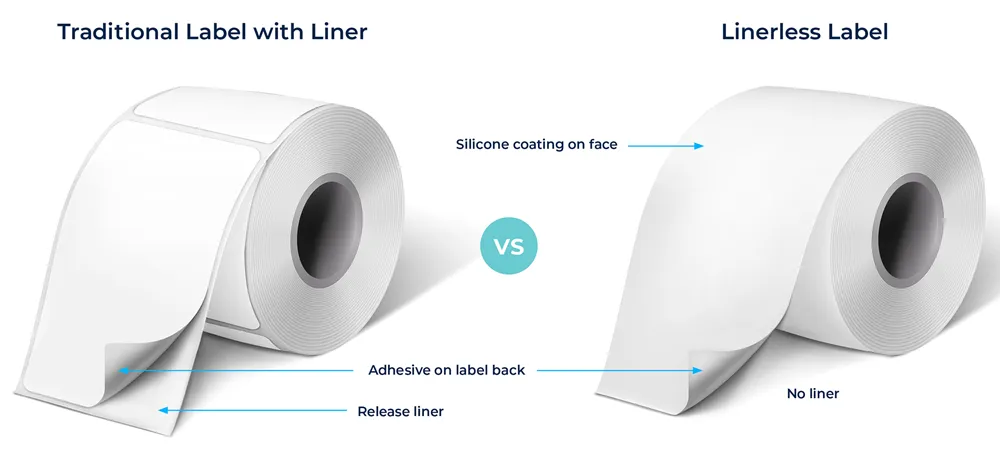
- **Linered vs. Linerless:** This functionality determines the printer's ability to support labels with a backing and not just paper. A linered printer supports both, while a linerless printer only supports paper. Most clients only require the linerless version; however, it depends on your use case.
[](https://opscom.wiki/uploads/images/gallery/2026-03/image.png)