# Survision LPR Camera
# Setting Up Your Survision LPR Camera
**Note:** This is assuming you have a PL8RDR computer already set up. See the PL8RDR information section below for more details.
# Powering the Camera
Your Survision camera should come with a cable. This is only used for providing power to the camera; the camera connects to the PL8RDR wirelessly. Power on both the PL8RDR and the Survision camera.
# Connecting to a Handheld Device
You will find the information for connecting to the PL8RDR [here](https://opscom.wiki/books/lpr-cameras-setup-playbook/page/connecting-to-the-pl8rdr).
# Positioning the Camera
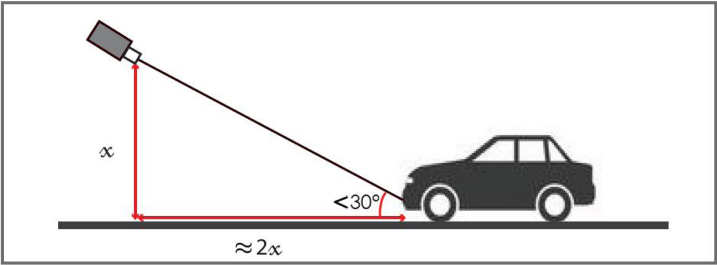
Choose a plate on a vehicle to be your reference. Park your enforcement vehicle behind it and to the side, as if you were driving past a street-parked car. The camera on your vehicle should be **5 meters** away from the reference plate, and angled **less than 30 degrees** off the front of the plate.
[](https://opscom.wiki/uploads/images/gallery/2024-06/ynbimage.png)
*(This diagram shows a vertical angle, but the same applies horizontally.)*
*You can also find best ways to adjust the LPR cameras [here](https://opscom.wiki/books/lpr-cameras-setup-playbook/page/lpr-camera-adjustment-tutorial-survision "LPR Camera Adjustment Tutorial - Survision")*
Connect to the pl8rdr.opscom Wi-Fi network on a device of your choice. The screenshots in this demonstration are from a phone, but any laptop or mobile device will work.
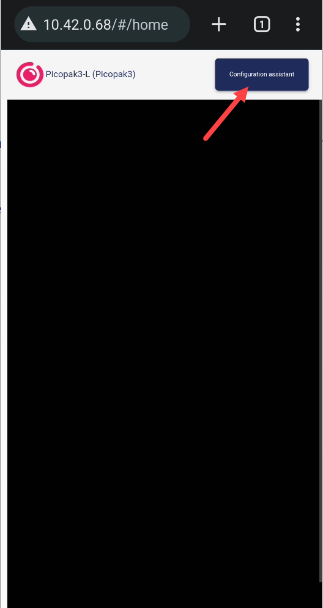
On your tablet (or other connected device) open a web browser, enter the IP address of the camera.
*For OPSCOM's test cameras, use the IPs below:*
One camera: **10.42.0.11**
Two cameras: **10.42.0.11** and **10.42.0.12**
Click on "Configuration assistant".
[](https://opscom.wiki/uploads/images/gallery/2024-06/fw0image.png)
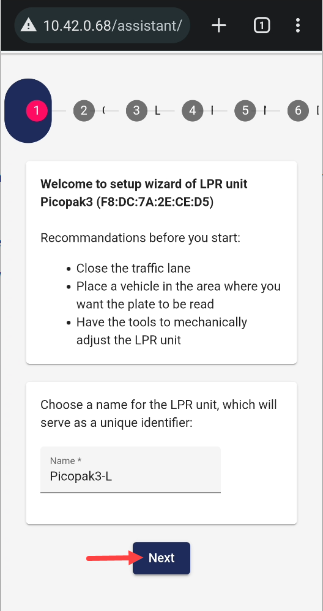
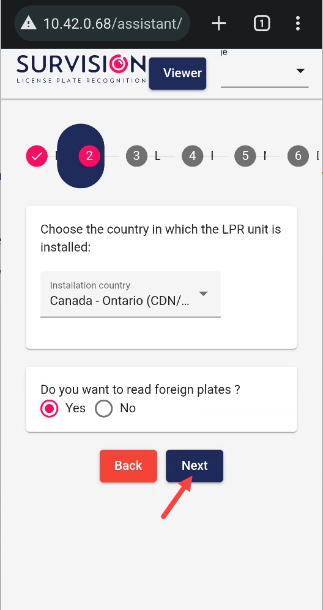
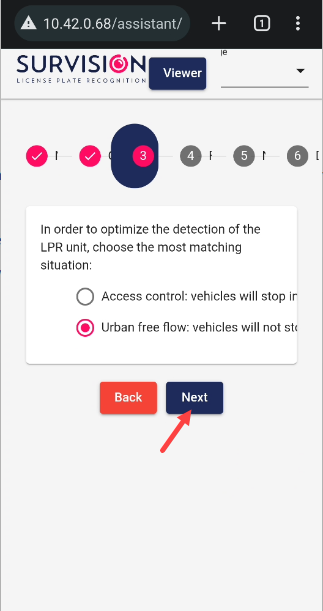
Proceed through the first 3 screens by clicking "Next" each time. These settings will have already been configured for you.
[](https://opscom.wiki/uploads/images/gallery/2024-06/THvimage.png)
[](https://opscom.wiki/uploads/images/gallery/2024-06/Gx7image.png)
[](https://opscom.wiki/uploads/images/gallery/2024-06/YREimage.png)
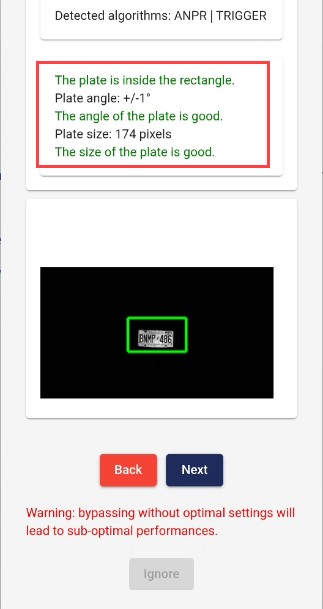
On the 4th screen, you will be prompted to set the camera angle. Adjust the camera on your vehicle until the plate you have chosen as your reference point is centered in the green box. The lines of text above the camera feed should all turn green when it is set correctly. When you are done, click "Next".
[](https://opscom.wiki/uploads/images/gallery/2024-06/Uloimage.png)
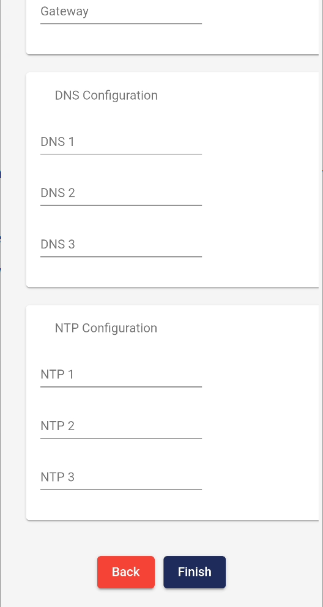
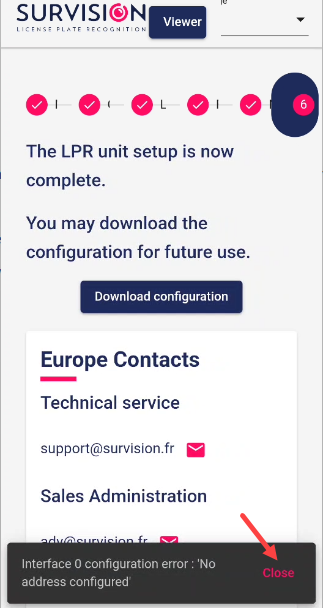
On the 5th screen, leave all the fields blank and click "Finish". The next screen may display an error message saying no address is configured. You can safely ignore this; the address is configured on the PL8RDR.
[](https://opscom.wiki/uploads/images/gallery/2024-06/iClimage.png)
[](https://opscom.wiki/uploads/images/gallery/2024-06/XyQimage.png)
Your camera should now be set up at the correct angle. You can go through this quick setup process every time you need to reposition the camera on your vehicle.
# LPR Annual Camera Maintenance Suggestions
## 1. Physical & Lens Care
Since the Picopak relies on high-speed image capture (60 fps) and internal OCR (Optical Character Recognition), image clarity is your top priority.
- **Lens Cleanliness:** Dust, mud, or road salt can degrade reading accuracy by 20–30%. Clean the lens weekly (or daily in harsh weather) using a **microfiber cloth** and a lens-safe solution. Never spray the solution directly onto the camera; apply it to the cloth first.
- **Check for Obstructions:** Ensure the camera's field of view is clear. For mobile setups, check that vehicle parts (like a hood or mirror) or mounting brackets haven't shifted into the frame.
- **Housing Integrity:** Periodically inspect the aluminum casing for cracks or signs of impact. While it is **IP67-rated** (waterproof and dustproof), a significant hit can compromise the seals.
- **Cable Inspection:** Mobile environments involve vibration and movement. Regularly check the **Amphenol connectors** and cables for fraying, oxidation, or loose connections.
- **Waterproofing Seals:** Ensure the RJ45 protective cover is securely tightened (recommended torque is **0.8 to 1.5 N·m**) to prevent water ingress into the network port.
- **Battery Health:** If using a portable battery kit, verify the charge levels and connector integrity to prevent sudden system shutdowns, which can occasionally corrupt data logs.
- **Firmware Updates:** Survision typically releases updates **2–3 times a year**. These are critical for maintaining high accuracy as vehicle plate styles change.
- **Remote Monitoring (Survision Guard):** It is highly recommended to use the **Survision Guard** service. This tool remotely monitors the camera’s "health," including internal temperature, power failures, and "Confidence Levels" (how sure the camera is of its own readings).
- **Accuracy Audits:** Perform a quarterly test by comparing the camera’s output against a manual log of 10–20 plates to ensure the "Confidence Ratio" hasn't drifted due to focus or vibration issues.
| **Feature** | **Requirement / Limit** |
| **Operating Temp** | -40°C to +55°C (-40°F to +131°F) |
| **Protection Rating** | IP67 (Dust tight / Immersion up to 1m) |
| **Power Supply** | 12/24 VDC (+/- 3V) |
| **MTBF** | 56,000 hours minimum (approx. 6.4 years) |