This article outlines the standard 12-week enterprise onboarding process for new OPSCOM clients. It provides an overview of the project phases, from initial discovery through to the final live launch, ensuring administrators understand their responsibilities during the rollout.
### Project Phases Overview The onboarding journey is structured into five distinct phases designed to ensure a smooth and successful system deployment. #### Phase 1: Learning the Basics (Estimated: 2 Weeks) Following the receipt of your signed contract, an OPSCOM representative will initiate the project with a discovery call. This meeting is crucial for aligning expectations and defining project scope. - Participate in a project kick-off meeting via Google Meet. - Identify and invite relevant team members to discovery sessions. - Review the roles and responsibilities of the OPSCOM team and your organization. - Receive your system site setup and login credentials via email.Billing commences immediately upon site creation. All clients are provided with net 30 payment terms.
#### Phase 2: Standard Component Assembly (Estimated: 2 Weeks) This phase focuses on the technical and financial foundation of your installation. Your **Account Executive** and **Trainer** will guide you through these core configurations: - Configure **Admin** and **Client Domains**. - Determine access requirements for the system. - Establish your **Roles and Permissions**. - Create **Administrator Accounts**. #### Phase 3: Tailored Configuration (Estimated: 3-4 Weeks) In this phase, the focus shifts to tailoring the system to your specific operational needs, including any custom development or data imports. - Configure **Admin Options**, **Lots**, **Permit Options**, and **Violation Options**. - Set up **System Messaging** and **User Portal** templates. - Customize **Email Templates**. - Place orders for necessary **Violation** stock.During this phase, you will be introduced to the self-guided training agenda. Use this opportunity to explore your **Preview System** to gain familiarity with the platform's functionality.
#### Phase 4: Final Testing (Estimated: 2-3 Weeks) This is the final testing phase designed to identify any operational needs or system bugs before the public launch. - Collaborate with your **Training** representative to ensure full system comprehension. - Attend scheduled live training sessions to walk through key system modules. - Conduct comprehensive testing of all installation functionalities. #### Phase 5: Go Live (Estimated: 1 Day) Once all requirements are met and testing is complete, the final launch occurs. - Complete all remaining custom requirements. - Verify system readiness with your project team. - Launch your live site for public use. This is what a 12 Week Enterprise Onboarding schedule looks like. [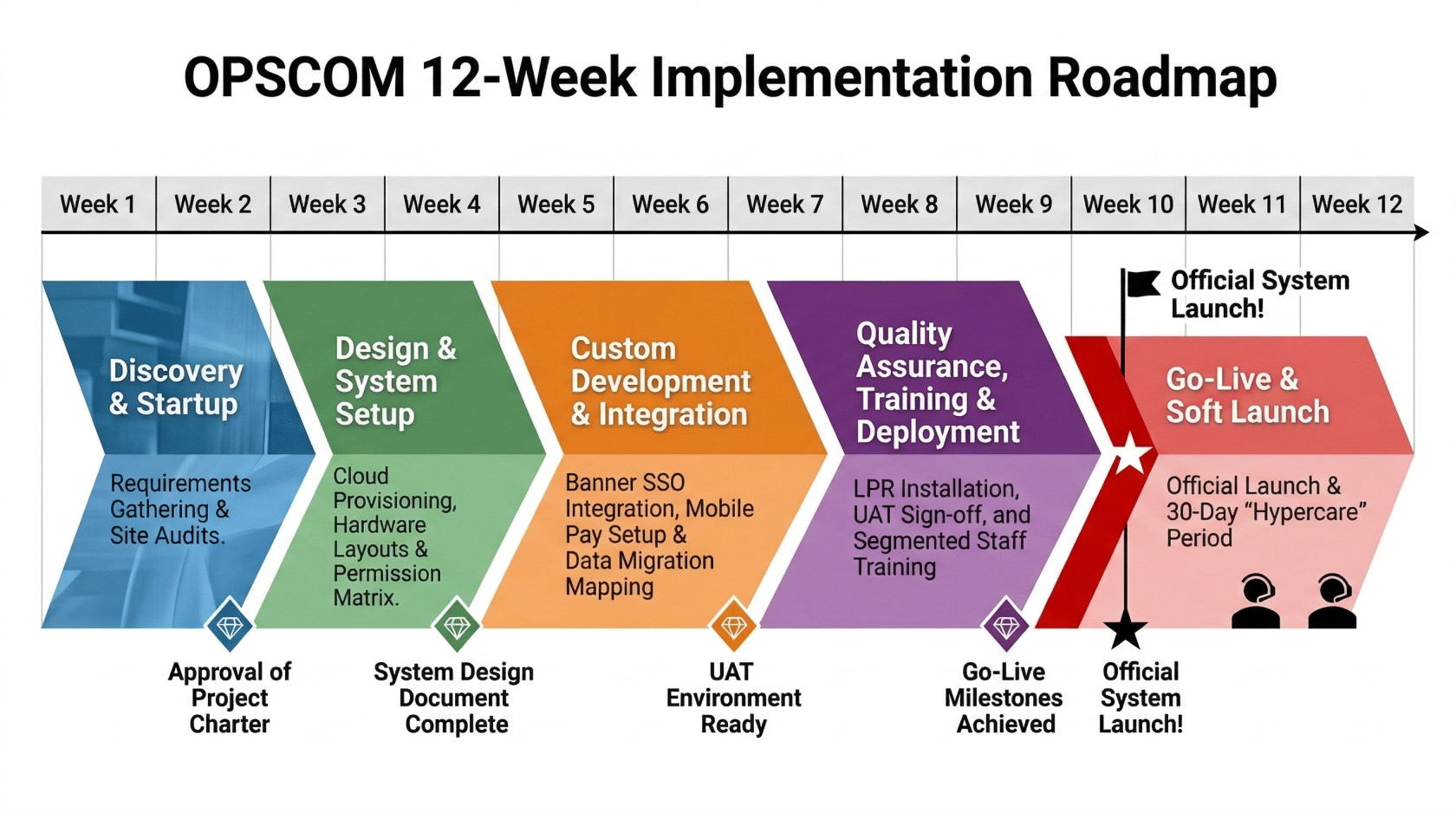](https://opscom.wiki/uploads/images/gallery/2026-03/12-week-deployment-rfp.png) --- ### Best Practices and Considerations - **Team Involvement**: Ensure the appropriate stakeholders from your organization are involved early in the discovery phase to clarify business processes and expectations. - **Production vs. Preview**: While you should use your **Preview System** to test and learn, ensure all final configurations are applied directly to your **Production** environment. - **Active Participation**: The onboarding process is a collaborative effort. **Maximize the value of your training sessions by preparing specific questions about your organization's unique operational workflows.**