OPSCOM Wishlist Items Released
Wishlist Information has moved! We have moved discussions to the new community. Come check out this information here!
We deeply appreciate your suggestions and ideas for making OPSCOM even better. Here, you can explore the exciting feature improvements we're actively planning and get a glimpse into the community-requested features we're seriously considering.
- Enhanced Admin Security: Multi-Factor Authentication (MFA) - Released January 2026!
- Reset your Appeal Associate Date - Released September 2025
- Manage your Email Preferences - Released September 2025
- Allow Appeal Evidence Uploads - Released July 2025
- Report: Stored Cards with No Active Rollover Subscription - Released June 2025
- New Account Setup Options - Released June 2025
- Display Waitlist Position - Released June 2025
Enhanced Admin Security: Multi-Factor Authentication (MFA) - Released January 2026!
We have recently added a critical security layer for our Admin users: Multi-Factor Authentication (MFA)! This is Phase 2 of our MFA project; in Phase 1, we successfully delivered MFA for all user-side accounts. This next phase provides Primary Admins with three flexible control options (Hidden, Visible, or Required) and enables Admin Users to securely log in using an email-delivered One-Time Password (OTP). This significantly strengthens account protection, addressing a key security request from clients.
MFA is always mandatory for security-sensitive actions:
-
Admin Account Creation
-
Password Changes
You will receive an MFA email code for these actions, regardless of the system setting! If you don't receive the code, your email address may be missing or incorrect—please contact your administrator for help.
There are 3 settings for the MFA functionality.
This setting is currently only configurable with the helps of support. If you wish to change the options on your site, contact support@ops-com.com
Here is how the prompt will look for your admin users:
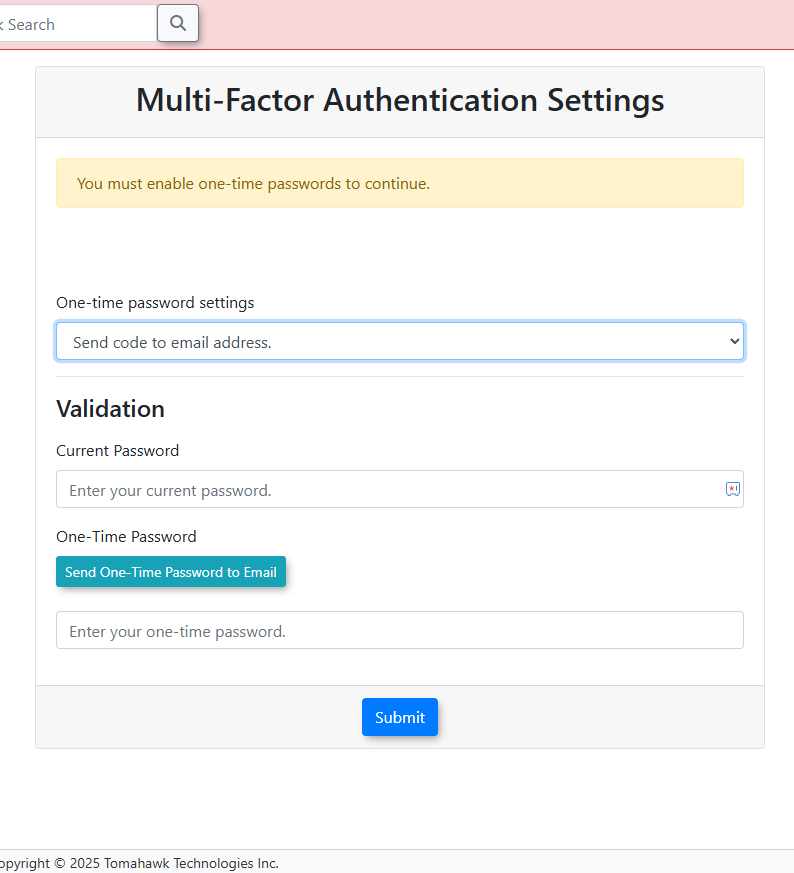
Note: The MFA email is a required security communication, and will be sent out to all users, even if they have unsubscribed from all email categories, on their user profile.
Originally requested on this community item!
Reset your Appeal Associate Date - Released September 2025
Hey OPSCOM Community! ? Get ready for a game-changing update that's all about fairness and giving your users the time they need! We've heard you, and we're thrilled to introduce a brand-new setting: Reset Appeal on Association! ?
This fantastic new feature is here to level the playing field for vehicle owners who've received a violation but haven't yet created an account. Before, they might have lost valuable appeal time. Now, with this setting enabled, once a user creates an account and associates it with their vehicle, the appeal time clock is reset! They'll get the full number of days specified under your Appeal days setting to appeal the violation, counting from the day they associated the account.
This isn't just a win for the user experience; it's a huge step toward making your appeals process fairer and more transparent. It ensures everyone gets an equal opportunity to appeal, regardless of when they set up their account. Think of it as a little extra dose of client delight, making their experience with OPSCOM even smoother and more enjoyable! ?
Read all about it in this wiki article – we think you're going to love this extra layer of flexibility!
Manage your Email Preferences - Released September 2025
Hey OPSCOM Community! ? Get ready for some fantastic news that's going to make managing your email preferences a breeze! We've heard your feedback, and we're thrilled to announce that we've rolled out a brand-new, super easy-to-use unsubscribe option for our email communications! ?
Say goodbye to those manual unsubscribe requests that were taking up valuable time for your parking office staff. This exciting update puts you in control, allowing you to effortlessly manage the emails you receive from us. Not only is this a big win for your team's efficiency, freeing up their time to focus on what matters most, but it's also a significant step forward in ensuring your privacy and security. Think of it as a little extra dose of client delight, making your experience with OPSCOM even smoother and more enjoyable. Read all about it here – we think you're going to love it! ?
Originally requested on this community item!
Allow Appeal Evidence Uploads - Released July 2025
Fantastic news, OPSCOM clients! ? We're thrilled to announce a significant enhancement to the violation appeals process! You can now allow your users to upload supporting evidence directly to their appeals, making the submission process more efficient and user-friendly! ?
This "customer delight" improvement was developed in response to requests from clients like Carleton and Trent Universities. It means less time administrators spend contacting users for supporting documents and a more streamlined review process for everyone involved!
We understand that different workflows require flexibility. That's why we've included a configurable setting that allows you to enable or disable this feature based on your specific needs, giving you full control. While it will be enabled by default, you have the power to choose what works best for your institution.
Our goal is to make OPSCOM as user-friendly as possible, and this new feature is a big step in that direction. Get ready for more streamlined appeals and an even smoother experience! ? Check out this wiki article for all the details!
Report: Stored Cards with No Active Rollover Subscription - Released June 2025
We’ve added a new report you asked for — now you can easily see which users have a stored credit card but no active rollover subscription.
The Subscription Verification Report provides administrators with a centralized view to proactively engage with these customers, encourage subscription enrollment, and streamline future permit renewals.
Documentation can be found here.
New Account Setup Options - Released June 2025
Fantastic news, OPSCOM users! ? We're thrilled to introduce a new, streamlined option for creating your account! Now, you'll have the choice to set your password right away during signup, making your first login super quick and easy. ?
Don't worry, the existing method of setting your password via email after signup isn't going anywhere! We understand that different workflows require flexibility, especially for our higher education partners who need seamless kiosk access. That's why we're implementing this as an additional option, giving you the power to choose the account creation method that best suits your needs.
Our goal is to make OPSCOM as user-friendly as possible, and offering multiple account creation pathways is a big step in that direction. Get ready for more choices and an even smoother experience! ?
Display Waitlist Position - Released June 2025
? Exciting news for OPSCOM waitlists! ? We've made it super easy for your clients to see their spot! If you turn on this option, your users will be able to clearly view their position on the waitlist without any additional clicks. This means less stress for your users and fewer calls for your Parking team – win-win! We have also added a Waitlist card to the user profile overview making it quick and easy for your Admins to view their positions. Get ready for a much smoother and happier waitlist experience! ?