Configure Violations to a Person
The Configure Violations to a Person feature allows administrators to issue citations directly against an individual's profile rather than attaching them to a specific vehicle license plate. Its primary purpose is to help enforcement teams track non-vehicular offenses, such as smoking, alcohol-related infractions, or personal conduct breaches on property. This article is intended for OPSCOM administrators.
Setup and Configuration
To issue personal violations, you must first enable the system-wide setting and then configure specific ticket categories to accept user-based assignments.
Enabling the Global Setting
-
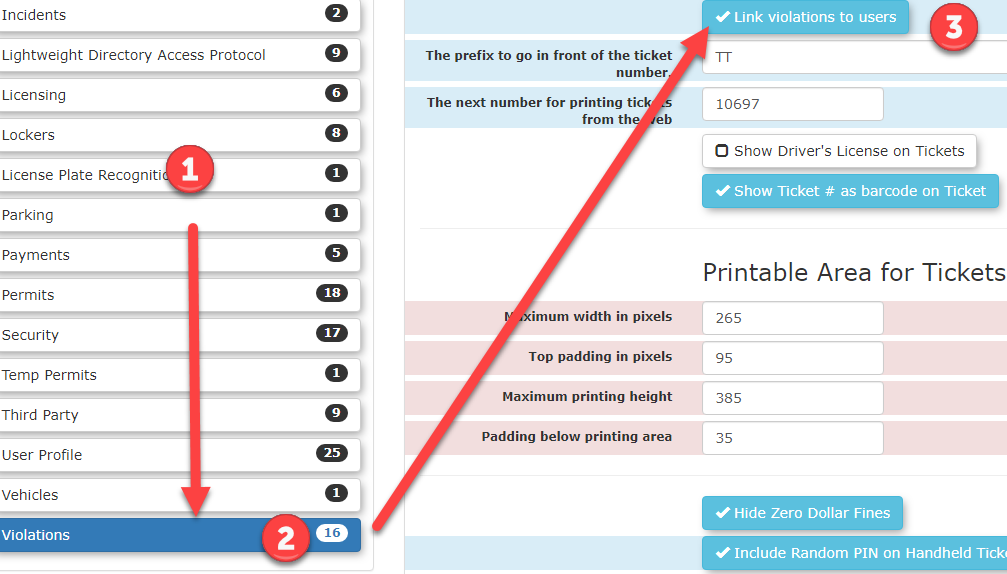
Hover over System Configuration and click System Settings.
-
Click the Violations tab.
-
Enable the Link violations to users checkbox to allow issuing violations by person.
-
Save your settings.
Configuring the Ticket Category
-
Hover over Admin Options and click Violations then Manage Ticket Categories.
-
Select the specific ticket category you wish to update (e.g., Municipal).
-
Locate the Violation Applies To setting.
-
Select Users to restrict this category strictly to individuals.
-
Save your changes.
Using this Feature
Once the category is properly configured, the violation entry form will dynamically adjust when this specific ticket type is selected by an administrator or patrol officer.
-
Begin the standard process for manually entering a violation.
-
Click the Ticket Type drop-down menu and choose the newly configured category.
-
Locate the Apply violation to: section that appears on the form.
-
Click the A Person option to attach the offense directly to the individual instead of a license plate.
-
Search for the specific user and finalize the violation entry.
Best Practices and Considerations
-
Category Management: Clearly define and separate your user-based ticket categories from your vehicle-based ones. Configuring categories specifically for personal conduct ensures that patrol officers do not accidentally issue vehicular tickets (such as parking in a fire lane) to a person without capturing the required license plate data.
-
Patrol Communication: Ensure your field enforcement officers are trained on which ticket types apply to users. They will need to know to search for a user's profile (using a name or ID) rather than scanning a license plate when issuing these specific infractions from their handheld units.