Incident Distribution Feature
The Incident Distribution feature allows dispatchers to email incident details directly to pre-configured user groups. Its primary purpose is to streamline communication and enable faster response times by eliminating the need to manually copy information to external email clients. This guide is intended for OPSCOM administrators and dispatch personnel.
Setup and Configuration
Before this feature can be utilized, an administrator must create distribution departments and assign users to them. These departments define the pre-configured recipients for incident emails.
Creating a Distribution Department
-
Hover over System Configuration, click Distribution, and select Departments and Users.
-
Click the List All button beside the Departments section.
-
Click the Plus button.
-
Enter a descriptive name in the Department Name field. This name will be visible to dispatchers.
-
Click Save Changes.
Adding a Contact to a Department
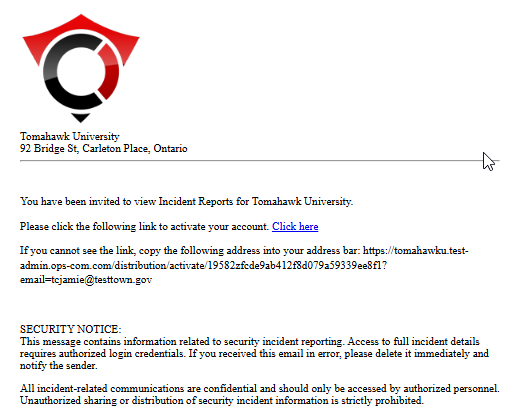
Contacts invited to view distributions are not the same as standard parkers or admin users. They exist strictly to access the incident distribution module, and they receive a specific invitation link to view internal incident reports when you click save and send.
Managing Existing Distribution Groups
Using this Feature
Once distribution groups are configured, dispatchers can quickly send vital incident details directly from an active incident's main information page.
Sending an Incident Email
Key Information Displayed
The automated email sent to the distribution group will extract and display the following key details from the incident report:
-
Incident Number
-
Location
-
Time of Incident
-
Description of Incident
-
Any optional comments added by the dispatcher
Best Practices and Considerations
-
Audit Distribution Groups: Regularly audit your distribution groups to ensure the email lists are completely up-to-date. Outdated contact information can lead to severely delayed or missed incident notifications.
-
Use Intuitive Naming: Create clear and intuitive group names. Titles like "Day Shift Patrol" or "Weekend Supervisors" are much more effective and recognizable for dispatchers than generic names like "Group 1".
-
Pre-Notify Contacts: Remember to send invited department contacts a separate message letting them know about the system. This ensures they expect the automated invitation and do not accidentally delete your message or lose it in their spam folder.