Moneris Checkout
The Moneris Checkout Hosted Payment configuration allows administrators to process secure online transactions through a fully integrated Moneris merchant account. Its primary purpose is to enable reliable payment processing—including pre-authorizations and stored cards for recurring billing—directly within the OPSCOM checkout flow. This article is intended for OPSCOM administrators.
Setup and Configuration
Properly configuring Moneris Checkout involves two key stages: generating and configuring the settings within your Moneris merchant account, and then mirroring those exact settings within your OPSCOM environment.
Gathering Required Credentials
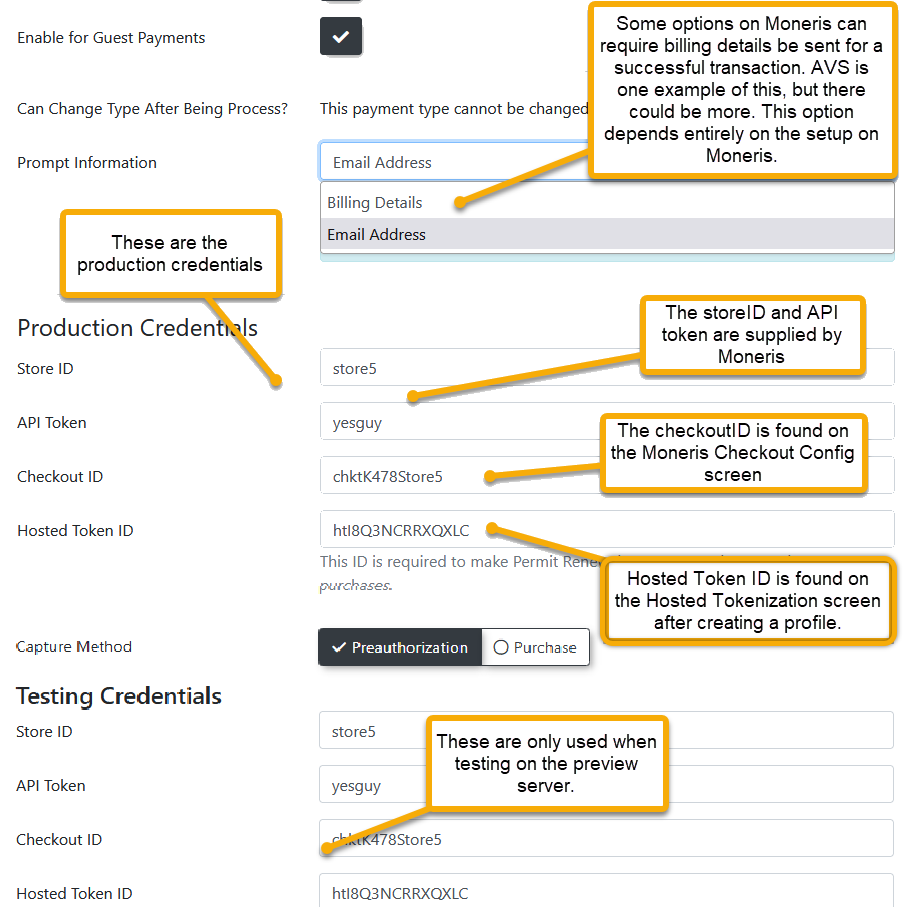
Before beginning the configuration in OPSCOM, you must create a profile in your Moneris account and obtain the following credentials:
-
store_id: Your unique Moneris store number.
-
api_token: Your unique API authentication token.
-
checkout_id: Your specific checkout profile ID.
-
hosted_token_id: Generated from the Hosted Tokenization page (required if using Moneris Vault for stored payments).
Moneris Portal Configuration
-
Log in to the Moneris Merchant Resource Center.
-
Click Admin in the main menu and select Moneris Checkout Config.
-
Locate your specific checkout profile and click to edit it.
-
Select I have my custom order form and want to use Moneris simply for payment processing under the Checkout Type settings.
-
Navigate to the Payment section and set the Transaction Type to your preferred method (preauthorize is highly recommended).
-
Disable the Tokenize Card option in the Payment section, as card tokenization for recurring payments is handled separately by the Moneris Vault.
-
Disable the Enable Fullscreen checkbox under the Branding and Design section to prevent the form from taking over the entire screen during checkout.
-
Select Use Own Page for the order confirmation setting so Moneris correctly redirects users back to the OPSCOM receipt page.
OPSCOM System Configuration
Once your Moneris portal is configured, you must add the payment type to OPSCOM. Detailed step-by-step instructions for adding the gateway can be found on the Payment Type Setup page.
Important: When configuring the gateway in OPSCOM, your Transaction Type setting (Pre-auth vs. Purchase) and your Security settings (AVS/CVV requirements) must exactly match what you configured in the Moneris portal.
Using this Feature
Because this is a backend payment gateway configuration, administrators do not manually interact with this feature on a daily basis. Once fully configured, Moneris automatically handles electronic routing when users process transactions on the user portal or when administrators process credit card payments via the administrative portal.
Moneris Vault for Stored Payments
Moneris Vault is a complementary service used for tokenizing and storing credit cards for future, automated use. This feature is heavily utilized for parking permit rollovers and the Text2ParkMe feature. To utilize this functionality, ensure your hosted_token_id is actively entered in your OPSCOM payment settings.