Violations From Static Cameras / Mailout Violations
The Violations From Static Cameras feature allows administrators to generate parking infractions based on chalk records captured by static License Plate Recognition (LPR) cameras. Its primary purpose is to automate the identification of unauthorized or overtime vehicles, streamlining the workflow for issuing mail-out violations. This article is intended for OPSCOM administrators.
Setup and Configuration
Before you can actively generate violations from static camera logs, there are system prerequisites that must be met and initial mapping that must be configured.
Ensure that the OPSCOM support team has configured your static cameras with the necessary settings to report on the correct lot group and GPS location. Additionally, if you need to change your default ticket prefix (e.g., TT-), you must contact support@ops-com.com to have this adjusted.
Admin Configuration
Using this Feature
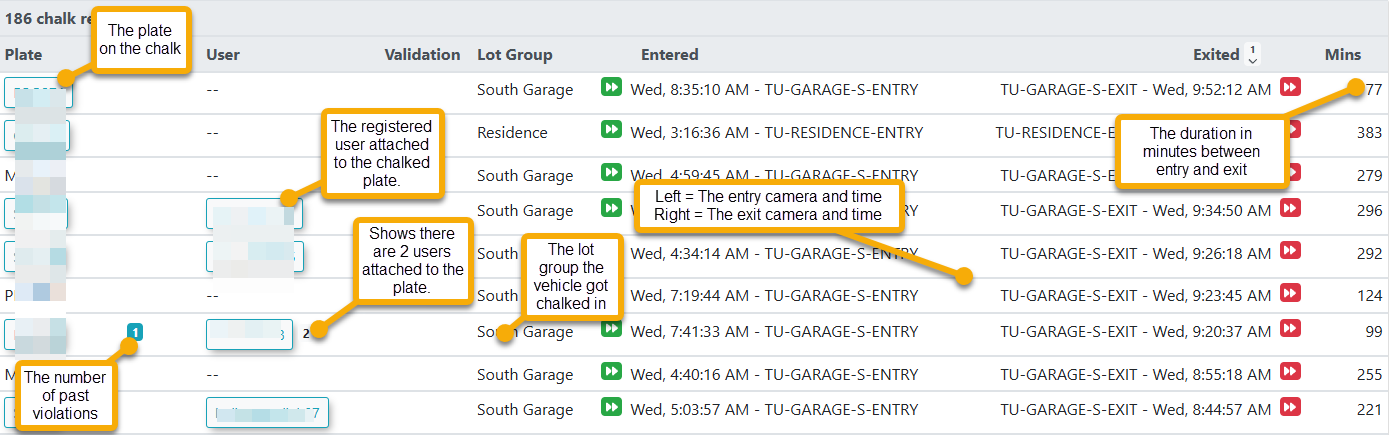
Once configured, static camera logs will populate in the system as they are captured, allowing administrators to filter the data and issue violations accordingly.
-
Hover over Violations, hover over LPR and Chalking, and click Create Violations From Static Cameras.
-
Click the Report Type drop-down menu to filter the logs (e.g., choose No Permit & Over Lot Time to only list vehicles that have no permits and have exceeded the lot group's free parking duration).
-
Click the Vehicle Status drop-down menu to further segment the search results based on system registration.
-
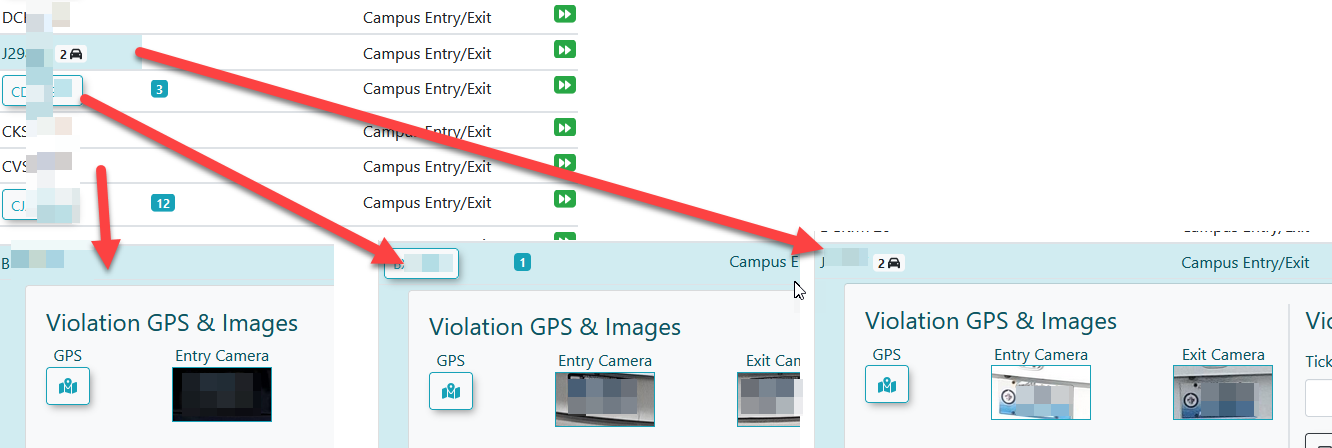
Click a specific log row from the generated list to display the violation entry form.
-
Review the entry and exit camera images provided to verify the chalk record.
-
Enter the required infraction details into the form and submit the violation.
Key Information Displayed
-
Vehicle Status Filters:
-
All: Returns all captured plates, regardless of their registration status in the system (this is the default setting).
-
In System: Filters the results to only show vehicles or plates that currently exist in the database.
-
Not in System: Filters the results to only show unknown or unregistered vehicles and plates.
- Registered Users: Filters the results to only show plates that are actively tied to a registered user or driver in the system.
-
- Weekdays Only: When checked, this filter restricts the search results to only show chalk records where both the vehicle's entry and exit occurred between Monday and Friday.

-
Vehicle Record Formats: Vehicles can appear on the creation screen in one of three formats: no existing vehicle record, a single vehicle record, or multiple vehicle records. The violation creation screen will dynamically adjust based on which format is detected.
Best Practices and Considerations
-
Verify Photographic Evidence: Always review the entry and exit camera images carefully before finalizing a violation. Confirming that the LPR text accurately matches the physical license plate in the photo prevents easily appealed administrative errors.
-
Automated Log Management: Once the violation details are entered and successfully submitted, the chalk record will automatically disappear from the processing list. The newly created violation can then be found and managed using standard system search tools.