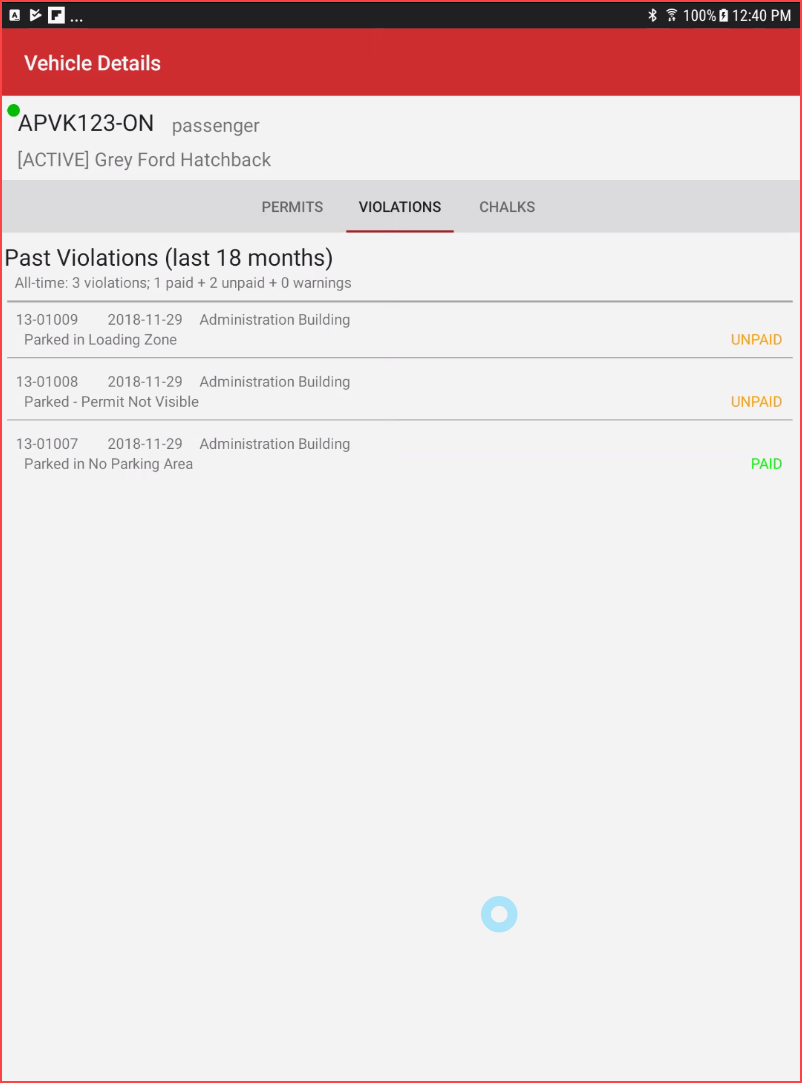
Violations Tab
ReviewThe Past Violations Tab
Inis thisa casespecific wesection seewithin threethe violations.Search TwoVehicle haveResults beenscreen paidon the legacy OPS-COM Parking Enforcement application. Its primary purpose is to provide field officers with a detailed historical log of all past violations issued to a specific vehicle, assisting them in making informed and escalated enforcement decisions. This article is intended for OPS-COM administrators and onefield isenforcement yetpersonnel unpaid.using the legacy Android application.
Setup and Configuration
The date,Violations location,Tab automatically retrieves its historical ticket data directly from the central database.
Admin Side: No specific configuration is required on the handheld device. Administrators manage all violation histories, payment statuses, and typeescalation policies within the core OPS-COM administrative portal.
Using this Feature
Enforcement personnel use this tab to review a vehicle's citation history and current payment compliance before issuing new tickets.
Accessing the Violations Tab
-
Perform a plate or VIN query using the Search Vehicles function.
-
Tap the specific plate read from the initial search results list.
-
Tap the Details button to open the extended vehicle record.
-
Tap the Violations tab (or swipe left/right across the screen to navigate to it).
Key Information Displayed
-
Violation Date: The exact date the previous ticket was issued.
-
Offense Location: The specific lot or zone where the infraction occurred.
-
Violation Type: The nature of the offense (e.g., Parked in No Parking Area).
-
History Summary: A high-level count of the vehicle's past violations (e.g., within the last 18 months), including a breakdown of paid, unpaid, and warning counts.
Visual Cues and Status Indicators
-
Payment Status Text: Each individual violation record features a clear, color-coded status indicator on the right side of the screen.
-
PAID (typically displayed in green) indicates the citation has been resolved.
-
UNPAID (typically displayed in red or orange) indicates there is
alsostillshownaninoutstanding balance for that specific infraction.
-
Best Practices and Considerations
-
Review unpaid violations before ticketing: Always check the Violations tab for a history of unpaid tickets or repeated offenses. Identifying a pattern of unpaid or frequent violations is critical for enforcing escalation policies, such as initiating a tow or applying a boot.
-
Ensure data synchronization: Always verify your device has an active connection when reviewing violation history. If your device is operating strictly from its offline cache, recent ticket payments or newly issued citations from other officers may not be immediately reflected on this
view.tab.