
Enterprise Onboarding Schedule
This article outlines the standard 12-week enterprise onboarding process for new OPS-COM clients. It provides an overview of the project phases, from initial discovery through to the final live launch, ensuring administrators understand their responsibilities during the rollout.
Project Phases Overview
The onboarding journey is structured into five distinct phases designed to ensure a smooth and successful system deployment.
Phase 11: Learning the Basics (estimate:Estimated: 2 weeks)Weeks)
AfterFollowing wethe receivereceipt of your signed contract, we’llan kickOPS-COM offrepresentative yourwill initiate the project with a Googlediscovery Meetcall. toThis getmeeting is crucial for aligning expectations and defining project scope.
-
Participate in a
deeperprojectunderstandingkick-offofmeetingyourviaspecificGoogleneedsMeet. -
Identify and
requirements. We encourage you toinviteotherrelevant team members tothisdiscoverycallsessions.to -
usReview
clarifytheyour expectationsroles andensure a smooth, delightful deployment.In this phase, we will cover some key areas, including:Assembling our teamResponsibilitiesresponsibilities of theOPSCOMOPS-COM teamduringandRolloutyour organization.Yourresponsibilities during the rolloutIntroduction to OPSCOM supportOverview ofReceive your
business processes
Yoursystem sitewill besetup and login credentialswill be sent automatically byvia email.
Billing occurscommences immediately upon site creation. All clients are givenprovided termswith ofnet n30.30 payment terms.
Phase 2: Standard Component Assembly (Estimated: 2 (estimate: 2 weeks)
Weeks)
Once the initial preparations are complete, we’ll move to Phase 2 to assemble the standard components of your installation. This includesphase focuses on the technical and financial requirements,foundation as well as implementingof your hostedinstallation. paymentYour solution.Account The New Client OrientationExecutive and Rollout wiki, along with your Trainer and Account Executive, will continue to guide you through allthese thecore tasks in this phase. Other areas of coverage include:configurations:
-
Configure Admin and Client Domains.
DeterminingAccessDetermine
toaccessOPSCOMrequirements for the system.DeterminingEstablish your Roles and Permissions.
CreatingCreate Administrator Accounts.
Phase 33: Tailored Configuration (estimate:Estimated: 3-4 weeks)
Weeks)
PhaseIn 3this isphase, where wethe focus onshifts to tailoring the trulysystem tailored aspects ofto your installation.specific Thisoperational isneeds, the stage whereincluding any custom development work or data importsimports.
-
ThisConfigure
isAdminalsoOptions,whenLots,wePermitwouldOptions,lookandatViolationintegrationsOptions.with -
externalSet
dataupsuppliers.SystemYouMessaging and User Portal templates. -
Customize Email Templates.
-
Place orders for necessary Violation stock.
During this phase, you will also be introduced to the self-guided training agendaagenda. soUse youthis canopportunity startto playingexplore your Preview System to gain familiarity with yourthe previewplatform's system and understanding how things work. Your Account Executive and/or Trainer will be working with you and your team to set up:functionality.
All configuration and admin optionsLots and Permit optionsViolation OptionsSystem messaging for the User PortalUser Portal Template and DesignYour Email TemplatesOrder your violations stock
Phase 44: Final Testing (estimate:Estimated: 2-3 weeks)
Weeks)
Phase 4This is the final testing phase of the project, designed to be as seamless as possible. Staff on both sides will work together to go through the various functionalities of the installation. This is a chance to learn the specific operations and identify any potentialoperational needs or system bugs or process needs before youthe gopublic live.launch.
-
Your Training representative will be workingCollaborate withyouyourduringTrainingthis timerepresentative to ensureyou feel completely comfortable with thefull systemandcomprehension.how -
useAttend
it. They will schedulescheduled live training sessionswith you and your team at your conveniencetoworkwalk throughthekeyvarioussystemmodules in the system.modules. -
Conduct comprehensive testing of all installation functionalities.
Phase 55: Go Live (estimate:Estimated: 1 day)Day)
Phase 5 is the final, exciting step of the project. Once all tasksrequirements haveare beenmet completed,and testing is complete, the final launch occurs.
-
Complete all remaining custom
requirementsrequirements.fulfilled, -
youVerify
feelsystemconfidentreadiness withtheyoursystem,project team. -
Launch your live site
will be launchedfor publicuse!use.
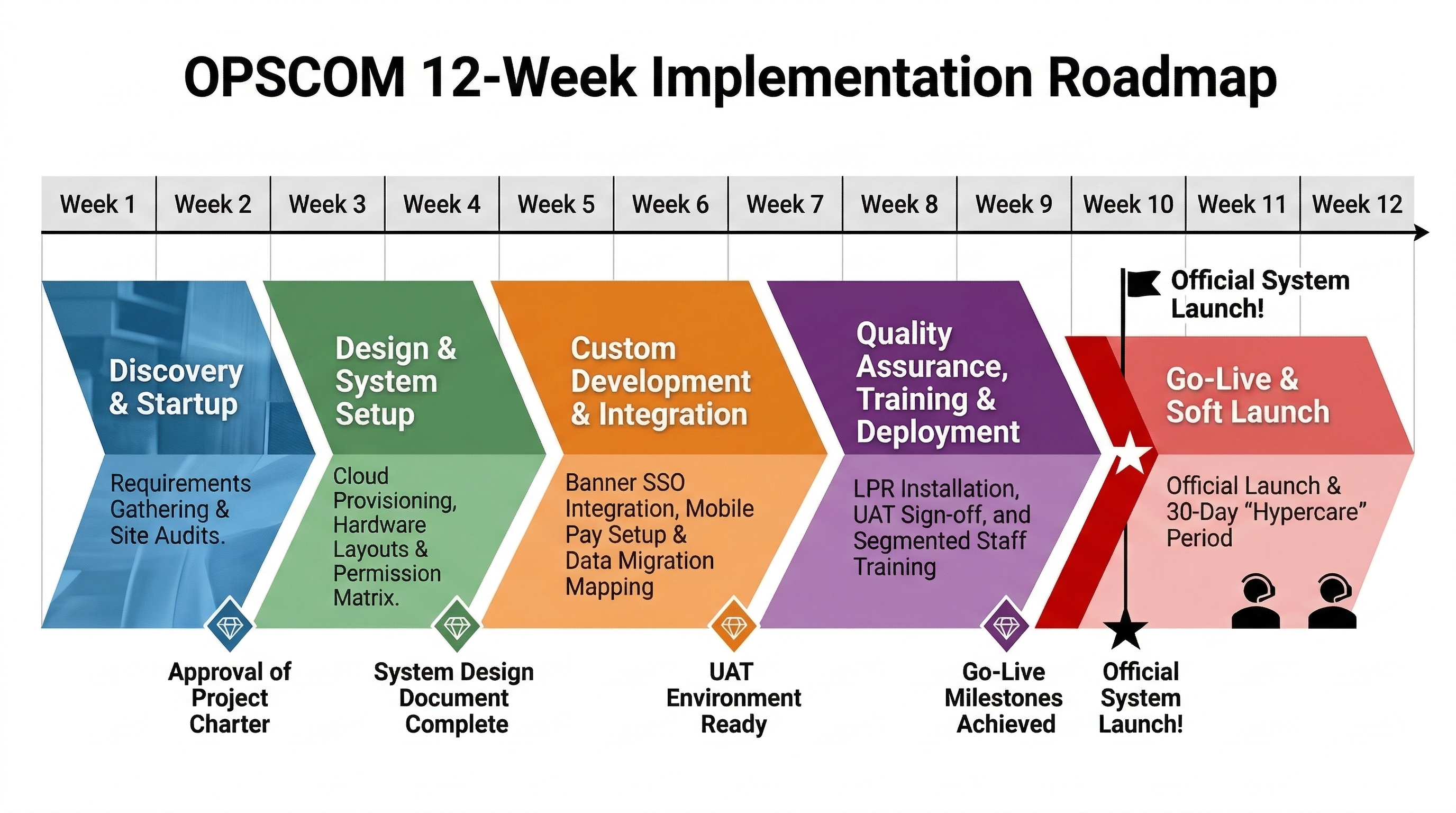
This is what a 12 Week Enterprise Onboarding schedule looks like.
Best Practices and Considerations
-
Team Involvement: Ensure the appropriate stakeholders from your organization are involved early in the discovery phase to clarify business processes and expectations.
-
Production vs. Preview: While you should use your Preview System to test and learn, ensure all final configurations are applied directly to your Production environment.
-
Active Participation: The onboarding process is a collaborative effort. Maximize the value of your training sessions by preparing specific questions about your organization's unique operational workflows.