
Defining User Profile Settings
The User Profile Settings infeature OPSCOM enableenables administrators to customize the specific information collected from users on their profile forms. ByIts primary purpose is to allow organizations to tailor the registration experience by controlling the visibility and requirementmandatory status of variousdata fields, youensuring that all necessary information is captured efficiently. This article is intended for OPS-COM administrators responsible for system configuration and user management.
Setup and Configuration
This feature is a core administrative tool used to dictate the fields presented to users during registration and profile updates.
Admin Side: Administrators must have the appropriate system role permissions enabled to access the global system settings menu and modify user profile requirements.
User Side: The configurations applied here directly dictate the fields end-users see and must complete when creating or updating their portal accounts.
Using this Feature
Administrators can tailoruse the userfollowing experienceinstructions to yournavigate organizationalto needs,the ensuresettings necessary data is captured,menu and streamlinemanage the registrationvisibility process.
Uservarious user profile itemfields.
Configuring areField configured within the System Settings area of OPSCOM.States
ClickHover over System Configuration
,thenand click System Settings.OnClick User Profile on the Manage System Settings
screen,screen.click-
Profile.Select the desired display state for each available profile item from the provided list.
UsingAvailable thisField FeatureStates
OnThe state selected for each field is highlighted in black, with a checkmark indicating the Useractive Profileselection. settings page, items in the listItems can be set to one of three states, controlling their appearance and requirement on the user-side profile form:states:
Note:asterisk. The system will not allow the user to save their profile if any required information is missing.
The
state
selected for each field is highlighted in black, with a checkmark indicating the active selection.
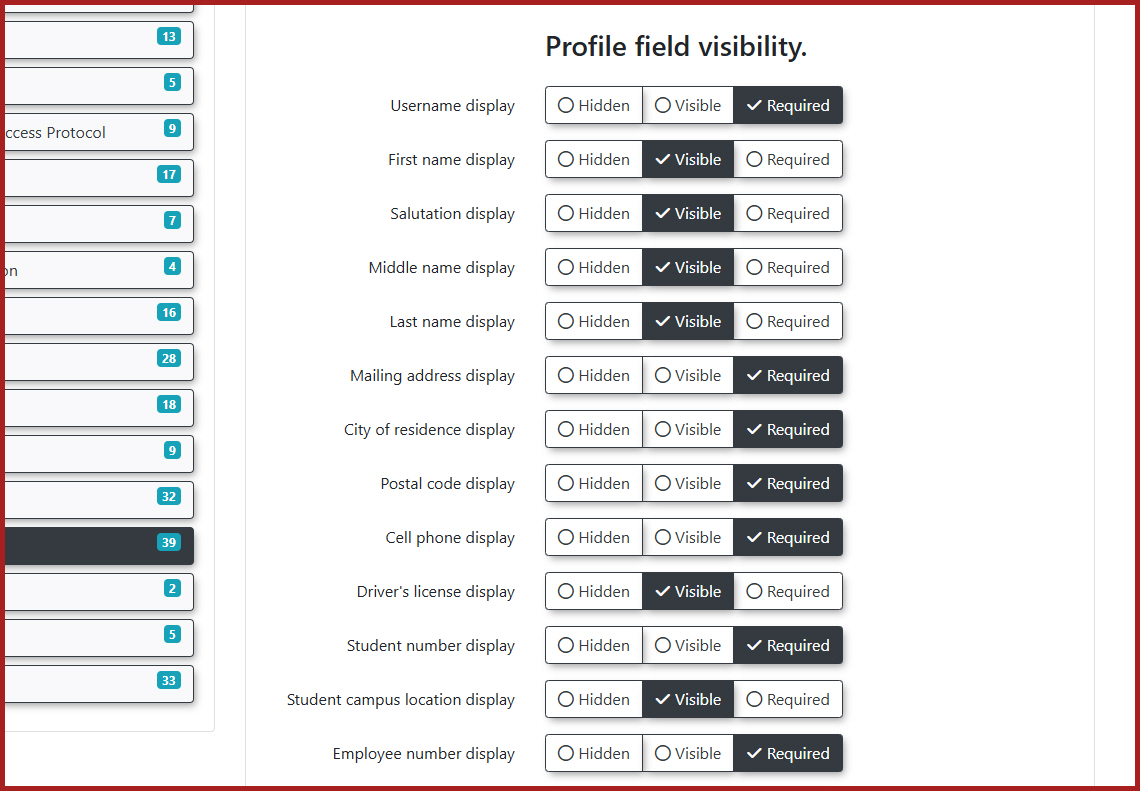
View the corresponding profile fields here.
Customizing Profile Sections
The settings page allows you to customize several specific categories of user information:
-
User
NameName::AUseruserNamename is an essentialas it's one of theuniqueidentifiersidentifier for system access. While a bare minimum typically includesUsername,aFirstusername,Name,first name, andLastlastName,name, any of these items can be toggledon/offbased on your needs. -
Note:Address Information:OnescenarioThiswhere you might hide Usernamesection is critical ifanyourexternalorganizationsourceplans(suchtoasmailLDAP)physicalispermitssupplyingortheotherusername.correspondence to end-users. -
EnablingPhoneUsernameInformation:EditsAllows for the collection of various personal and primary phone numbers. -
License Information:
:This field specifically refers to a driver's license number, not a vehicle license plate. You may opt to record this information if your organization is connected with local law enforcement. -
Student Information: Controls fields relevant to student identification, such as student numbers and maximum/minimum digit limits.
-
Employee Information: Controls fields relevant to employee identification, such as staff numbers.
By default, the username field is not editable by administrators. ToIf enableyour thisorganization functionality,requires the ability to manually change user account names, you must contact support@ops-com.comcomcom to request changes tothat the Allow Username Edits setting locatedbe withinenabled for your environment.
Text2ParkMe Configuration
If your organization utilizes the Text2ParkMe module, a second tab will be available on the User Profile settings list.page. OnceThis activatedtab allows you to configure additional details that end-users can enter, including specific credit card information fields.
If any credit card information is entered by the OPSCOMuser Team, administrators will havevia the abilityText2ParkMe tab, the system automatically switches all other credit card information fields to edita usernamesrequired directly.state for that specific transaction to ensure payment processing succeeds.
Best Practices and Considerations
-
Balance data collection and the user experience: Avoid making too many fields required, as this can create friction and deter users from successfully completing their profiles. Prioritize truly essential information to streamline the registration process.
-
AddressUnderstandInformationunderlying system overrides::ThisBesectionawareisthatcriticalthe system may still require certain fundamental pieces of information even if youplanattempt tomailhidepermitsthem. For example, core identifiers like a username orotheremailcorrespondenceaddress are essential for basic functionality and may override your hidden settings. -
Configure student address requirements: If you require students to
end-users.
To ensure students provide both theira Mailing Addressmailing and Activelocal Localaddress, Addressensure you enable the Require Both Addresses for Students setting. setting in System Settings>User Profile. Once students fill thesefilled out, admins can view both locations under the Active Addresses section of the Useruser Profileprofile. -Do complete with Map icons for quick Google Maps viewing. Note: To ensure these are visible on the Admin side, don'tnot forget to also enable the Using Student Second Address setting.
- so
PhonetheseInformation:fieldsAllowsareforvisible on thecollectionadminofside.various phone numbers.License Information: This field specifically refers to Driver's License number (not plate number). You may opt to record this information, especially if you are connected with local law enforcement.Student Information: Fields relevant to student identification (e.g., Student Number, Max/Min Student Number Digits).Employee Information: Fields relevant to employee identification (e.g., Employee Number, Max Employee Number Digits).
Considerations for Text2ParkMe Users
If your organization is using Text2ParkMe, a second tab will be available on this page. This tab allows you to configure additional details, including credit card information, that end-users can enter.
Important: If any credit card information is entered by the user, it automatically switches all other credit card information fields to "required" for that transaction.
Best Practices & Considerations
Balance Data Collection and User Experience: While it's important to collect necessary data, avoid making too many fields "Required" as this can create friction and deter users from completing their profiles. Prioritize truly essential information.Understand System Overrides: Even if you hide everything possible, the system might still require certain fundamental pieces of information (e.g., core identifiers like Username or Email) and will override your settings to ensure basic functionality.- Review
HiddenhiddenFieldsfieldsPeriodicallyperiodically::Ensure that fields marked"Hidden"as hidden truly remain irrelevant to your current processes. Organizational needs canchange,change rapidly, making previously hidden data suddenlyimportant.important for enforcement or reporting. -
Tailor requirements to
UserspecificTypesuser types::Consider which information is truly necessary for different usertypesclassifications.(e.g.,Youstudents versus employees) andcan configureaccordingly.the Impactsystem to ask for different identifying details depending onMailing/Enforcement:whetherIftheyouregisteringrelyuseronismailingapermitsstudent orrecordinganspecificemployee.ID numbers for enforcement, ensure the corresponding profile fields are set to "Required" or at least "Visible."TheAllow Username Editssetting can only be toggled by the OPSCOM Support team. If you require the ability to edit usernames, please contact OPSCOM support to request this change.