
Active Deposit Report
Navigating
he Active Deposit Report provides OPS-COM administrators with a comprehensive overview of all security deposits currently held within the system. This report is designed to help staff track outstanding funds, identify orphaned deposits without active permits, and manage financial rollovers during sales cycles.
Setup and Configuration
While the Active Deposit Report is a standard feature, its accuracy depends on proper permit type configuration.
-
Ensure that permit types requiring a deposit have the Deposit
ReportAmount field populated within Permit Management and Lot Administration. -
Verify that financial departments have established a General Ledger (GL) Code specifically for deposit accounts to ensure seamless reporting between OPS-COM and external accounting software.
-
Instructions for initial permit setup can be found on the Permit Configuration page.
Using this Feature
YouAdministrators canuse findthis report to audit current liabilities and ensure that deposits are either refunded, consumed, or renewed when a user’s parking status changes.
Accessing the activeReport
-
byHover
going toover Parking Management→inReportsthe→main navigation menu. -
Click Reports.
-
Click Active Deposit Report.
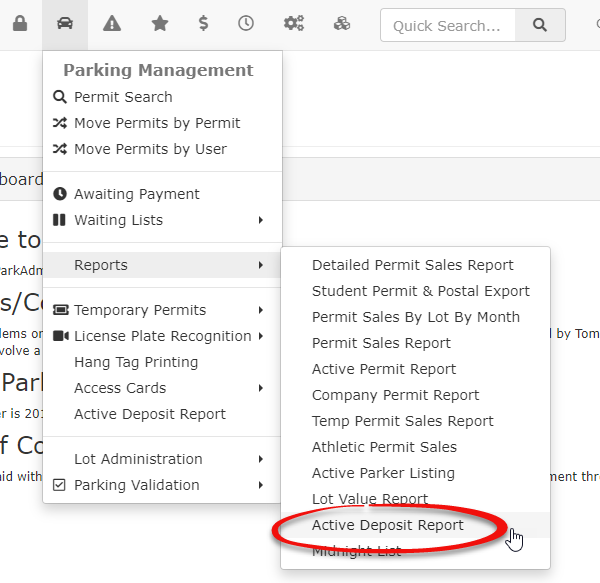
-
From there theThe Deposit Report By Lot page willappearload, displaying a breakdown of deposits categorized by their assigned parking area.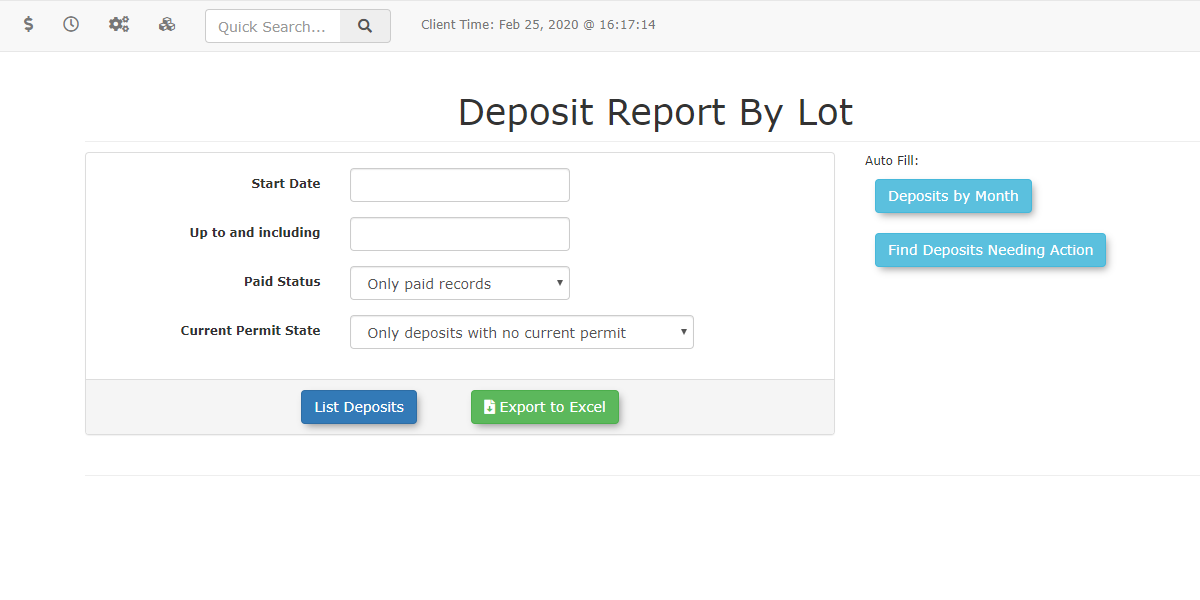
Finding
Visual DepositsCues and Status Indicators
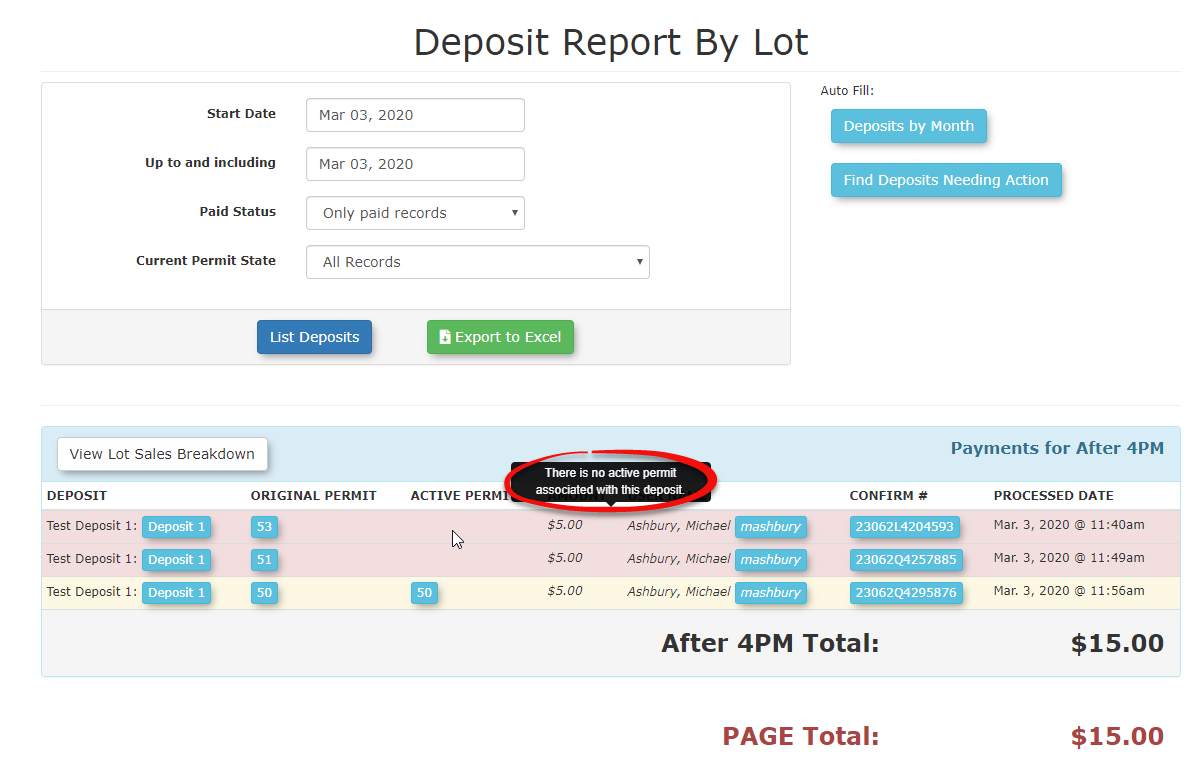
AllTo assist with quick auditing, the outstanding deposits within this report thatuses havespecific beencolor-coding forgottento duringhighlight arecords salesrequiring window switch or have no active permit will be highlighted.attention:
-
YellowAnyHighlighting: Indicates deposits that have been rolled over to a new permit cycle but have not yet been fully processedyetorwillreconciled.be -
inRed
yellow.Highlighting: Indicates "orphaned" deposits where the user no longer has an active permit associated with the funds, or the sales window has closed without action.
Key Information Displayed
-
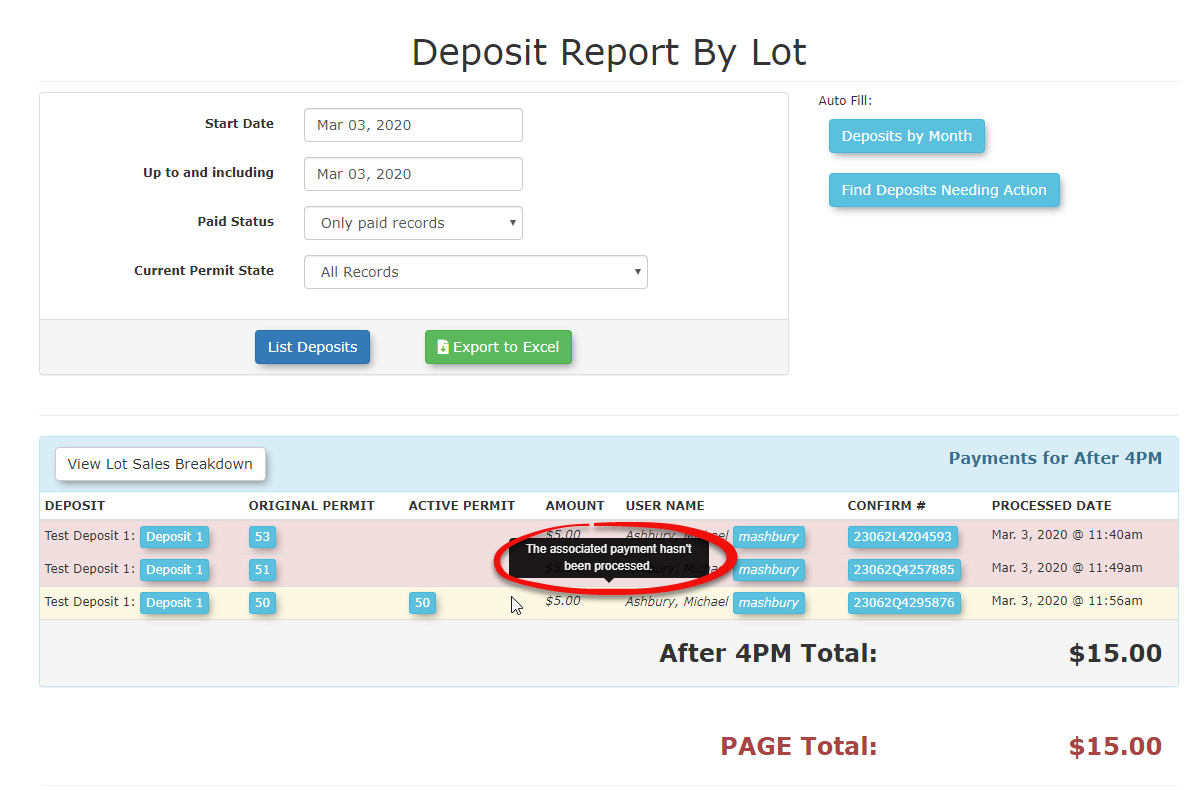
User Name: The account holder associated with the deposit.
-
Permit Number: The specific permit linked to the funds.
-
Lot Name: The physical location the deposit is secured against.
-
Deposit Amount: The total value held by the organization.
-
Date Added: When the deposit was originally paid.
Managing Active Deposits
When a user finishes parking or a permit expires, administrators must manage the Usersdeposit Profilethrough
the User Profile. There are three differentprimary waysmethods thatfor adminshandling canthese manage deposits depending on the actions required at the time. funds:
Refunding
Refunding a deposit allows you to refundUse the amountRefund paid by the useraction if their deposit is in good standing and they have finished parking with you.
Consuming
Consuming a deposit can be useful in two different scenarios when users have finished parking with you.
A. Thethe user is finished parking with you and has not returned their deposit or the deposit wasitem not(e.g., a physical gate key or hangtag) is returned in good standingstanding. This returns the original amount paid back to the user's initial payment method or via a manual check.
Consuming
B. The Consume action is used when the user has lost their deposit and is finished parking with you.
Consuming deposits will not charge, refund, or renewbut the deposit tofunds are being retained by the usersorganization. accountThis sinceis youcommon arewhen:
-
The user did not return the
amountdeposittheyitem.paid. -
The item was returned damaged or not in good standing.
-
The user lost the item.
Note: Consuming a deposit does not trigger a refund or a new charge; it simply moves the funds from a "held" status to an "earned" status for the organization.
Renewing
RenewingThe Renew action is used when a user intends to continue parking but their original deposit has been forfeited due to damage or loss. This allows the administrator to require a new deposit payment for the upcoming permit period while closing out the previous record.
Best Practices and Considerations
-
Perform regular monthly audits of the Active Deposit Report to identify orphaned deposits (highlighted in red) and ensure your liability accounts match your physical inventory.
-
Establish a clear business rule for the timeframe in which a deposit must be claimed. Organizations should decide if a deposit is
similarautomatically consumed if a permit has been expired for more than 30 or 60 days. -
Always verify the condition of hardware (transponders, fobs, or keys) before selecting the Refund button to
consumingpreventit,financialhowever,loss.we -
useDocument
thisthe reason for consumption in thecaseUserthatNotes section of theuserUserwantsProfile whenever a deposit is not returned tocontinueprovideparkingawithclearyouauditbut requires to paytrail for thedeposit due tocustomer.A.
B. Misplacement