
Student Permit and Postal Export
1.The In Parking Management, hover over the 'Permit Management' icon and click 'Student Permit and Postal Export'.
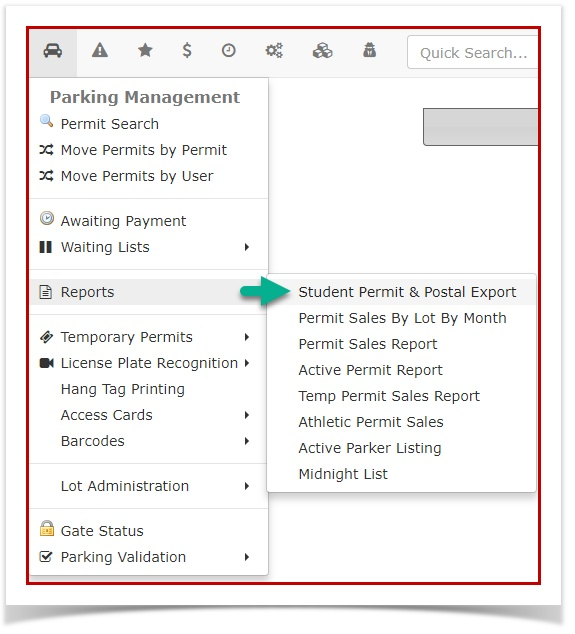
2.a reporting tool that allows administrators to extract a list of student permit records alongside the users' postal code data for a specified date range. Its primary purpose is to help organizations analyze student commuting demographics and geographical parking trends by exporting the data directly to a spreadsheet. This willarticle bringis upintended for OPS-COM administrators.
Setup and Configuration
This report is a standard feature within the Permit Management module and requires no specialized system setup to run. However, administrators must have the appropriate reporting and permit management permissions assigned to their user role to access the page and generate the export. Ensure that postal code fields are set as mandatory during your student registration process to ensure the resulting report is populated with accurate data.
Using this Feature
Administrators can use this tool to quickly generate an Excel spreadsheet containing the requested permit and location data.
Generating the Report
-
Hover over Permit Management and click Student Permit and Postal
CodeExport.Report -
Enter the desired timeframe into the start date and end date
forfields on thereportStudentyouPermitwantandtoPostalgenerate.CodeSelectReport page. -
Click the Create Report button to
haveautomatically generate and download thereportdataexported toas an Excel spreadsheet.
Key Information Displayed
The reportexported Excel spreadsheet will lookcontain similara compiled list of student user data corresponding to the sampleselected below.date range, specifically focusing on the intersection of their active permit information and their registered home postal or ZIP code.

OfficeExport Excel:does spreadsheetnot generate a preview istable finallyon here!the screen. Clicking the Create Report button will immediately process the request and download the .xls file directly to your local computer.
Best Practices and Considerations
-
YouAnalyzecanCommuternowData:displayUse thisfilereportasprioratospreadsheet,theinsteadstart of aPDF.newRe-uploadsemesterStudentPer...305D4644813.xlstodisplayunderstand where your student parkers are commuting from. This geographic data can be highly valuable when planning alternative transportation initiatives, adjusting lot allocations, or targeting specific regions for parking availability communications. -
Maintain Clean Data: The value of this export relies entirely on accurate user profiles. If your organization allows users to register without a valid postal code, the
newresultingpreview.spreadsheethttps://OPSCOM.atlassian.net/wiki/download/attachments/755925/StudentPermit_11-02-2017_20305D4644813.xls?api=v2will contain blank fields. Consider reviewing your user profile configuration to make address fields mandatory.