
Violations by Location/Officer Report
This article outlines how to generate the Violations by Location and Officer report. This report allows OPS-COM administrators to analyze enforcement activities by summarizing violation data based on specific locations and the officers issuing the citations within a selected date range.
Using the Report
- Go to Violations, then Reports, and click Report by Location / Officer.
The Violation Summary by Location / Officer screen is displayed. Select your date parameters for the search, and select whether the date you enter is for the violations Issued date, or the violations Paid date (all unpaid will be excluded);
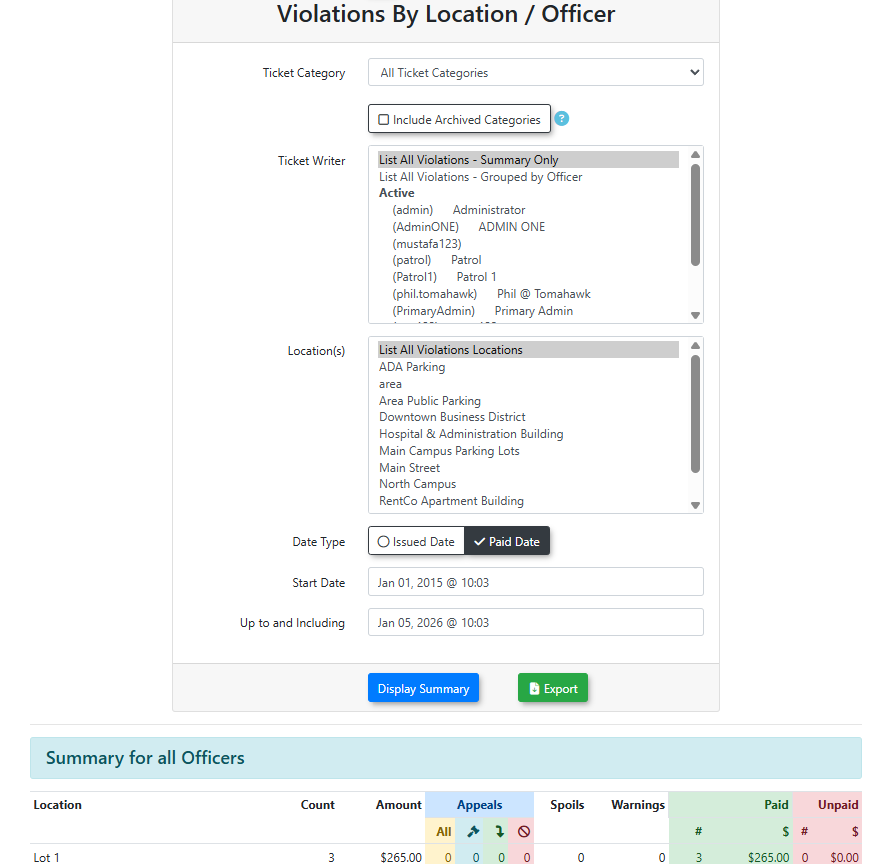
Click Display Summary and the report will appear at the bottom of the screen.
Key Information Displayed
Once generated, the report typically categorizes data to help administrators visualize:
-
Location Stats: The number of violations issued in specific lots or zones.
-
Officer Stats: The number of violations issued by specific enforcement officers within those locations.
Best Practices and Considerations
- When selecting your date parameters, keeping the range concise (e.g., monthly or quarterly) can help identify specific trends and ensure the report generates quickly.
-
Performance Review: Use this report during performance reviews to discuss enforcement coverage with officers.
-
Resource Allocation: Analyze location data to determine if specific parking zones require more or less enforcement frequency based on violation volume.