
Violations by Location/Officer Report
ThisThe article outlines how to generate the Violations by Location and Officer report. This reportReport allows OPS-COM administrators to analyze enforcement activities by summarizing violationticket data based on specific locationsparking zones and the officersticketing issuingofficers. theIts citationsprimary withinpurpose is to help management track citation volume, evaluate officer performance across different areas, and optimize patrol deployment over a selected date range. This article is intended for OPS-COM administrators.
Setup and Configuration
This report is a standard feature within the violations module and requires no specialized system setup to run. However, administrators must have the appropriate reporting and violations management permissions assigned to their user role to access this page. Ensure that your parking lots and field staff user profiles are accurately configured within the system so their activity is properly captured and categorized in the final report.
Using this Feature
Administrators can use this tool to filter violation data by specific timeframes and toggle between issuance dates and payment dates to review enforcement coverage.
Generating the Report
GotoHover over Violations,
thenhover over Reports, and click Report by Location / Officer.
TheEnter Violationthe Summary by Location / Officer screen is displayed. Select yourdesired date parameters forinto the search,provided andsearch selectfields to define the reporting period.
Select whether the date yourange enterapplies is forto the violations Issued date, or the violations Paid date (all unpaid will be excluded):.
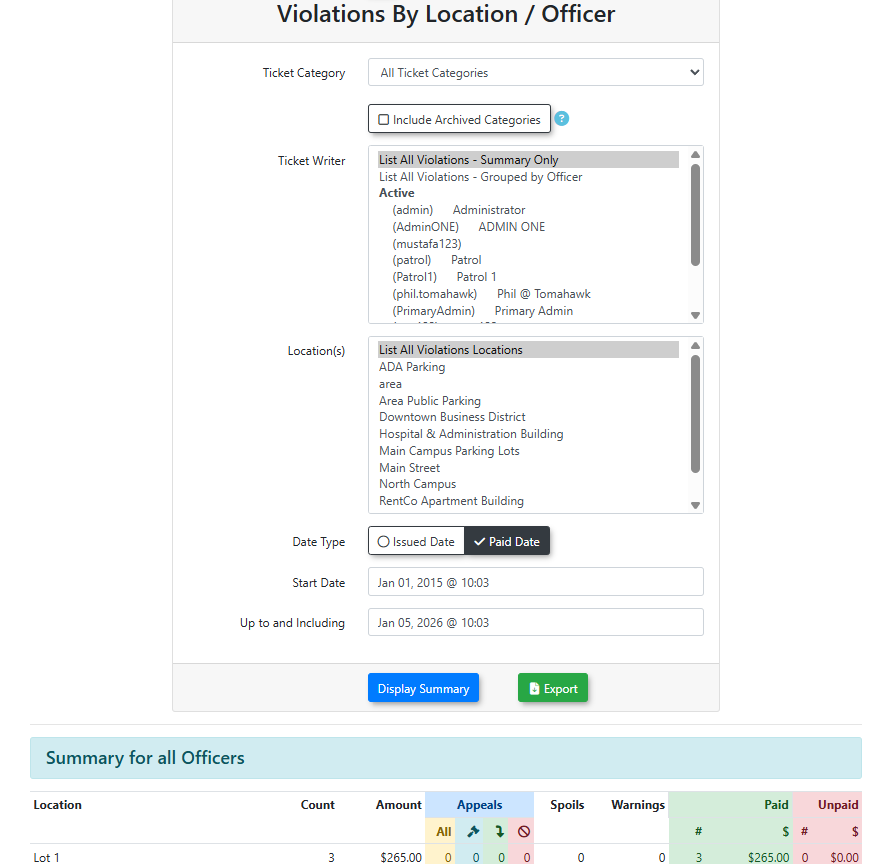
Click the Display Summary andbutton to generate the report will appear at the bottom of the screen.
Key Information Displayed
Once generated, the report typicallycategorizes categorizesthe data to help administrators visualize:visualize enforcement activity:
-
Location Stats: The total number of violations issued
inwithin specific parking lots or designated enforcement zones. -
Officer Stats: The total number of violations issued by specific enforcement officers within those designated locations.
Available Actions and Buttons
-
Display Summary: Click this button to execute your query based on the selected date range and display the results on the screen.
When filtering your search, selecting the Paid date option will automatically exclude all unpaid violations from the generated report. If you are attempting to audit an officer's daily patrol productivity, it is highly recommended to search by Issued date.
Best Practices and Considerations
-
Keep date ranges concise: When selecting your date parameters,
keepingkeep the range concise (e.g., monthly or quarterly).canThishelphelps identify specific seasonal or operational trends accurately andensureensures the report generatesquickly.quickly without overloading the system. -
PerformanceConductReview:performance reviews: Use this report during performance reviews to discuss enforcement coverage with officers. It provides concrete data on where individual staff members are spending their time and issuing citations. -
ResourceOptimizeAllocation:resource allocation: Analyze location data regularly to determine if specific parking zones require more or less enforcementfrequencyfrequency.basedAonconsistently high violationvolume.volume in a particular lot may indicate the need to assign dedicated patrol units to that area.