
Access Cards - Search
1.The InAccess ParkingCards Management,Search hovertool overallows administrators to locate and review access card assignments within specific parking lots. Its primary purpose is to help efficiently query access card data based on lot assignment or specific card number ranges. This article is intended for OPS-COM administrators.
Setup and Configuration
There is no specific configuration required to access this search tool, provided your administrative user role has the 'Permitappropriate Management' iconparking and clickpermit 'Accessmanagement Cards'permissions thenenabled.
Using this Feature
Administrators can use this tool to filter and review access card assignments based on specific search criteria.
-
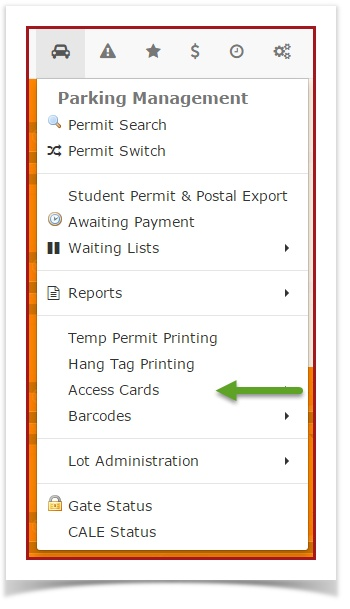
2.HoverTheover'Parking Management and click Permit Management then AccessCardCards followed by Search'.screen -
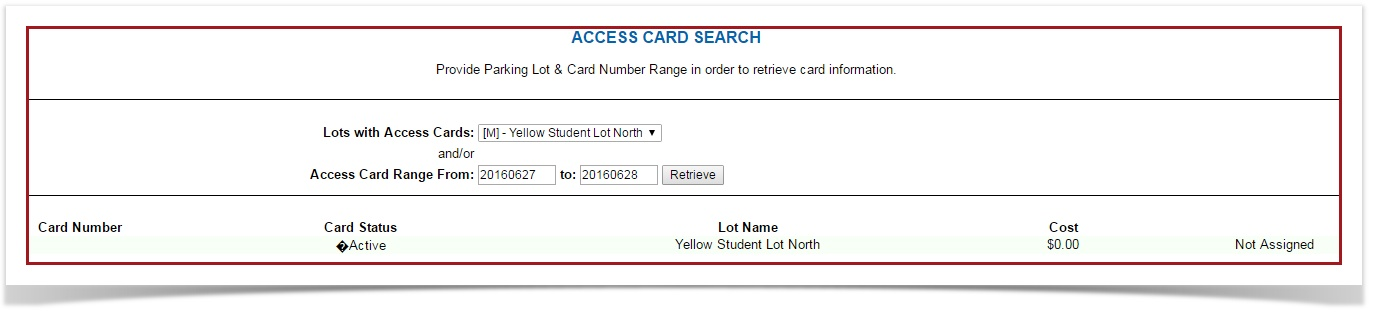
displayed. SelectClick the Lot
nameNamethatdrop-down menu and choose the lot you want to search.Note, -
lots that have access cards associated with it will be listed inEnter the
LotnumericalNameparametersdrop-down menu.Enterin the Access Card Rangeandfieldsclickto narrow down the'search to specific cards. -
Click the
Retrieve'Retrievebutton.button to generate the report.
Key Information Displayed
-
Search Results: Any access cards that match your search criteria will appear directly below the search
criteria.fields, displaying the relevant card numbers and their associated assignment details.
Best Practices and Considerations
-
Targeted Searching: Utilize the Access Card Range fields when managing high-capacity lots to quickly find a specific card or a block of issued cards without needing to scroll through the entire lot inventory.