
Filling out the Incident Form (WIP)
HereThe Incident Form allows OPS-COM administrators to record, track, and manage comprehensive details regarding security or operational events. Its primary purpose is to centralize essential incident data, from basic descriptions to involved parties and follow-up tasks, ensuring accurate and organized record-keeping. This article is intended for OPS-COM administrators and security personnel responsible for incident management.
Setup and Configuration
Accessing and filling out the Incident Form is a samplecore function of whatthe IncidentAdmin module. It requires no specialized setup, but administrators must have the appropriate incident creation and editing permissions assigned to their user role to interact with these fields.
Using this Feature
When creating a new incident or modifying an existing record, administrators will interact with two primary sections: the basic overview and the detailed record tabs.
Basic Incident Information
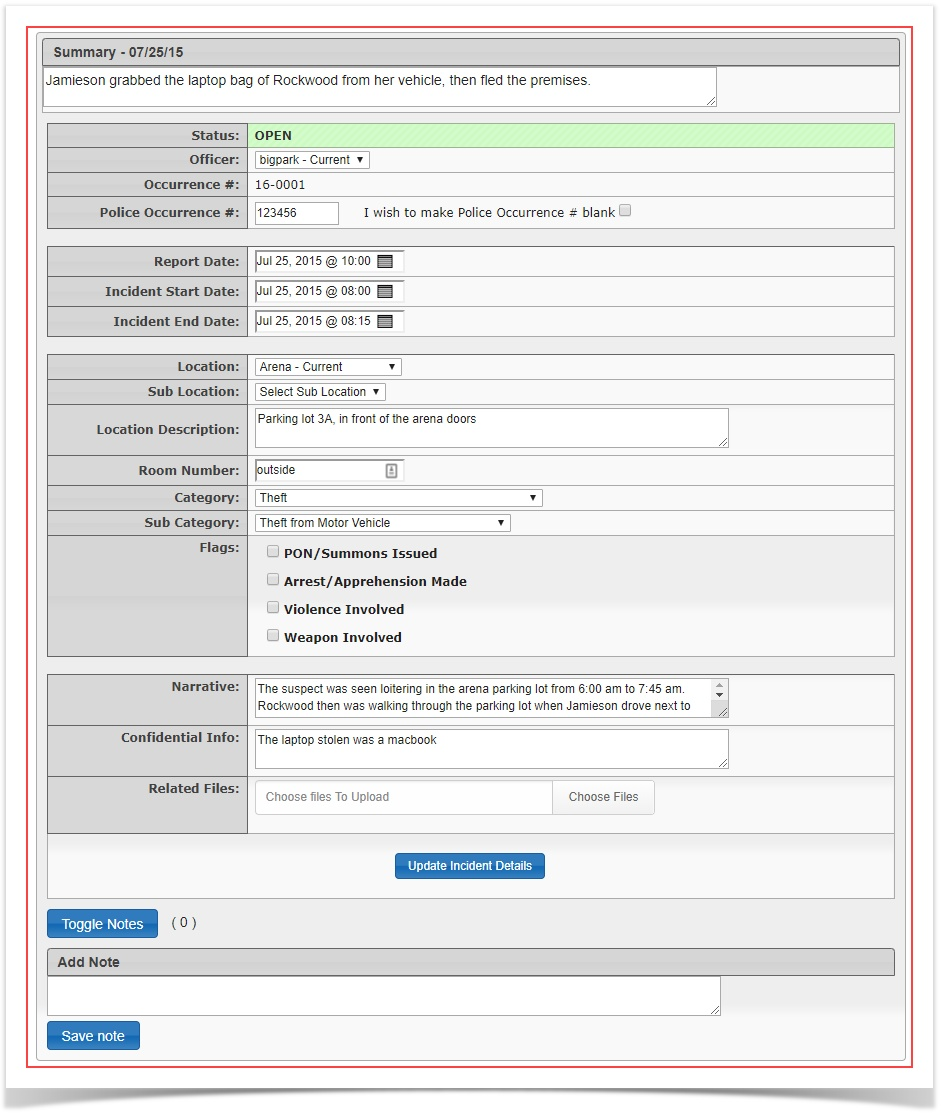
The top section of the report looks like. Basic information describing what occurred can be registered here incaptures the overview.essential, This includes what one might consider the essentialhigh-level information about the incident.
event. Ensure the following core fields are completed accurately:
-
Description: A comprehensive narrative outlining what occurred.
-
Status: The current state of the incident (e.g., Open, Closed).
-
Time: The exact date and time the incident took place.
-
Place: The specific physical location where the event occurred.
AnyrelatedRelated information or events: Any immediate contextual details necessary for understanding the incident.
Detailed Incident Tabs
TheBelow the basic information, the incident report also allows the adminadministrators to record details:granular details using a series of specific tabs. Click each tab to link relevant data to the main incident report:
-
Dispatch Logs: Link or review communications and dispatch entries related to the event.
-
People:
InvolvedRecord and link the profiles of any individuals involved in or witness to the incident. -
Vehicles:
InvolvedAttach specific vehicle records and license plates involved in the event. -
Missing Property:
ifDocument any items reported lost or stolen during the incident. -
Tasks: Assign and track follow-up actions required to
beresolvecompletedthe case. -
Checklist:
(ACompleteCustomanyformcustom-generatedthatforms or mandatory procedural checklists required by your organization. -
Related: Link this incident to other existing issues or incident reports in the system.
-
External: Log follow-up items or external agency involvement.
-
Violations: Associate any parking or moving violations directly connected to the incident.
Best Practices and Considerations
-
Thorough Documentation: Always provide clear, objective, and detailed narratives in the Description field. This ensures the incident report can be
generated)accurately interpreted during future audits, investigations, or legal reviews. RelatedissuesCross-Linking
orData:incidentsMake full use of the detailed tabs to cross-link People, Vehicles, and Violations. Centralizing this data provides a complete picture of the event for investigating officers.External(Follow-UpMandatory
Items)Checklists: RelatedIfViolationsyour organization utilizes custom procedural forms, ensure the Checklist tab is fully completed before attempting to change the incident Status to closed.
