
Incident Checklist
The Incident Checklist provides a standardized form for administrators and investigators to ensure all critical investigative steps are completed before closing an incident. Its primary purpose is to help maintain comprehensive, consistent, and legally sound records for audits and internal reviews. This article is intended for OPS-COM administrators and security personnel responsible for managing and closing incident reports.
Setup and Configuration
The Incident Checklist is a core component of the IncidentAdmin module and requires no additional system setup. However, administrators must have the appropriate permissions to view and edit incidents to access and complete this form.
Using this Feature
Administrators must navigate to an active incident report to access and fill out the checklist. The form requires users to select standard responses (e.g., Yes, No, Not Required) and provide clarifying remarks for each step of the investigation.
Accessing the Checklist
TheDepending on your organization's specific subcategory configurations, filling out this checklist formmay willbe open.a mandatory system requirement before an administrator is permitted to close the incident report.
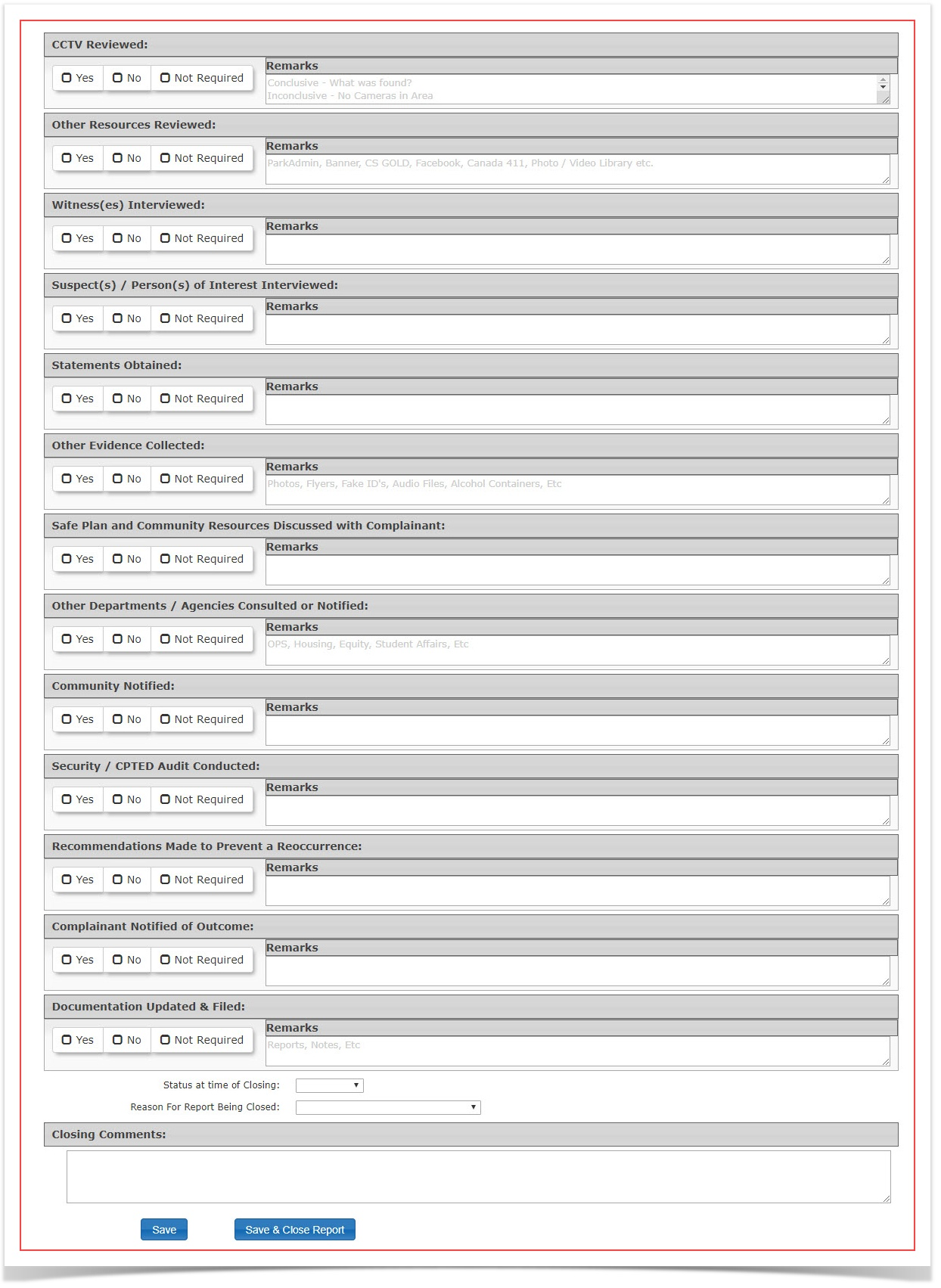
Checklist Fields Defined
When filling out the checklist, provide specific details in the remarks fields to justify your selections.
-
CCTV
:Reviewed:ReviewedIndicate if
theclosed-circuittelevisioncameras were reviewed.(Yes/No/Not Required)Statethe reason forwhatwas selected or additional details. E.g. Whatwas found in thefootage?footageWhyorwasexplain why the footage was notreviewed?reviewed. -
Other Resources
:Reviewed:ReviewedIndicate if
otherexternal resources werereviewedutilized, such asasocialpartmedia,ofpublicthe incident. (Yes/No/Not Required) State all resources useddirectories, oradditionalOPS-COMdetails.records.E.g. -
Witness(es)
:Interviewed:InterviewedIndicateNote if witnesses wereinterviewedspokenas a part of the incident. (Yes/No/Not Required) State all witnesses,to and summarize theircontributionspecific contributions to the incidentresolutionresolution.or -
Suspect(s) / Person(s) of Interest
:Interviewed:InterviewedIndicateDocumentifanythesuspectsuspectsinterviews,were interviewed as a part of the incident. (Yes/No/Not Required) State all suspects involved, andnoting their involvementwith the incidentoradditionalstatements.details. -
Statements
:Obtained:ObtainedIndicateConfirm if formal, written statements were collectedasfromaanypartinvolvedofparties.the -
Other Evidence
:Collected:CollectedIndicateDetailif otherany physical or virtual evidencewas reviewed as a part of the incident.gathered (Yes/No/Note.g.,Required)photos,Statephysicalall the evidence collected, where it is storeditems) andimportantnoteinformationitsaboutsecureit,storageorlocation.additional -
Safe Plan and Community Resources Discussed with
:Complainant:ComplainantIndicateNote if the complainant was provided with asafesafety planand community resources were discussed with the complainant. (Yes/No/Not Required) State what specifically was discussed,oradditional details. E.g. Complainant was informed that the police were updated on the case and that the complainant's information was givenreferred tothem.external support resources. -
Other Departments / Agencies Consulted or
:Notified:NotifiedIndicateListifanyotherinternal departments (e.g., Student Housing) or external agencies (e.g., local police) that werenotifiedbriefedas a part ofon the incident.(Yes/No/Not -
Community
:Notified:NotifiedIndicateState if and how the broader community wasnotifiedalertedas a part ofto theincident.incident (Yes/No/Note.g.,Required)safetyStatebulletins,howcampusandemails).why -
Security / CPTED Audit
:Conducted:ConductedIndicate if
securityaand/or CPTED (Crime Prevention Through EnvironmentalDesign)Design (CPTED) or general security audit wasconductedperformed.as a part of the incident. (Yes/No/Not Required) State what was audited,Note anyproblemsvulnerabilitiesfound,discovered and the steps taken to resolvethem,them.or -
Recommendations Made to Prevent a Re-
:occurrence:occurrenceIndicateDetailifanyrecommendationsoperational or security changes suggested to prevent futureincidentssimilarwereincidents.made. -
Complainant Notified of
:Outcome:OutcomeIndicateConfirmifthat thecomplainantreporting party wasnotifiedupdated on the final resolution of theoutcome.case.(Yes/No/Not -
Documentation Updated &
:Filed:FiledIndicateNoteifexactlydocumentationwherewasrelatedupdatedfiles,and filed for the incident. (Yes/No/Not Required) State what documentation was updated,audits, oradditionalharddetails.copiesE.gwereSecuritysaved.audit -
Status at time of
:Closing:ClosingIndicateSelect thestatusfinal state of theincident at the time thecaseis(Solved,closed.Unsolved,(Solved/Unsolved/or Unfounded). -
Reason For Report Being
:Closed:ClosedIndicateClick thereasonsdrop-down menu and choose the primary reason forthe report being closed. (Drop down box) E.g Reason beyondclosing thecontrolreport. -
Closing Comments: Provide a final narrative summarizing the resolution and confirming any implemented recommendations.
Best Practices and Considerations
-
Standardize Remarks: Organizations should develop a business rule outlining the minimum level of
serviceClosingdetailComments:required in the remarks section.IndicateSimpleany final comments"Yes" ordetails"No"ofanswers without context can lead to poorly documented investigations. -
Complete Before Closing: Ensure all relevant checklist fields are thoroughly completed before attempting to change the
case. E.g. Case has been closed, recommendations have been implemented for security and staffing. This type ofoverall incidentshouldstatusnotolongerclosed.be