
Lot Passwords
The Lot Passwords feature allows administrators to restrict access to specific parking lots by requiring a password during the permit booking process. Its primary purpose is to help control lot reservations for specific groups or events, ensuring only authorized users can secure a permit. This article is intended for OPS-COM administrators.
Setup and Configuration
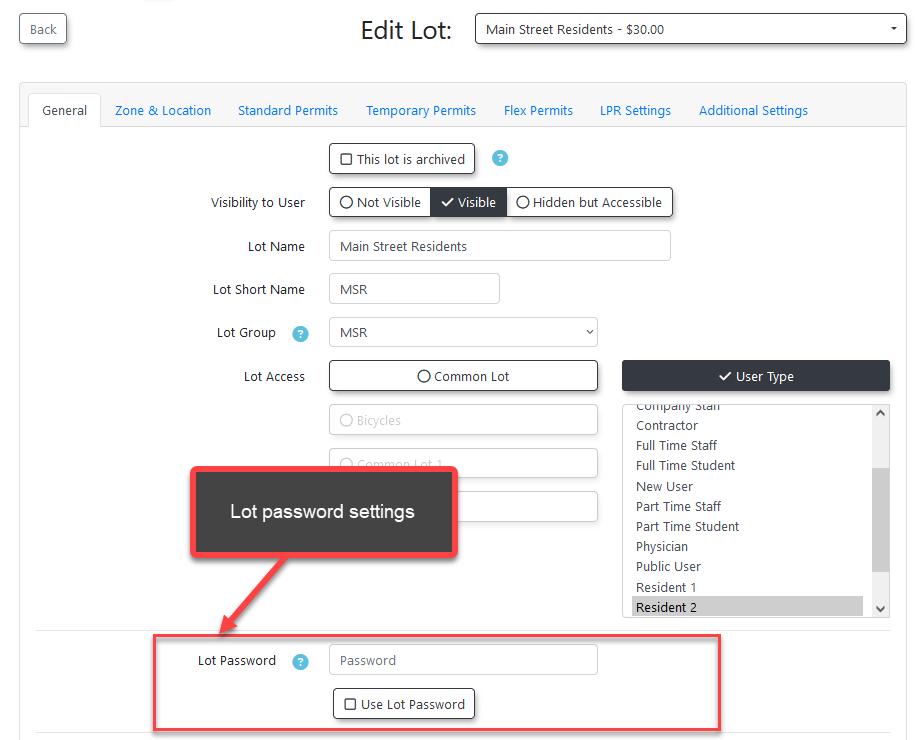
Administrators must configure the password settings directly within the specific lot's profile to enforce the restriction.
-
Hover over Parking Management and click Lot Administration then Pricing & Lot Admin.
-
Click the specific lot name to open the lot editing page.
-
Enter the required password string into the Password field.
-
Enable the Use Lot Password checkbox to enforce the restriction.
-
Save your changes to apply the password protection to the lot.
Feature Dependency: The Use Lot Password setting cannot be enabled if the Password field is left blank. You must set a password first before you can enforce it.
Using this Feature
Once a lot is password-protected, the system handles access differently for end-users and administrators.
User Experience
When an end-user attempts to access a password-locked lot, they are immediately redirected to a password input screen.
-
Enter the required password to access the permit reservation page.
-
Proceed with the standard permit booking process.
Once the password has been input, the user will not need to enter it again for that single lot until their session data is cleared. If they attempt to access a different password-protected lot, they will be prompted for that specific lot's password.
Administrative Access
Administrators are not restricted by lot passwords on the administrative side of the system. You will not be prompted to enter the password when booking or allocating a permit on behalf of a user.
Visual Cues and Status Indicators
-
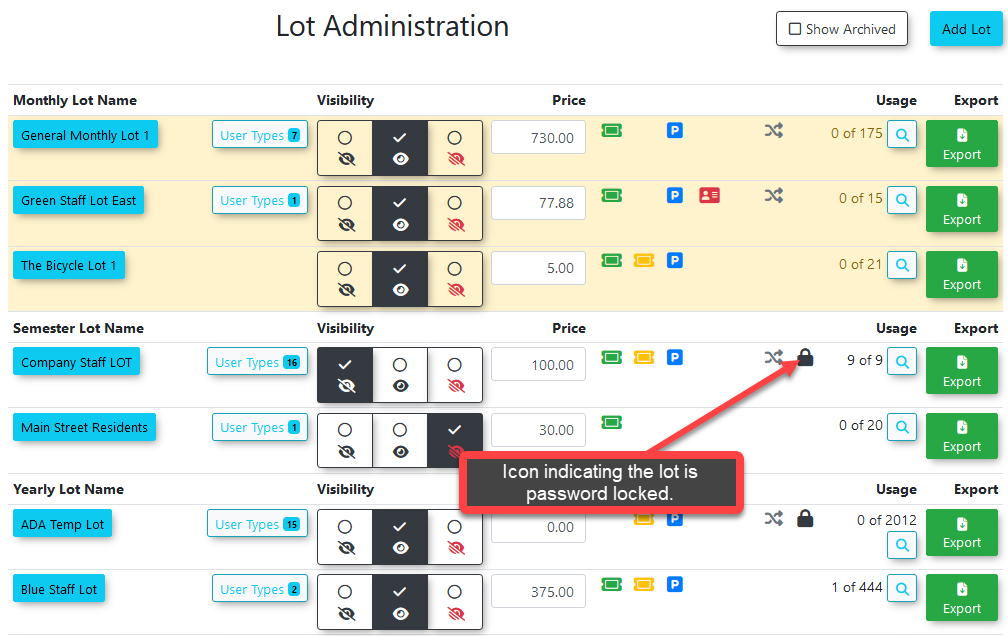
Lock Icon: When a lot has password usage enabled, a lock icon will appear next to the lot name everywhere it is displayed throughout the system. This includes the main lot administration page, the user-facing portal, and the real-time parking map.
Best Practices and Considerations
-
Event Parking Security: Combine lot passwords with lot visibility settings to create a highly secure booking process for specialized event parking. By hiding the lot from the general public and assigning a password, you ensure that the lot can only be booked by users who have been provided both the direct URL link and the correct password. Instructions for hiding a lot can be found on the Lot Visibility Options page.
-
Password Communication: Ensure you have a clear, documented method for distributing the lot password to your authorized users (e.g., via event registration confirmation emails or targeted internal memos), as they will be completely blocked from securing their parking without it.