
Lot Passwords
Introduction
The abilityLot Passwords feature allows administrators to lockrestrict access to specific parking lots withby requiring a password hasduring beenthe added.permit Settingbooking process. Its primary purpose is to help control lot reservations for specific groups or events, ensuring only authorized users can secure a passwordpermit. onThis aarticle lot prevents users from booking a permit in that lot unless they enter the password.
In support of event parking, this can be used to make a lotis intended for anOPS-COM eventadministrators.
Setup canand onlyConfiguration
Administrators bookedmust from by users who have been givenconfigure the password forsettings directly within the lot.
specific lot's profile to enforce the restriction.
-
ThisHovercanoverbeParkingusedManagementinandcombinationclickwithLot Administration then Pricing & Lot Admin. -
Click the specific lot
visibility settingsname tomakeopenathe lotthateditingcanpage.only -
bookedEnter
fromtheby users given a direct link andrequired password string into the Password field. -
Enable the Use Lot Password checkbox to enforce the restriction.
-
Save your changes to apply the password protection to the lot.
Feature
Dependency:The Use Lot EditPassword Page
setting Passwordscannot be enabled if the Password field is left blank. You must set a password first before you can beenforce managed from the lot edit page.it.
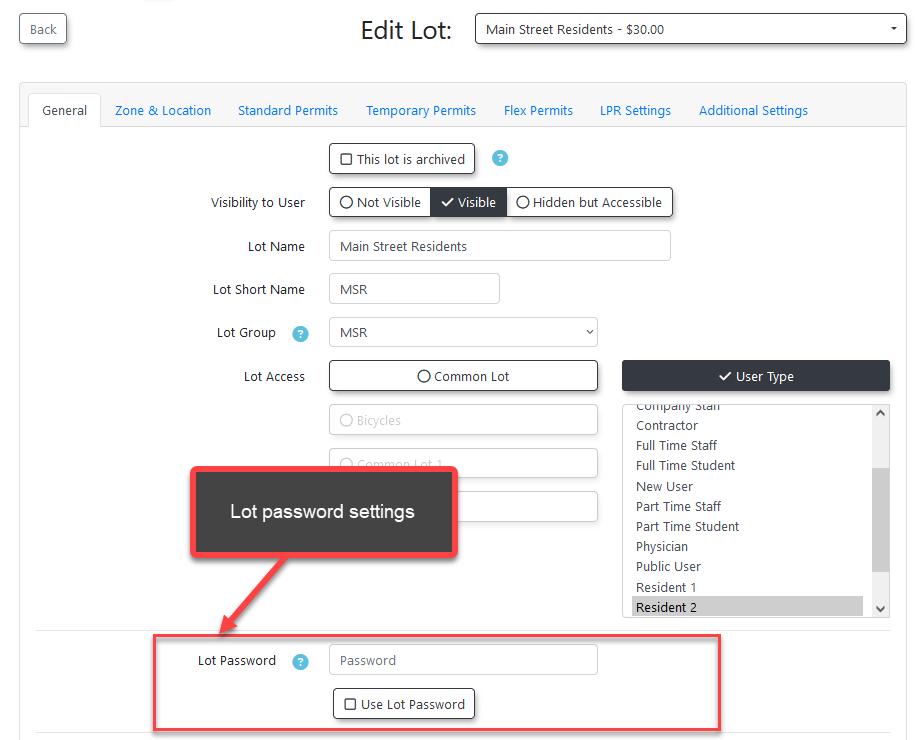
There
Using arethis two settings related to lot passwords:
Password - the password that must be entered to access permit booking for the lot.
Use Lot Password - enables or disables the application of the password on the lot.
Feature
Even if a lot has a password set, the password input will not be enforced unless the lot has password use enabled.
Passwords cannot be enabled for a lot if there is no password set for it.
View all Lots Page
Password usage will be indicated by a lock icon beside the lot on the lot admin page.
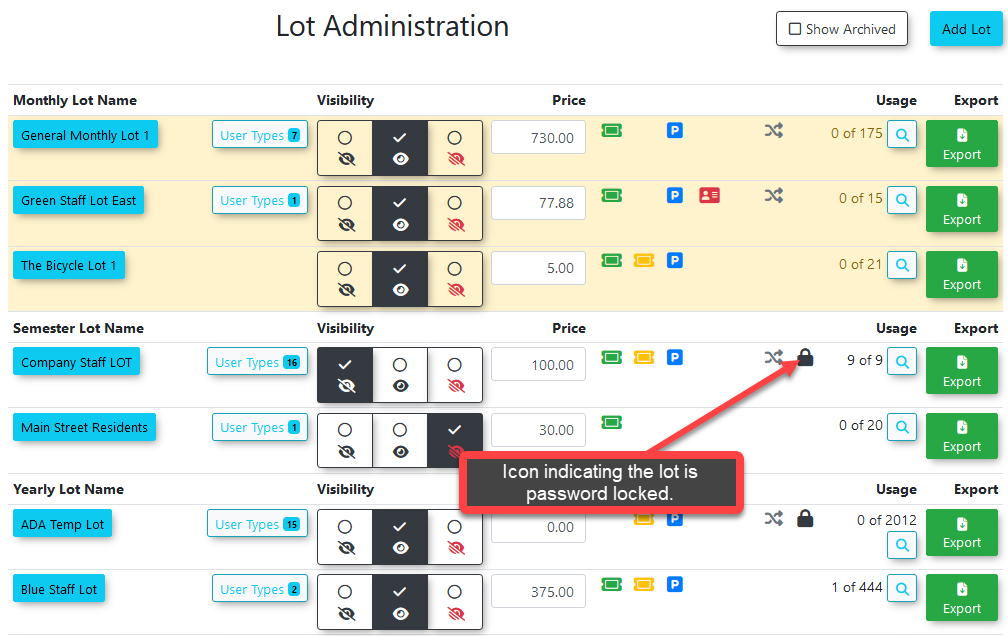
Usage
WhenOnce a lot is password-locked,protected, the system handles access differently for end-userstryingand administrators.User Experience
When an end-user attempts to access
itawillpassword-lockedbelot,forcedthey are immediately redirected to a passwordinput.inputTheyscreen.will-
Enter the required password to
enter the password in order to be able to get toaccess the permit reservation page. -
Proceed with the standard permit booking process.
needOnce the password
hadhas been input, the user will not need to enterthe passwordit again for that single lot until their session data is cleared. If -
- they
Thisattempt to access a different password-protected lot, they willonlybeapplyprompted for that specific lot's password.Administrative Access
Administrators are not restricted by lot passwords on the administrative side of the system. You will not be prompted to
the single lotenter the passwordwaswhenenteredbookingfor.orOtherallocatinglotsawithpermitpasswordsonwillbehalfstillofpromptathe user for the password.
user. -
Lock Icon: When a lot has
apasswordonusageit,enabled, a lock icon will appear next to the lot namein places whereeverywhere itappears,isincludingdisplayed throughout the system. This includes the main lot administration page, the user-facing portal, and the real-time parking map. -
Event Parking Security: Combine lot passwords with lot visibility settings to create a highly secure booking process for specialized event parking. By hiding the lot from the general public and assigning a password, you ensure that the lot can only be booked by users who have been provided both the direct URL link and the correct password. Instructions for hiding a lot can be found on the Lot Visibility Options page.
-
AdminsPasswordareCommunication:notEnsurerestrictedyoubyhavelotapasswordsclear,ondocumented method for distributing theadmin-side, and will not need to enter thelot password tobookyouraauthorizedpermitusersfor(e.g.,aviauser.event registration confirmation emails or targeted internal memos), as they will be completely blocked from securing their parking without it.
Visual Cues and Status Indicators