
LPR Audit Log
Viewing the
The LPR Audit Log allows administrators to view and track License Plate Recognition (LPR) camera and chalking events. Its primary purpose is to help monitor entry, exit, patrol, and tracking activities across the parking system. This article is intended for OPS-COM administrators responsible for monitoring LPR activity and auditing vehicle movements.
Setup and Configuration
ToThere accessis no specific setup or configuration required to use the LPR Audit Log, goprovided your administrative user role has the appropriate permissions to theview LPR and violation data.
Using this Feature
The LPR Audit Log provides a centralized view of all LPR-related events, along with filtering tools to help you find specific records.
-
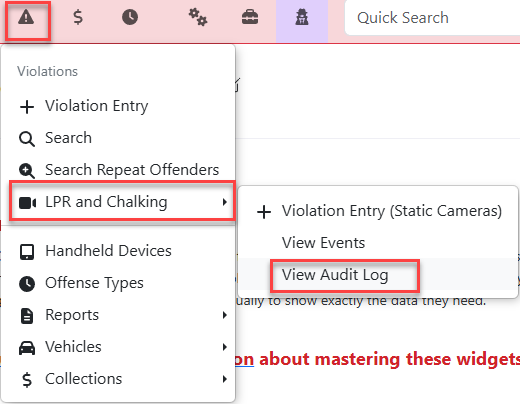
Hover over Violations
menuandhover overclick LPR and Chalking.Selectthen View Audit Log.from - Review the
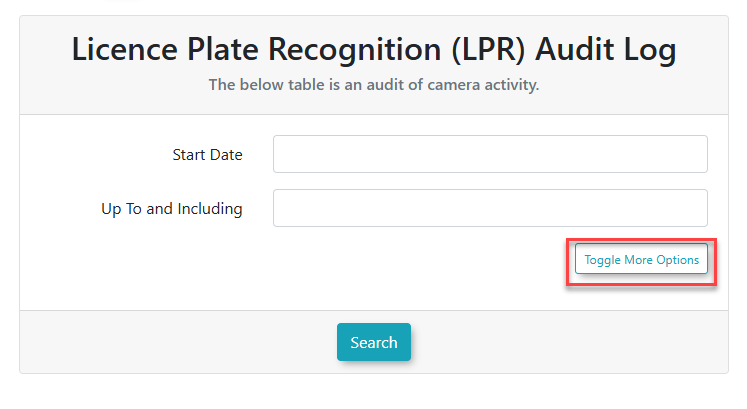
resultinginitialdropscreendowntomenu.see the default audit log display.
The initial screen3. will display with the option toClick Toggle More Options to expose the filtering capabilities.
Filtering
Results
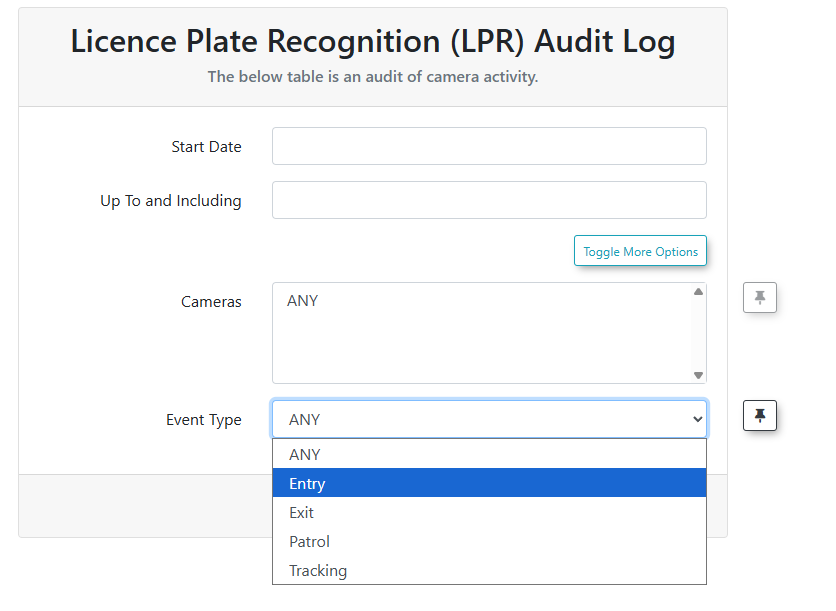
Search4. resultsSelect cana bespecific filteredcamera from the Camera selection drop-down menu to displayfilter by location.
5. Select a specific information.event Thefrom twothe filter fields are Camera selection and Event type whendrop-down clickingmenu Toggleto Morenarrow Options.the search results.
Event Type Definitions
When filtering by Event type, refersyou tocan oneselect from the following five categories:
-
Any Event: Displays all recorded LPR actions across the system.
-
Entry Events: Displays records of
fivevehiclesselections:entering a monitored area. -
Any EventEntry Events
ExitEvents
Events: Displays records of vehicles exiting a monitored area. -
Patrol
EventsEvents:(These areDisplays LPR chalking recordsfromcaptured by a PatrolOfficer'sOfficerhandusinghelda handheld unit.Tracking(These -
beTracking: Displays records from cameras
thatconfigured to trackmovementinternal movement, such as a vehicle moving from one floor of a multilevel parking garage toanother floor.another.
Best Practices and Considerations
-
Targeted Filtering: Use the Camera selection and Event type filters combined to quickly drill down into specific data. This is particularly useful in high-traffic environments where searching without filters may yield an overwhelming number of results. -
System Monitoring: Regularly review the audit log to verify that both stationary LPR cameras and handheld units are successfully capturing and transmitting data to the system.
-
Handheld Unit Data: Keep in mind that Patrol Events are directly tied to the actions of officers on the ground. Auditing these specific events can help verify patrol routes and coverage times.