Municipal Violations and Collections
Introduction
The
Municipal Violations and Collections process allows Ontario-based municipal clients locatedto within Ontario have specific processes formanage violation offencesoffenses to be sent through. The two relevant processes arethrough the POA (Provincial Offenses Act)Act and(POA) or the AMPS (Administrative Monetary Penalty System)System (AMPS). MunicipalitiesIts willprimary prescribepurpose is to one process orautomate the other.
OPS-COM supports most aspectsretrieval of the POA process and is considered as a Permitted Recipient under ARIS rules. The POA process is used when a violation is given to a vehicle that has no user information present within the system.
This process involves sending out vehicleowner data to the transportation authority (MTO) to receive additional user information, so any outstanding violations on the vehicle can be sent to court for collections.
This article will explain the process involved in the life-cycle of a violation for one municipality in Ontario, including interactions withfrom the Ministry of Transportation (MTO)MTO) for unregistered vehicles, facilitating the distribution of notice letters and processing for court collections. This article is intended for OPS-COM administrators managing municipal parking enforcement workflows.
Setup and Configuration
Before utilizing the MTO lookup and Court Requested Conviction (CRC) workflows, your municipality must be approved by the MTO as an Authorized Requester. Contact ARIS@ontario.ca to request a RAW data account.
Once approved, administrators must configure four specific provincial codes within the system to ensure compatibility with the Ontario court system.
It is important to note these violations would be issued to a vehicle by license plate number. Unless the driver is a registered user in the OPS-COM system, the actual owner of the vehicle would not be known.
A client must be setup beforehand to use theMTOLookup and the Court Requested Conviction status and workflow. This could require custom development fees to handle the client’s setup. Currently, this process is only available for use within the Ontario court system.
In addition to theOPS-COMsetup, the client must work with theMTOto become an Authorized Requester of theMTOinformation. The process can be started by contactingARIS@ontario.caand requesting aRAWdata account.
Please contact your sales representative for more information.
An Example
Consider a municipal client that has the following violation life-cycle:
-
AHoverviolation is issued withover7SystemdaysConfigurationtoandpayclickduringSystemwhich the fine amount may be discounted.Settings. -
OnSelect the8thCollectionsday, the fine is no longer discounted.component. -
Weekly, all tickets that have reached their15th dayof non-payment are sent toEnter theMTOto do a lookup of relevant driver info. TheMTOwill send a return file containing the driver information for the vehicle involved in the violation, including address and driver's license number, to be stored temporarilyin the database.Notice letters can be issued to drivers who have not paid their violations. This is done using the letter report.
If the violation is still outstanding onday 65it will be sent to court and an additional court fee can be applied to the violation.A file can be generated that is compatible with the Ontario court system if upload is available. In addition, a summary file can be generated to include all cases submitted to court in a particular timeframe.
When the ticket has been paid, the court will send a report back to the parking manager to let them know what the outcome was. Admins can then use the information in the report process the payment on the violation within theOPS-COMsystem.
Important Note aboutMTOInformation
ARISrules dictate the use ofMTOinformation, requiring the information from theMTOis only temporarily stored within theOPS-COMsystem.
Once a violation has been cancelled, paid, or sent to collections, all information from theMTOrelated to the violation will be purged from the system.
Starting the Process
The interaction with the MTO begins after a violation is past due.
The admin will run a weekly report to determine if there are outstanding violations in the system that have gone unpaid for 7 days after they were marked as due. This is done using the Vehicle Lookup Export page.
This page can be found by following this menu tree:
Violations → Collections→Vehicle Lookup Export
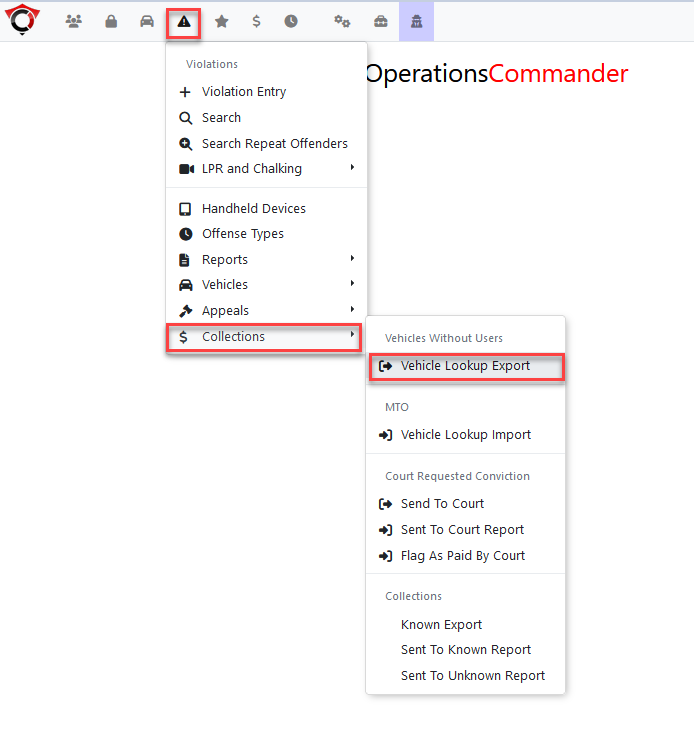
Vehicle Lookup Export Tool
Several search options are present on the page:
Minimum number of violationsVehicle province or stateTo search by issue date or by due dateDate range of the lookup

Clicking on export will generate a file to be sent to the MTO containing the vehicle information that is additional information is being requested for.
Notice there are various formats for this export:
Aris Raw Data Account:Used with anARISclient using raw format lookups.Aris Abstract Account:Used with anARISclient using abstract format lookups.Send to Collections:Used to send a report to a typical collections agency outside of theMTOprocess.
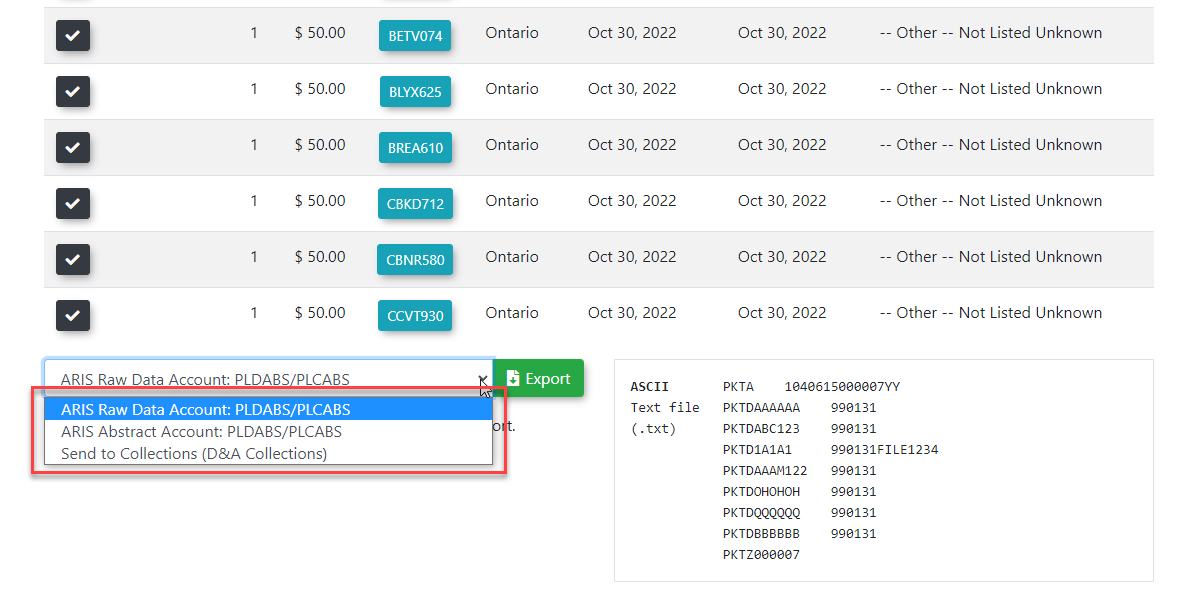
A text file will be generated with the filename as SendToMTO-XX-XX-XX.txt, with the Xs acting as placeholders for the timestamp at the time of file creation.

MTO Export File
Here is a sample of what the exported text file will look like.
The file is formatted in a custom format required for the MTO to lookup driver information.
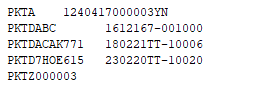
MTO Response File
The file that is returned from MTO Lookup will include driver information such as the registered vehicle owner's name and home address.
This information is temporarily stored in the OPS-COM system. As governed by ARIS rules, the information will be purged from the system after it is no longer needed.
The document return from the MTO will look like the following:

Simulated Response File
There is an option to generate a mock version of an MTO response file using the file previously exported.
This can be done using the Third Party Simulator page, located under the menu tree:
Tomahawk Options → Third Party Simulators

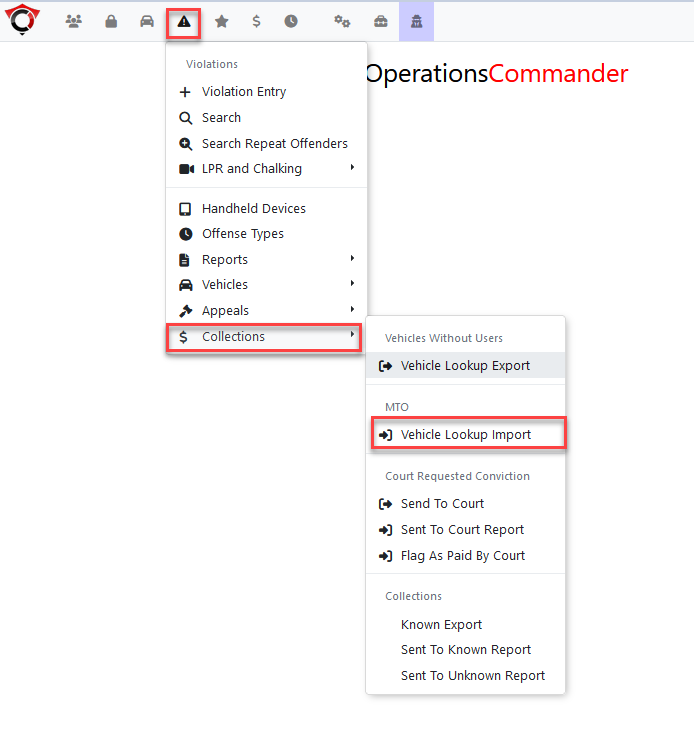
Importing the MTO Response File
To import the information received back from the MTOvalues into the OPS-COMfollowing system,designated navigatefields to the vehicle lookup import found under the menu tree:
Violations → Collections→Vehicle Lookup Import
The Vehicle Lookup Import file selector tool opens.
Choose the file that came back from MTO and navigate to the file you wish to select for import.
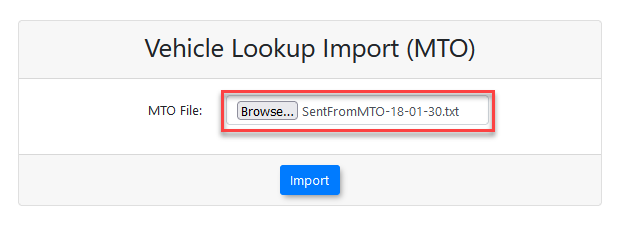
Click the Import button.
A confirmation message will appear in the top right of the page.

Generating Notice Letters
Once the information has been imported, the data will be used to populate any missing notice letter information.
Violations that have had MTO information associated to them can be viewed from the Letter Report page.
After the notice letters have been printed, they must be sent to the drivers of the vehicles by mail.
Sending to Collections
If the ticket still remains unpaid after the notice letter has been sent, it is eligible to be sent to the Ontario court system for collections.
The page can be found under the menu tree:
Violations → Collections→Send to Court
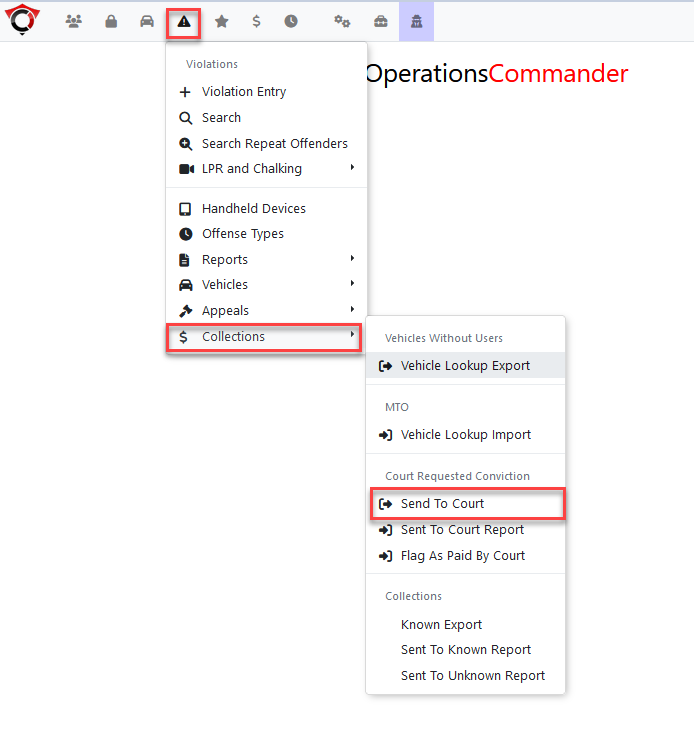
The number of days since the violation was issued can be specified, and violations that have not been issued a notice letter can also be included.
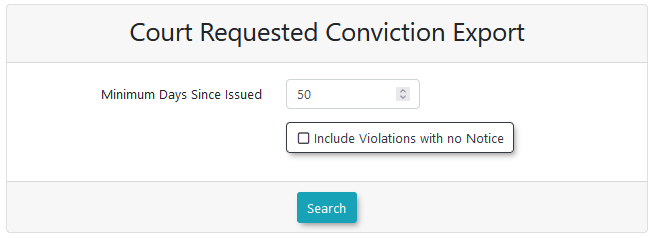
An admin fee can be added to the violationbased on export.your specific municipality:
Some municipalities have a fee and some do not.
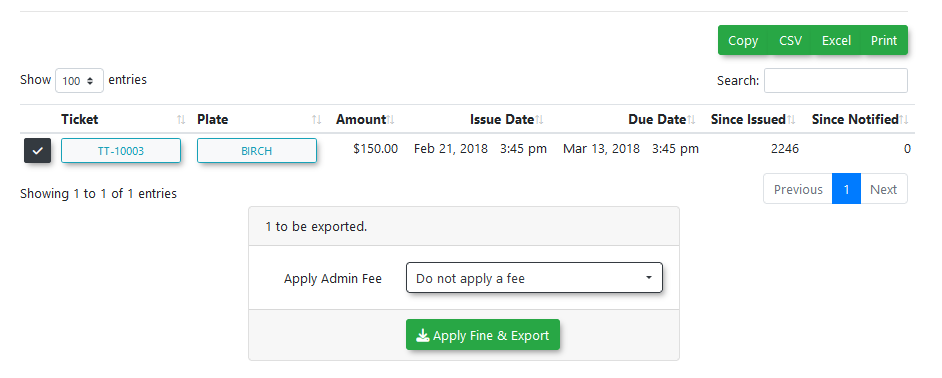
The page will then generate a file to be sent to the Ontario court system, named in the format of SendToCRC-XX-XX-XX.txt, with the Xs acting as placeholders for the timestamp at the time of file creation.
The report generated by the system is in a format specified by the Ontario court system for processing, and must be customized for each municipality.
It will look something like this:

Client MTO Codes
For each client sending information to the MTO, there are 4 codes required by the Ontario court system that must be set up on the client’s site.
NOTE - The client must request a RAW Data account from the MTO to use this process. This system will not work otherwise.
Here's a reference for all the provincial forms: https://ontariocourtforms.on.ca/en/provincial-offences-act-forms/
The provincial forms are:
-
Case Court:
startsAat character 3 - a 44-digit number (Parrye.g.,Sound is 3060, Perth's is 1860)3060).This is repeated starting at character 57 and again at character 186. -
Case Jurisdiction:
startsAat character 7 - a 33-digit number (Parrye.g.,Sound is 658, Perth's is 073)658).This is repeated starting at character 61 and again at character 190. -
TheAgency Code: 3 alphanumeric characters followed by 3 numbers (Parrye.g.,Sound is BYL390, Perth's is BYL658)BYL390). -
Disbursement Code: 1 alphanumeric character followed by 3 numbers (
Parrye.g.,Sound is M525, Perth's is M658)M525).
To set these codes up within the site, go to System Settings and selectClick the CollectionsSave Settings Component.button.
Enter

ForIf municipalitiesyour usingmunicipality theuses an extra-detailed version of the notice letter where one notice is sent out for each individual violation rather than in bulk, you must disable the "Include All Unpaid Violations" setting within this same configuration menu.
Using this Feature
The lifecycle of a municipal violation involves several stages of exporting data, importing MTO responses, and escalating unpaid tickets.
Exporting Data for the MTO
When violations reach a specific age of non-payment (e.g., 15 days), administrators export the unknown vehicle data to request owner information from the MTO.
-
Hover over Violations and click Collections then Vehicle Lookup Export.
-
Configure your search criteria using the Minimum number of violations, Vehicle province or state, and Date range fields.
-
Click the export format button that matches your account type (e.g., Aris Raw Data Account or Aris Abstract Account).
-
The system will generate and download a text file formatted for the MTO.
Importing the MTO Response File
Once the MTO returns the file containing the registered owner information, it must be disabled.imported into the system to generate notice letters.

Hover over Violations and click Collections then Vehicle Lookup Import.
Generating
Click to choose the returned MTO file from your local computer.
Click the Import button. A confirmation message will appear in the top right of the page once complete.
You can now generate and print your mail-out notices using the Notice Letter Report page.
Sending Violations to Court
If a ticket remains unpaid after notice letters are sent (e.g., on day 65), it is eligible to be sent to the Ontario Courtcourt Reportsystem for collections.
-
AHover over Violations and click Collections then Send to Court. -
Specify the number of days since the violation was issued to filter the list.
-
Apply any required administrative fees using the provided field.
-
Click the export button to generate the required text file
canforbethegeneratedOntarioandcourtexportedsystem.to -
containingTo generate a printable summary of
alltheseviolationscasesbeingforsent toyour courtindate,ahoverparticularovertime frame.The page can be found under the menu tree:Violations
→and click Collections→then Sent to Court Report, and click Export.
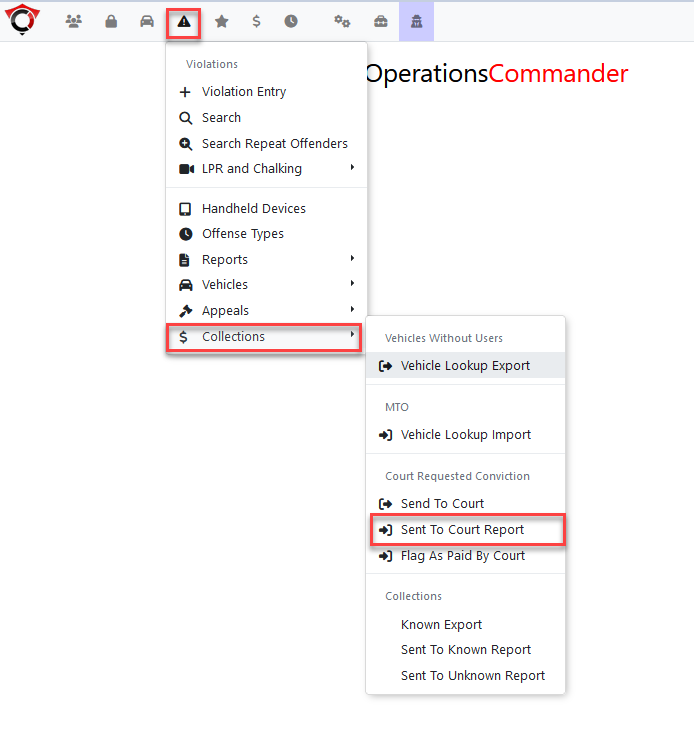
This will open the Court Requested Conviction - Already Sent Report.
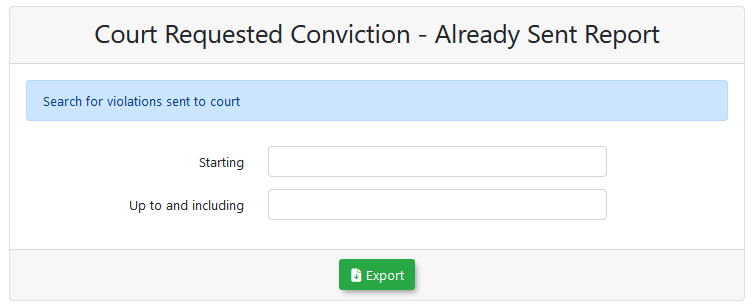
Clicking on export will download an Excel file to the browser.
A copy can be printed to bring to court on the day of the hearings.
It is exported in the format recommended by the courts:

Court Requested Conviction Fee
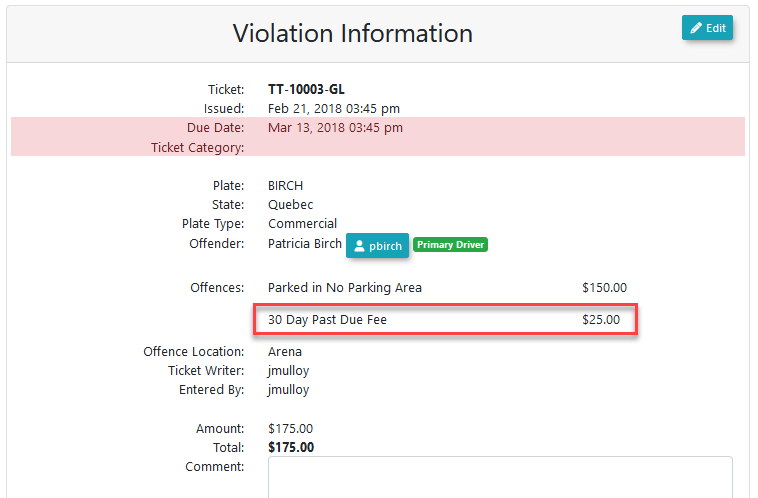
If a conviction fee was added on to the violations sent to court, it can be viewed when looking at the violation’s info page.
A record for the Court Requested Conviction (CRC) fee will have been added.
Flagging Paid Records
from Court
When the court provides a report is received back from the court indicating a violation was successfully paid, it must be flaggedmanually updated in the system as being paid.OPS-COM.
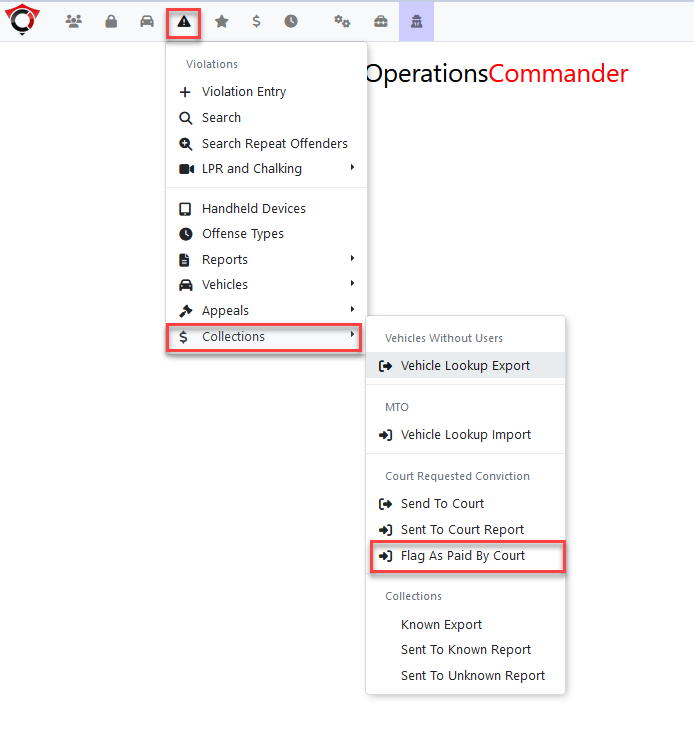
The report to flag as paid is located under the collections menu, within the menu tree:
-
Hover over Violations
→and click Collections→then Flag as Paid by Court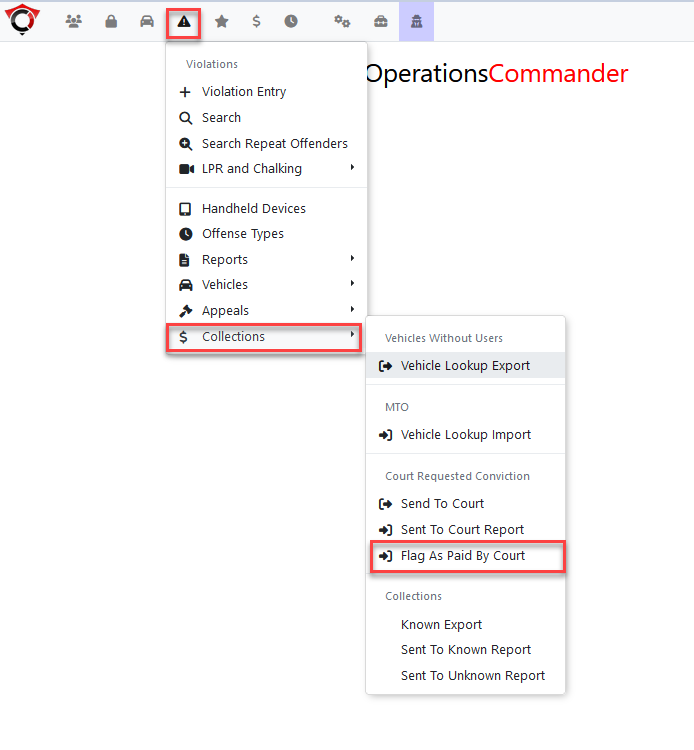
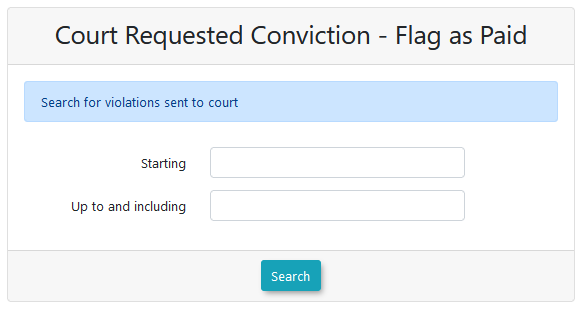
Enter athe applicable date range and pressclick the searchSearch button.
A list ofSelect the specific violations that havewere been sent to court will be returned by the page.resolved.
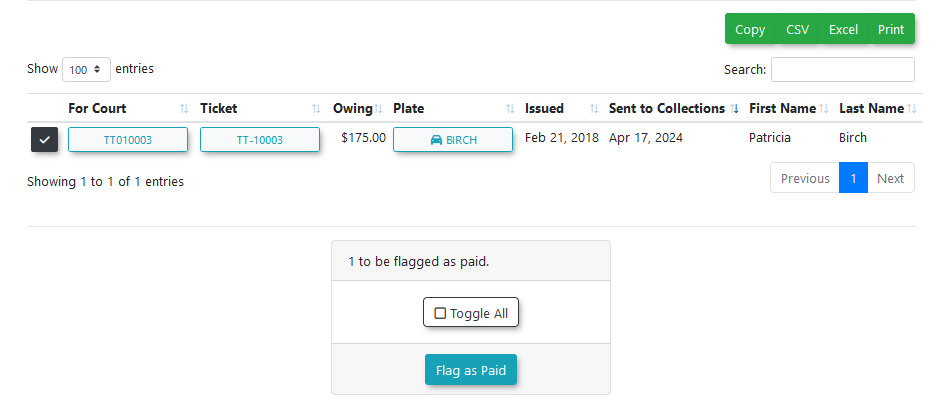
Click the Flag as paid tobutton. processThese all selected violations to be marked as paid.
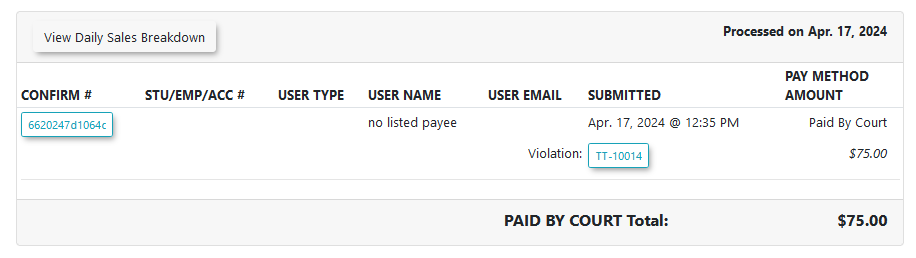
Violations flagged as paidtickets will alsonow appear on the Daily Processed Report with a payment type of paid by court.court.
Best Practices and Considerations
Additionally,[!WARNING] whenMTO lookingData atPurging (ARIS Rules): ARIS regulations dictate that information retrieved from the vehicleMTO informationis foronly thistemporarily violation,stored within the OPS-COM system. Once a violation has been cancelled, paid, or sent to collections, all associated MTO informationpersonal data will havebe beenautomatically and permanently purged from the system.
-
NoteEstablish a Schedule: Organizations should develop a strict, recurring schedule for their violation lifecycle (e.g., exporting MTO lookups every Monday for tickets reaching 15 days old, and sending tickets to court every Friday for tickets reaching 65 days old) to maintain compliance and steady revenue recovery. -
Testing with Simulators: If you need to test your import workflow before receiving live data back from the
vehicleMTO,showsyoutherecanaregeneratenoaassociatedmockdrivers.response file using the Third Party Simulators tool.