
Resolve Duplicate Options
The Resolve Duplicates feature in OPSCOM allows administrators to identify and merge duplicatesduplicate records by email, student number, staff numbernumber, and vehicle (plate)plate. inIts theprimary system. Thispurpose is crucialto for maintainingmaintain data accuracy, preventingprevent operational errors, and ensuringensure that enforcement and permit management processes are basedrely on clean, unique vehicle data. This article is intended for OPS-COM administrators responsible for system data maintenance and focuses specifically on resolving duplicatesvehicle byduplicates.
Setup however,and Configuration
This feature is a core administrative data maintenance tool and requires no specialized initial setup.
Admin Side: Administrators must have the conceptappropriate system permissions enabled to access the data maintenance tools and execute merges.
User Side: This feature is strictly a backend administrative tool and is not accessible to end-users on the sameportal.
Using otherthis dataFeature
Administrators can use the following instructions to generate a list of duplicate vehicles, select the appropriate retention data, and merge the records.
Resolving Duplicates By Vehicle
ClickonHover over Tools
,hoverandoverselect Resolve Duplicates, then click ByVehicle.Vehicle.
Using this Feature
OnSelect theyour Resolve Duplicates By Vehicle page, you will be presented with options to define the criteria for identifying potentialdesired duplicate vehicleidentification records.
Duplicate Identification Options
There are two choicesoption to generate a list of potential duplicates:duplicates.
Review the generated list carefully, paying close attention to vehicle descriptions and other details to confirm they are actual duplicates.
Click the Merge button next to the specific pair of duplicate records you wish to consolidate.
Select which specific data fields you wish to retain from the duplicate records in the merge function window.
Finalize the merge to permanently combine the records.
Available Actions and Buttons
-
Strict
DuplicateDuplicate:Purpose:SelectThisthis optiongeneratesto generate a list of vehicles where all three primary unique identifiers (Plate, State/Province, and Plate Type) are identical. This is used for finding exact, unambiguous duplicates.Unique identifiers are:PlateState/ProvincePlate Type
Include Different Plate
TypesTypes:Purpose:SelectThisthis optiongeneratesto generate a list of vehicles where the Plate and State/Province are identical, but the Plate Type may differ.This -
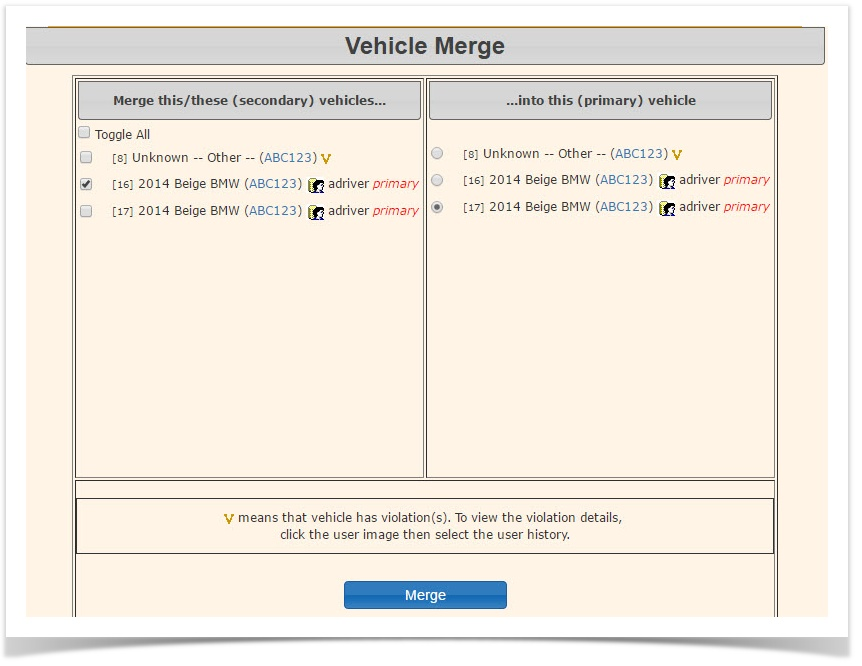
Merge: Click this button next to a pair of duplicate entries to open the data retention window and begin the consolidation process.
The Include Different Plate Types option is particularlyhighly useful for identifying potential input errorserrors. whereFor example, if a vehicle might have beenwas entered twiceonce with the correct plate and province, but an incorrect or unspecified plate type was initially used.
Example: Ifand a vehiclesecond is a beige BMW sports car with plate ABC123, province Ontario, and an unspecified Plate Type, but there's another record for a beige BMW sports car with plate ABC123, province Ontario, and Plate Type Passenger, it is highly probable that these are the same vehicle enteredtime as a duplicate.passenger Comparingplate, thethis vehiclesearch descriptioncriteria (make,will model,flag color)them can help confirm such cases.
Resolving Duplicates
Once a list ofas potential duplicates is generated based on your chosen criteria:
Review the list carefully, paying close attention to vehicle descriptions and other details to confirm actual duplicates.For each pair of duplicate records you wish to merge, click theMergebutton provided next to the entries.ClickingMergewill take you to the merge function window, whereso you canselectcomparewhichtheinformationmake, model, and color toretain from the duplicate records and then finalize the merge.
Best Practices &and Considerations
-
CoreUnderstandVehiclecoreIdentificationvehicle identification::InOPSCOM,OPS-COM, vehicles are uniquely identified by three key pieces of information: LicensePlate,Plate, Province /State,State, and PlateTypeType..All three details are essential for a vehicle to be considered unique within thesystemsystem,(e.g.,as"ABC123"the exact same plate number couldbetheoretically exist as both a passengerplateandalso acommercial plate in the sameprovince,province.requiring the plate type for distinction). -
CarefulPerformReviewcareful reviews before merging::Always thoroughly review potential duplicates beforemerging.finalizingMerginga merge, as merging incorrect records can lead to permanent data loss or inaccuracies. Ensure you are selecting the most accurate and complete data fields to retain during the final step. -
CommonEstablishReasonsregularfordata maintenance routines: Periodically run the Resolve Duplicates report to maintain a clean and accurate vehicle database.:BeThisawareis especially important after periods ofcommonhighscenariosuserthat lead to duplicates:Mismatched vehicle information(e.g., slight variations in plate number or state entry).Incorrectly entered plate numbersregistration or manual dataentryentry.errors.OrphanedDuplicate vehiclesthatcan cause significant confusion, particularly when multiple drivers arenot properly linked to a user profile.Orphaned violationsthat should beassociated withathespecificsamevehicle but are linked to a duplicate record.vehicle.
-
ProactiveEncourageDataproactiveEntrydata(Prevention)entry::The more information included when adding a vehicle to the system, thebetter. Providing additional details helpsbetter the system can recognize potentialduplicatesduplicates.and reduces errors. In addition to the three key identifiers, itIt is highly recommended toinclude:always- include
VehicletheColourvehicle's Vehiclecolor,Makemake, Vehiclemodel,Modeland Vehicle YearThese details helpyear to clearly identify specific vehicles andensurereducethey are properly recorded.errors.
-
DataInvestigateRetentioncommon duplicate causes::WhenBemerging,awareOPSCOMoftypicallycommonallowsscenariosyouthat lead toselectduplicates,whichsuchdata fields from the duplicate records you wish to preserve. Ensure you retain the most accurate and complete information. Regular Maintenance: Periodically run theResolve Duplicatesreport to maintain a clean and accurate vehicle database, especially after periods of high user registration oras manual dataentry.entryDuplicatetypos,vehiclesslight variations in state entry, or orphaned violations. Identifying these root causes cancausehelpsignificantyouconfusion, especially when multiple drivers are associated with the same vehicle, impacting permit management and enforcement accuracy.User Training: If duplicate entries are a recurring issue, consider reviewingimprove user trainingorand refine data entry procedures to minimize future occurrences.