
Moneris Checkout
This article provides OPSCOM system admins with a comprehensive guide to setting up and configuringThe Moneris Checkout asHosted Payment configuration allows administrators to process secure online transactions through a paymentfully provider.integrated Moneris Checkoutmerchant account. Its primary purpose is a full-service partner that allows you to supportenable a wide range ofreliable payment optionsprocessing—including pre-authorizations and stored cards for recurring billing—directly within OPSCOM.the OPS-COM checkout flow. This article is intended for OPS-COM administrators.
Setup and Configuration
Properly configuring Moneris Checkout involves two key stages: generating and configuring the settings within your Moneris merchant accountaccount, and then mirroring thethose appropriateexact settings within OPSCOM.your WeOPS-COM recommend using the pre-auth settings in both Moneris and OPSCOM for the most reliable payment process.
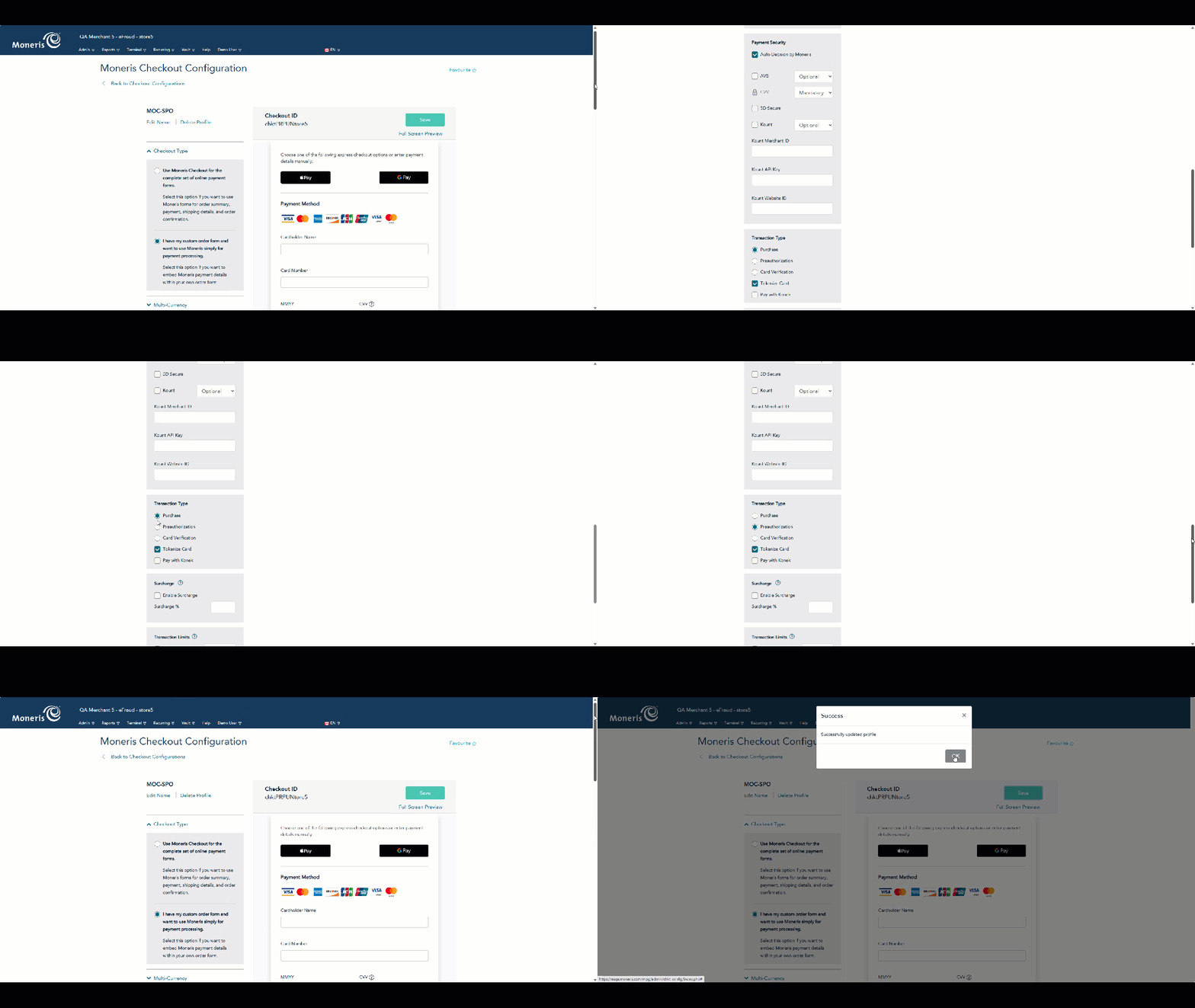
See this gif image, which shows what setting to change on the Moneris Merchant Resource Center, in order to switch from purchase to pre-authorization. (shown in the image below, beside capture method)
InformationGathering Required for SetupCredentials
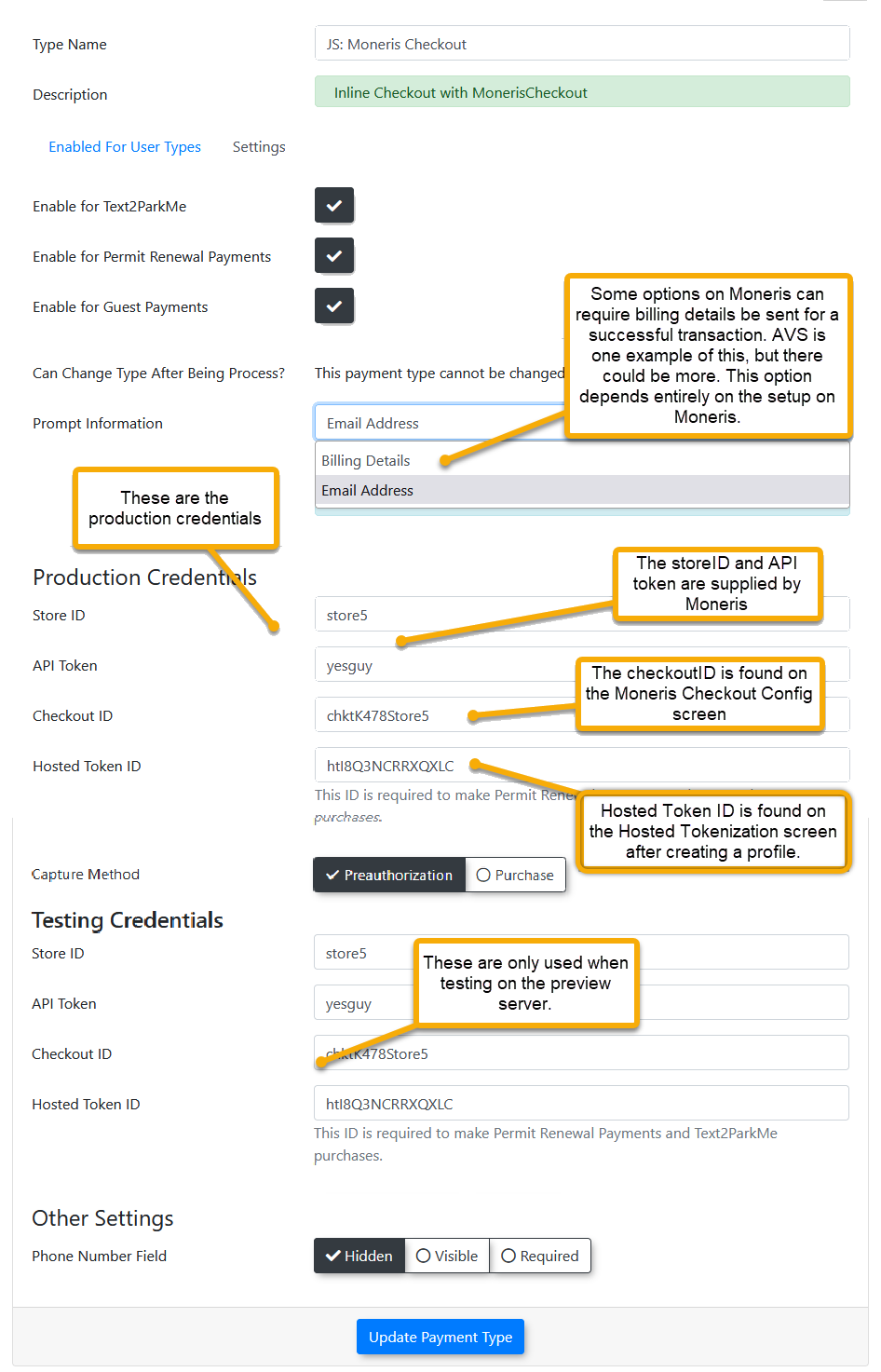
Before beginning the configuration,configuration in OPS-COM, you must create a profile in your Moneris account. account From there, you will need toand obtain the following credentials from within the Moneris account. OPSCOM will require these details to connect to the service.credentials:
-
store_id:
store#Your unique Moneris store number. -
api_token:
xxXXXXXYour unique API authentication token. -
checkout_id:
xxxxxxxxStore#Your specific checkout profile ID. -
Hosted_token_idhosted_token_id: Generated from the Hosted Tokenization page (Generatedrequiredbyifyou,usinglaterMonerisonVaultinforthisstoreddocument)payments).
<div class="info-box"> You must also determine if your Moneris security settings, such as Address Verification Service (AVS), will require your customer's billing address to be collected. This decision affects which fields OPSCOM will prompt the user to complete.
</div>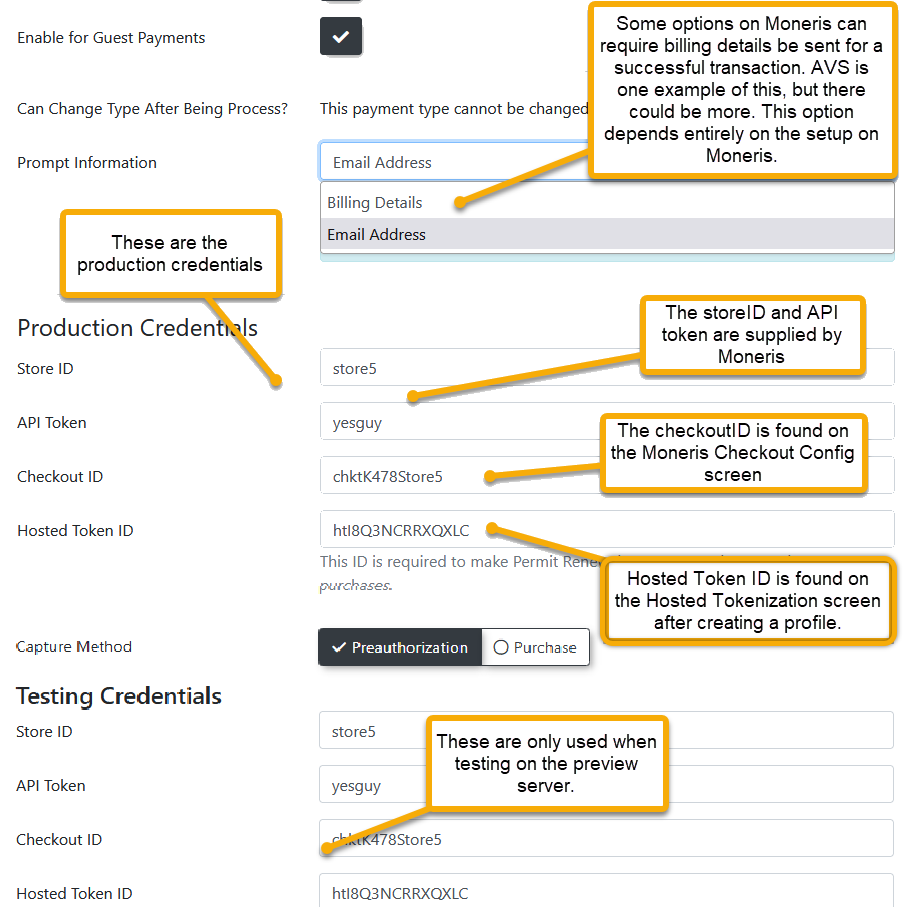
Moneris Portal Configuration
-
Log in to the Moneris Merchant Resource
Center and navigate to the configuration area.Center.
-
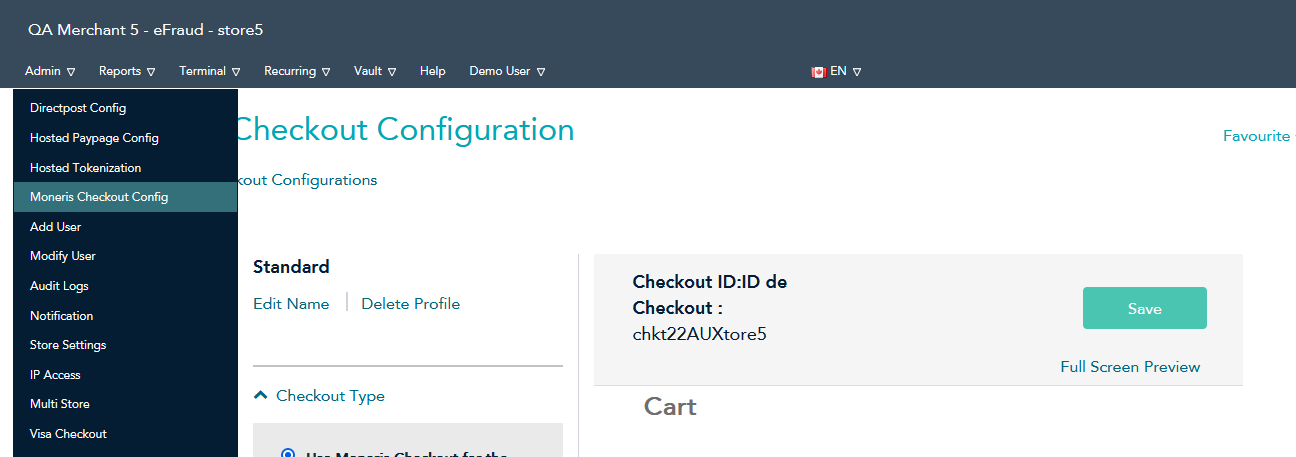
Click Admin in the main menu and select Moneris Checkout
Config.Config. -
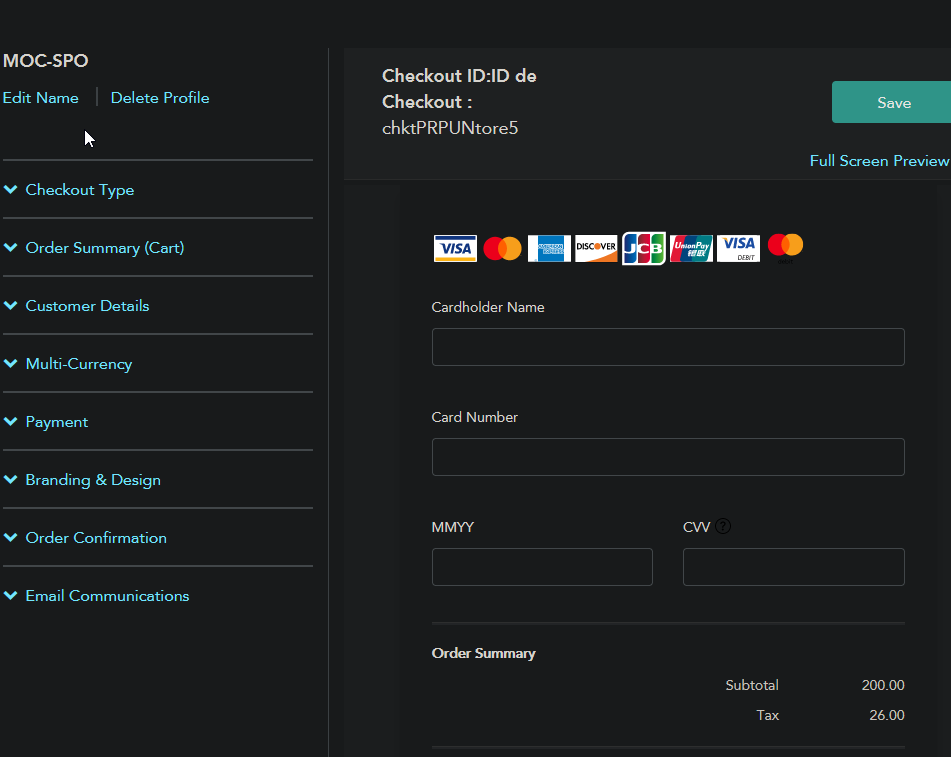
Locate your specific checkout profile
(e.g., MOC-SPO)and click to edit it.

From there, you can change any of the settings:
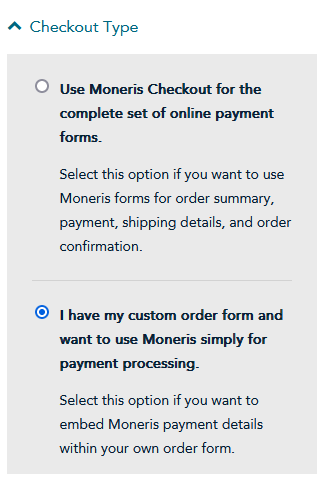
Checkout Type
Select;
“I have my custom order form and want to use Moneris simply for payment processing.”
This ensures that Moneris providesunder the paymentCheckout fieldsType embedded within your existing OPSCOM order form.
Multi-Currency
This feature can be enabled if you need to process payments in multiple currencies.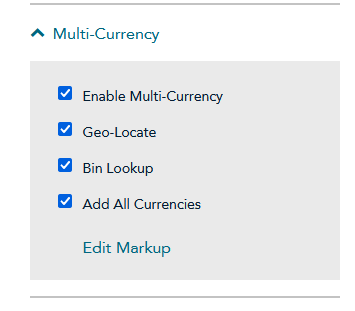
Feature Limitations: with Multi-Currency Enabling Multi-Currency will disable support for Recurring Billing, Gift Cards, 3-DSecure 1.0, and Google Pay.
Payment
This section defines transaction rules and security options.
This is where you can control whether or not you wish to use a pre-authorize or payment capture model, the benefits of which are described above.Payment Security:It is your decision whether to enable security features like AVS and CVV.If you enable these, you must configure OPSCOM to collect the full billing address from users. Note that if Multi-Currency is active, 3D Secure is not supported.settings.-
TransactionNavigateType:toYouthecanPayment section and setthisthe Transaction Type toeitheryourpreauthorize,preferredormethodpurchase.(preauthorizeTHEisPAYMENThighlyTYPE IN OPSCOM MUST ALSO BE CONFIGURED THE SAME WAY.recommended). -
Disable the Tokenize
Card:CardEnsureoption in theTokenizePaymentCardsection,optionasisdisabled. Cardcard tokenization for recurring payments is handled separately by the MonerisVault, which is configured separately.Vault.
The purchase model (current) requires a client's connection be stable. Should anything interrupt that, javascript errors, spotty connection, etc., the callback will not reach OPSCOM. With the new pre-auth model, the capturing of the funds now happens server to server meaning neither the client, the app, nor spotty connections can interfere with processing the payment. The Preauthorize Capture model provides a more reliable payment process.
Branding and Design
To ensure the payment form integrates smoothly with the user experience:
-
Disable
thethe Enable Fullscreencheckbox.checkboxThis preventsunder thecheckoutBranding and Design section to prevent the form from taking over the entirescreen.screen during checkout.
The rest of the branding and design decisions can be configured to your liking.
Order Confirmation
Configure Moneris to redirect the user back to OPSCOM after a payment attempt.
-
Select
the option “Use OwnPage”Page for the orderconfirmation.confirmationThissettingallowssoOPSCOMMoneris correctly redirects users back todisplaythefinalOPS-COMsuccessreceiptor failure receipt.page.
OPSCOMOPS-COM System Configuration
Once your Moneris portal is configured, you must add the payment type to OPS-COM. Detailed step-by-step instructions for adding the gateway can be found on the Payment Types Setup page.
PleaseImportant: clickWhen configuring the gateway in OPS-COM, your Transaction Type setting (Pre-auth vs. Purchase) and your Security settings (AVS/CVV requirements) must exactly match what you configured in the Moneris portal.
Using this hyperlinkFeature
Because bethis redirectedis toa ourbackend Paymentpayment Typesgateway Setupconfiguration, documentation,administrators anddo thennot finishmanually interact with this feature on a daily basis. Once fully configured, Moneris automatically handles electronic routing when users process transactions on the remaininguser stepsportal afteror thatwhen hasadministrators beenprocess finished.credit card payments via the administrative portal.
Create a new section for setting up Hosted providers. We currently have only three:
Moneris Vault for Stored Payments
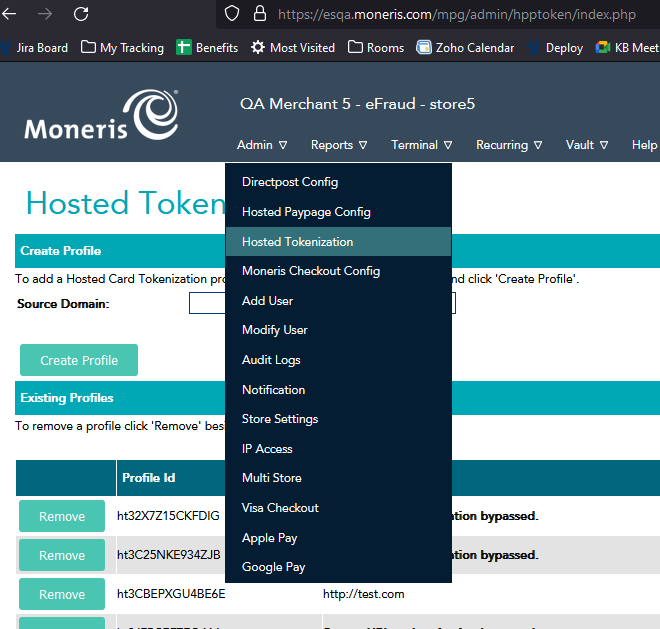
Moneris Vault is a complementary service used for tokenizing and storing credit cards for futurefuture, use,automated suchuse. asThis withfeature is heavily utilized for parking permit rollovers orand Text2ParkMe.the ThisText2ParkMe functionalityfeature. requiresTo oneutilize additionalthis piecefunctionality, ofensure informationyour duringhosted_token_id setup:is actively entered in your OPS-COM payment settings.
Best Practices and Considerations
AVS and Billing Information: Ensure your required checkout fields match your security settings. If Moneris is configured to require Address Verification Service (AVS), you must configure OPS-COM to collect the user's full billing address during checkout. If OPS-COM is set to only collect an email address while Moneris expects a full billing address, all transactions will fail.
Multi-Currency Limitations: While Moneris supports multi-currency processing, enabling this feature will completely disable support for Recurring Billing, Gift Cards, 3D Secure 1.0, and Google Pay. Evaluate your institutional needs before enabling this feature.
Invalid Credentials Error: If you encounter an "Invalid credentials" error when attempting to tokenize a card, it is likely due to a missing hosted_token_id or because the token's "Source URL" authentication does not match the domain you are using. ForVerify testing,your youdomain can use a profile without Source URL authentication.
Best Practices and Troubleshooting
Common Billing and AVS/CVV Errors
The most common issue during setup is a mismatch between Moneris's expectations and the data OPSCOM provides.
If Moneris is configured to require and validate billing details (AVS is enabled), but OPSCOM is only configured to ask for an email address (promptFor is set to anonymous), all transactions will fail. You must ensure the OPSCOM configuration matches the security requirements you setmappings in the Moneris portal.portal to resolve this.