Payroll Deduction Settings
Enable
The /Payroll DisableDeduction payingSettings feature allows administrators to control whether users can select payroll deduction as a Violationvalid /payment Permitmethod usingfor Payrollparking Deduction.violations and temporary permits. Its primary purpose is to easily toggle these internal payment options on or off during the user checkout process to align with your organization's current financial policies. This article is intended for OPS-COM administrators.
Setup and Configuration
Controlling
theFirstavailability goof payroll deductions is managed through the global system settings. Because these settings use a "disable" logic, administrators must explicitly uncheck the boxes to make the payment options available to end-users.
Admin Configuration
-
Hover over System Configuration

thenclickselectSystem Settings. -
Click the Payments
optioncomponent to
You will now seeopen theoptionspayment"control menu. -
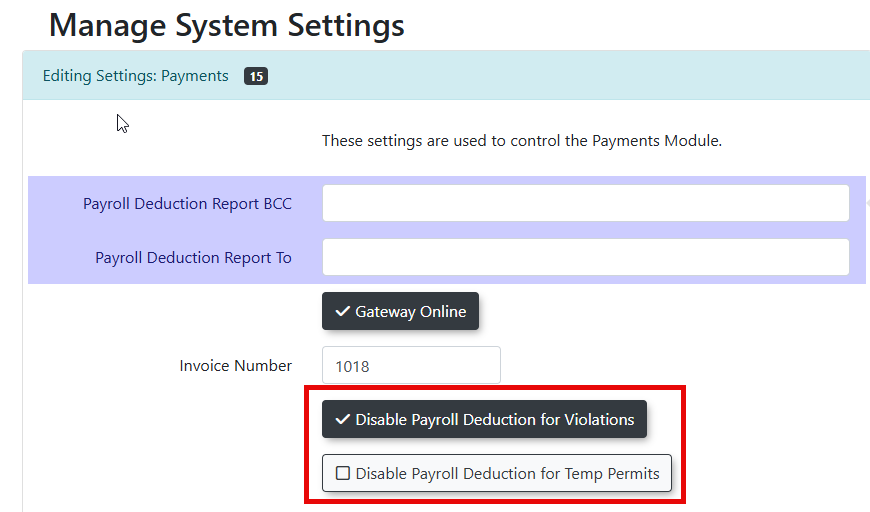
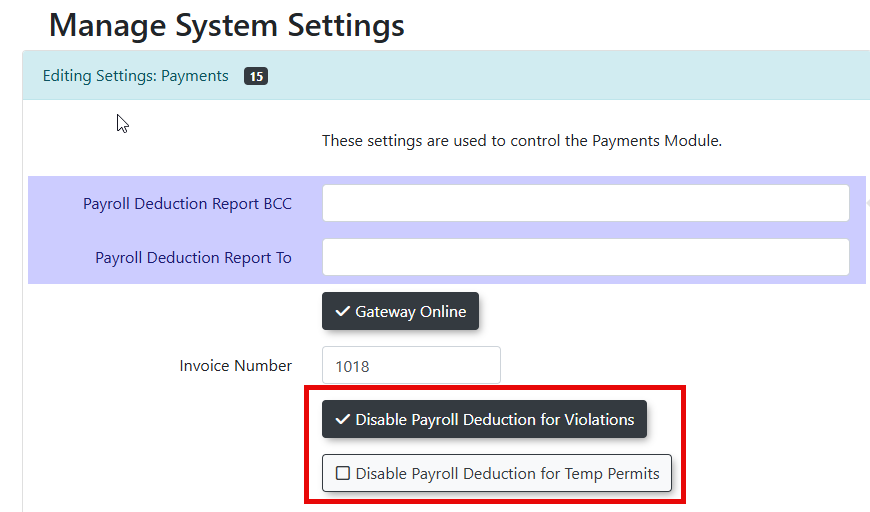
Locate the payroll deduction settings area within the menu.
-
Enable the Disable Payroll Deduction for
Violations"Violations&checkbox"to stop users from paying for citations via payroll deduction, or disable the checkbox to allow the payment method. -
Enable the Disable Payroll Deduction for Temp
Permits",Permitsyoucheckboxcantousestop users from purchasing temporary permits via payroll deduction, or disable thecheck boxes on these optionscheckbox totoggle on / offallow theabilitypaymentformethod.users -
Save your system settings.


Using this Feature
Once configured, the system automatically handles how payment methods are presented to usethe end-user.
User Checkout Experience
-
Feature Enabled (Checkbox Unchecked): When a user proceeds to the checkout screen to pay a violation or purchase a temporary permit, "Payroll Deduction" will appear as a selectable option alongside standard payment methods like credit card or account balance.
-
Feature Disabled (Checkbox Checked): The payroll deduction option is completely hidden from the user's checkout screen for
payingthatViolationsspecificand/item type.
Best Practices and Considerations
Reversing the Logic: Remember that these settings are framed in the negative. To turn the payroll deduction feature ON for your users, you must make sure the respective checkboxes are disabled (unchecked).
-
Clear Financial Policies: Ensure your organization has a clear, documented policy regarding employee eligibility for payroll deductions before allowing this payment method in the system.
-
Permit Types: Note that this specific configuration targets temporary permits. If your organization handles payroll deductions for long-term or
Permitspermanentwhenpermits,theythosecheckareout.typically managed within the individual permit pricing and eligibility settings, rather than this global toggle.