
Spoiling a Violation
How
The to Spoil/VoidSpoiling a Violation
- feature
Toallowsspoiladministrators to void or invalidate an issued parking ticket within the system. Its primary purpose is to help correct enforcement errors or dismiss aviolation,ticketstartthat was issued incorrectly, effectively removing its active penalty status. This article is intended for OPS-COM administrators.Using this Feature
Administrators can manually change the status of an active ticket to spoiled by
searchingediting the specific violation record.1. Search for the specific violation
throughusing the Quick Search or Violation Search tool.2. Click
onthe Ticket #onlink from theViolationsearchInformationresultspageto
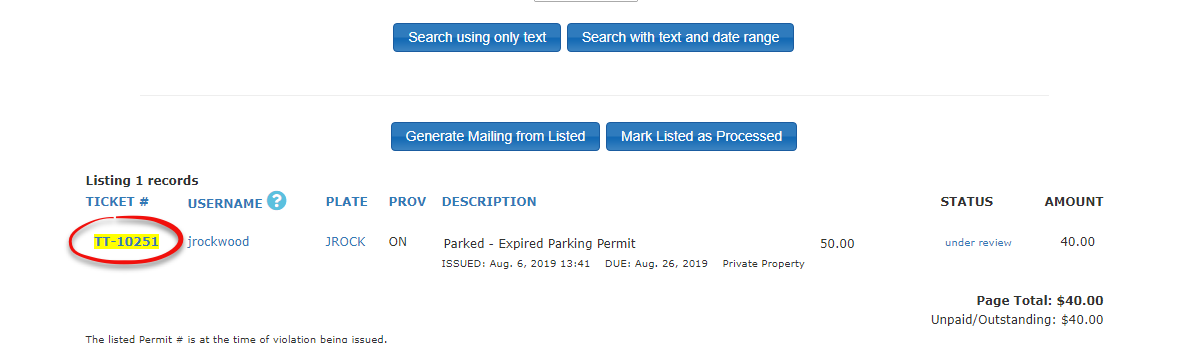
SelectClick the Edit button located at the top right of the violationandscreen.change4. Click the Spoiled drop-down menu and choose Spoiled
status(changing it from the default Valid - not spoiled).5. Click the Submit button to
Spoiled.save
3.
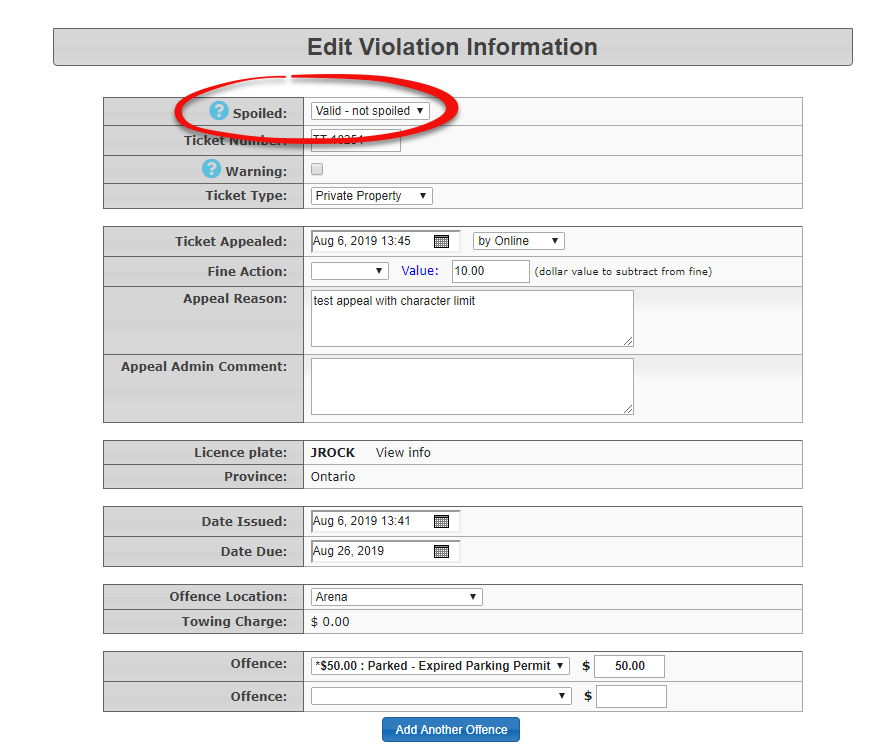
Submitsubmitted, thechanged violation details and yourticket willnowbemarkedsuccessfully updated and will display as Spoiled the next time yougoquery it in a search.
Best Practices and Considerations
-
Audit Trails: Always add a descriptive note or comment to
searchthe violation record when changing its status. Documenting the specific reason forit.voiding a ticket (e.g., officer error, successful appeal, duplicate entry) creates a reliable audit trail that can be referenced if there are questions regarding the user's account history. -
Financial Impact: Remember that once a violation is successfully spoiled, any associated fines or financial penalties are completely nullified. Verify your changes through the search tool to ensure the ticket status correctly displays as Spoiled so the user is no longer held financially responsible.
-
Once