
Ticket Warnings Explained
BelowThis is,article provides a samplebreakdown of the layout and specific details displayed on both the front and back of OPS-COM violation and warning tickets. Its primary purpose is to help administrators understand the information presented to violators, as well as clarify the operational differences between issuing a warning ticket,and spoiling a sampleticket. ofThis guide is intended for OPS-COM administrators.
Setup and Configuration
There is no specific system setup or configuration required for this overview. Ticket templates and layouts are generally configured in conjunction with OPS-COM support during your initial system onboarding.
Key Information Displayed
Whether an actualenforcement officer issues a standard violation ticket andor a sample ofwarning, the backprinted ofticket adisplays ticket/warningspecific, providedstandardized byinformation for the OPSCOM software.
user.
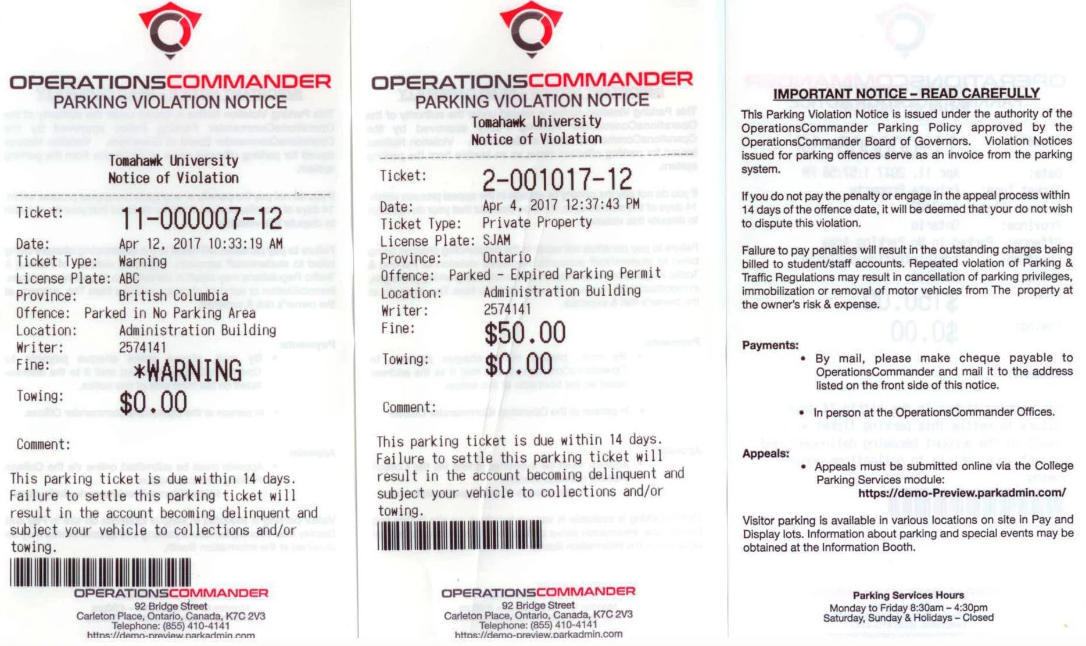
Explanation of the Front of the Ticket/Warning
The front of the ticket contains the core details of the infraction:
-
Ticket
NumberNumber:-AThis is a systemsystem-assigned number that uniquely identifieseachtheindividualviolationviolation/or warning. -
DateDate:-TheThisexactisdate and time thedate that the violation/warningticket wasissuedissued.on. -
Ticket
TypeType:- This identifiesIdentifies thetypebroad category of the violationthat(e.g.,occurredPrivate(broad range category)Property). -
License
PlatePlate:- This is theThe license plate numberforof thevehicleoffendingthatvehicle.incurred -
ProvinceProvince:- This is theThe provincethator state where the license plate isissuedregistered.in. -
Offense
TypeType:- This identifiesIdentifies the specific rule or parking violation that occurred. -
LocationLocation:-TheThisspecificidentifieslottheorlocationproperty area where the violationoccurred.took place. -
WriterWriter:-AThis is a systemsystem-assignednumber that identifies the enforcement officer that issued the violation. Each enforcement officer has their ownunique numberand can be verified by administrators. The writer is identified by a unique identifier to provide security toidentifying the enforcement officer.IfThisyou require more information aboutprotects theticketofficer'swriterprivacyyou can searchin theviolationfield,onwhile allowing administrators to easily look up the writer's actual name within the adminsideportal.and -
FineFine:-TheThisfinancialis the amountpenalty owed for theparticularviolation.violation.-
onVisual Cue: On a warning ticket, the
warning ticket thefine amount is followed by"*Warning"Warning. This indicates thatthenoamountpaymentonis currently due, but demonstrates what theticket is not owing, but this is the amount thatpenalty wouldbehaveduebeen ifaan actual ticketfor the same violationwas issued.
Note, -
-
TowingTowing:-TheThis is theadministrative amount due if the offending vehiclethat incurred the violationhad to be towed. -
CommentsComments:- This section includes anyAny additional notesthator context provided by the enforcementofficer wants to include.officer.Explanation
Back of the Ticket/Warning
The back of the ticket provides detailsthe aboutviolator with the organizationnecessary thatadministrative issueddetails and organizational policies:
-
Payment and Appeal Instructions: Clearly outlines the
ticketstep-by-stepandprocessthe policies and procedures regarding the ticket. The backclearly identifiesfor how the violator can either pay their fine or submit a formal appeal through theticketonline portal. -
Sign-off Section:
withProvides asectiondesignated area for the violator to identify themselves and signoff ontheticket.ticketTheifbackrequiredalsobyidentifiesyour organization's policies. -
Organization Details: Lists where to find additional
informationinformation,onyourtheorganization'sorganizationcontact details, andtheyour standard office hours.
WarningsBest Practices and Spoiled TicketsConsiderations
WarningUnderstanding Warnings vs. Spoiled Tickets: isWhile neither a warning thatnor a spoiled ticket requires payment from the useruser, hasthey brokenserve two entirely different purposes within the rules.OPS-COM Thesystem.
-
Issuing Warnings: A warning is officially tracked in the system as a
zerozero-dollar violationthatand is processed immediately upon syncing to the server.TheUseideawarningshereasisanthateducational tool for first-time offenders or minor infractions, effectively giving the user auser will still get a ticket, but won't have to pay for it. A"slap on thewristwrist"aswhiletheystillsay..maintaining a permanent record of the offense on their profile. -
SpoiledSpoiling Tickets:refersThe "Spoiled" status is used tothe old concept of spoiling a ticket. Back in the day (of paper!) a patrol might be writing upvoid a ticketandcompletely, making it as if theuserticketshowsneveruphappened. Officers should spoil a ticket if it was initiated in error, such as accidentally entering the wrong license plate details, or if a driver arrives and moves theircar.vehicleThejustticketasis then said to be spoiled, or another example might be athe patrolenteringofficer begins writing thewrongcitation.plate/vehicle