
Ticket Warnings Explained
This article provides a breakdown of the layout and specific details displayed on both the front and back of OPSCOM violation and warning tickets. Its primary purpose is to help administrators understand the information presented to violators, as well as clarify the operational differences between issuing a warning and spoiling a ticket. This guide is intended for OPSCOM administrators.
Setup and Configuration
There is no specific system setup or configuration required for this overview. Ticket templates and layouts are generally configured in conjunction with OPSCOM support during your initial system onboarding.
Key Information Displayed
Whether an enforcement officer issues a standard violation or a warning, the printed ticket displays specific, standardized information for the user.
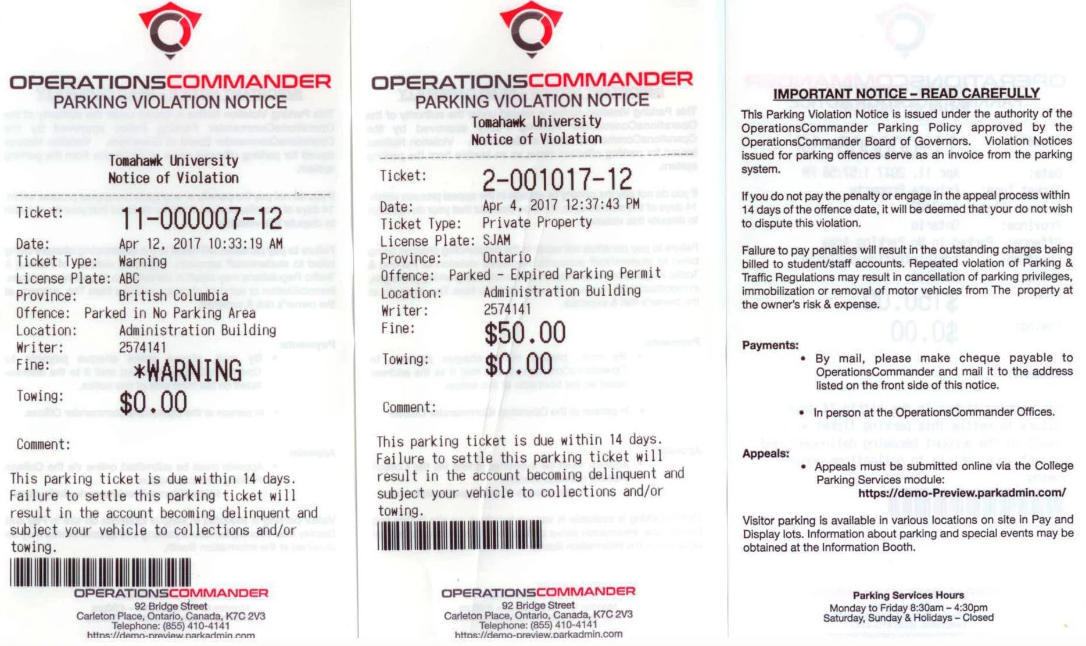
Front of the Ticket/Warning
The front of the ticket contains the core details of the infraction:
-
Ticket Number: A system-assigned number that uniquely identifies the violation or warning.
-
Date: The exact date and time the ticket was issued.
-
Ticket Type: Identifies the broad category of the violation (e.g., Private Property).
-
License Plate: The license plate number of the offending vehicle.
-
Province: The province or state where the license plate is registered.
-
Offense Type: Identifies the specific rule or parking violation that occurred.
-
Location: The specific lot or property area where the violation took place.
-
Writer: A system-assigned unique number identifying the enforcement officer. This protects the officer's privacy in the field, while allowing administrators to easily look up the writer's actual name within the admin portal.
-
Fine: The financial penalty owed for the violation.
-
Visual Cue: On a warning ticket, the fine amount is followed by *Warning. This indicates that no payment is currently due, but demonstrates what the penalty would have been if an actual ticket was issued.
-
-
Towing: The administrative amount due if the offending vehicle had to be towed.
-
Comments: Any additional notes or context provided by the enforcement officer.
Back of the Ticket/Warning
The back of the ticket provides the violator with the necessary administrative details and organizational policies:
-
Payment and Appeal Instructions: Clearly outlines the step-by-step process for how the violator can either pay their fine or submit a formal appeal through the online portal.
-
Sign-off Section: Provides a designated area for the violator to identify themselves and sign the ticket if required by your organization's policies.
-
Organization Details: Lists where to find additional information, your organization's contact details, and your standard office hours.
Best Practices and Considerations
Understanding Warnings vs. Spoiled Tickets: While neither a warning nor a spoiled ticket requires payment from the user, they serve two entirely different purposes within the OPSCOM system.
-
Issuing Warnings: A warning is officially tracked in the system as a zero-dollar violation and is processed immediately upon syncing to the server. Use warnings as an educational tool for first-time offenders or minor infractions, effectively giving the user a "slap on the wrist" while still maintaining a permanent record of the offense on their profile.
-
Spoiling Tickets: The "Spoiled" status is used to void a ticket completely, making it as if the ticket never happened. Officers should spoil a ticket if it was initiated in error, such as accidentally entering the wrong license plate details, or if a driver arrives and moves their vehicle just as the patrol officer begins writing the citation.