
Part 1: Getting an Installer & Cable Modifications (Optional)
The Installer and Cable Modifications process outlines the necessary physical cabling setup required to power Mobile License Plate Recognition (LPR) cameras and the PL8RDR computer within an enforcement vehicle. Its primary purpose is to ensure all hardware is correctly wired, powered, and integrated for reliable field operation. This article is intended for OPS-COM administrators and professional vehicle equipment installers.
Setup and Configuration
This process requires a professional installer to set up all required vehicle cabling. Verify with your installer exactly how you want the system to function, as they will determine the optimal power routing and cabling layout for your specific vehicle fleet.
Installer Side: Depending on your vehicle's hardwiring requirements, the standard cables provided in your kit may require physical modification.
Your installer may have to modify the provided factory cables. The Survision camera cable includes a standard car adapter which may need to be cut off and replaced with the 12V 5.5x2.5 Male-Female Power Plug to ensure a direct and stable power connection.
Cable Configuration
Installers can use the following connectivity instructions to accurately route power and data between the vehicle, the cameras, and the PL8RDR computer based on the specific splitter cables included in your hardware kit.
M12 Y-Splitter Configuration
If your hardware setup includes the standard Survision cable and the M12 Y-Splitter, ensure the physical connections match the following configuration:
-
Connect terminal A directly to the power input.
-
Connect terminal B directly to the LPR Camera.
-
Connect terminal PC directly to the PL8RDR computer.
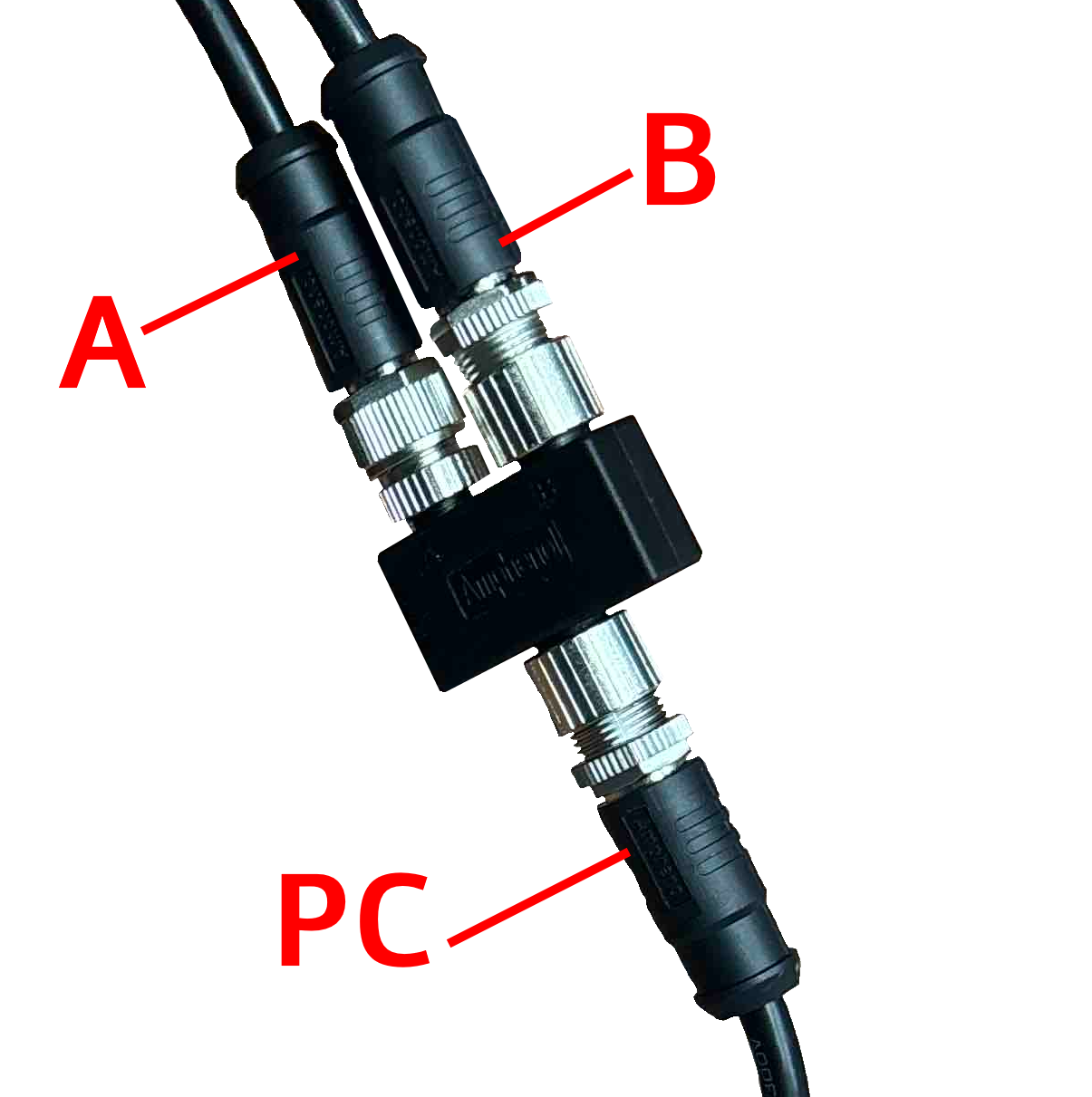
Standard DC Y-Splitter Configuration
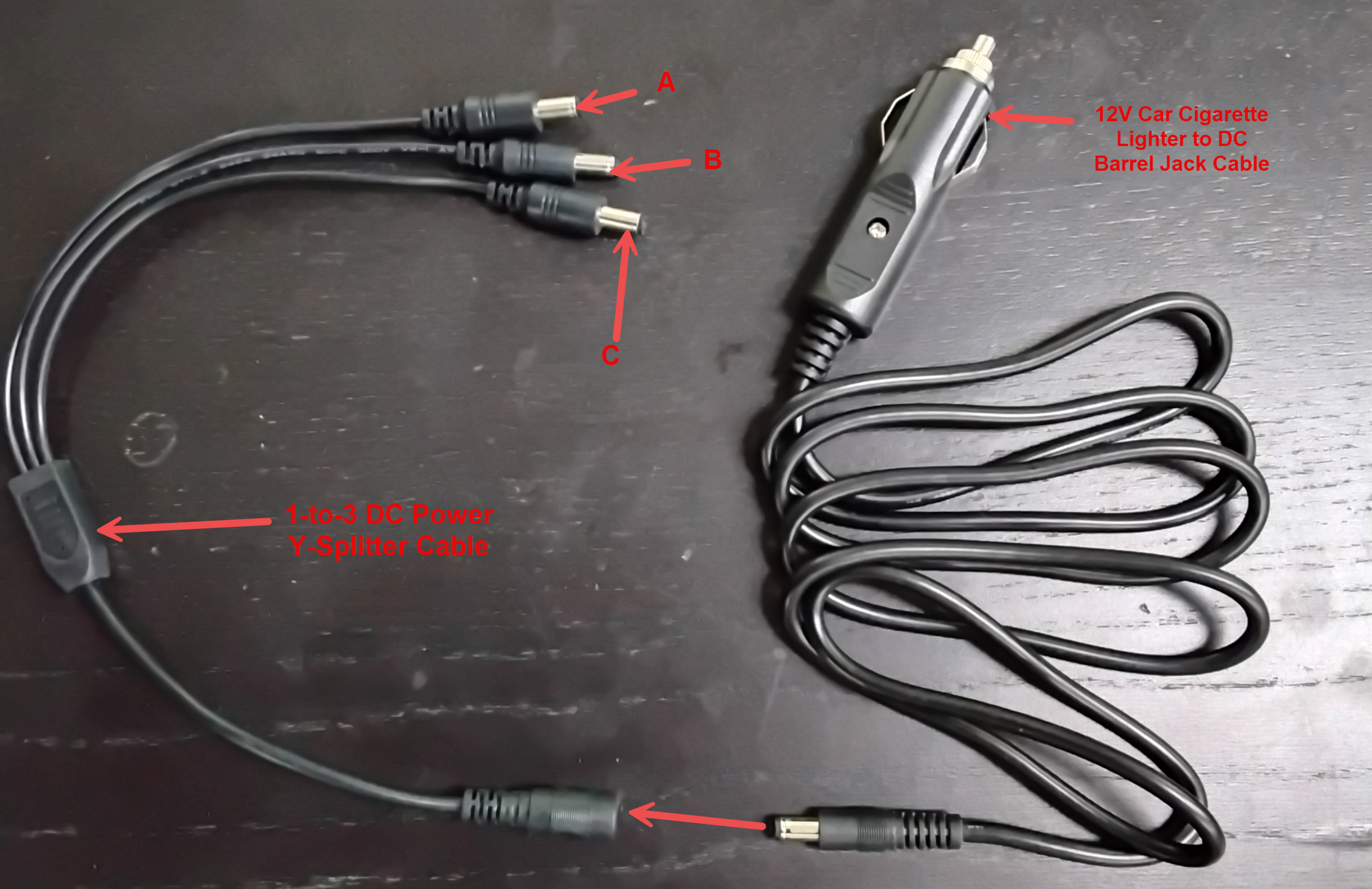
If your hardware setup utilizes the 12V Car Cigarette Lighter to DC Barrel Jack and a 1-to-3 DC Y-Splitter, the connectivity follows a highly simplified route:
-
Connect terminal A to LPR Camera 1.
-
Connect terminal B to LPR Camera 2.
-
Connect terminal C directly to the PL8RDR computer.
-
Connect the 12V Car Cigarette Lighter Jack directly into the vehicle's 12V auxiliary power outlet.
Best Practices and Considerations
-
Provide the specification document: Ensure your installer is provided with the PICOPAK3 PINOUT and CONNECTIONS specification document here PICOPAK3 PINOUT & CONNECTIONS_English.pdf. This is absolutely crucial for verifying pinouts and maintaining hardware warranty standards during any custom modification.
-
Verify power requirements: Verify the consistent power draw and electrical requirements with your installer. Mobile LPR equipment requires stable power; improper connections or insufficient voltage can lead to unexpected system reboots or data loss during active enforcement patrols.
-
Secure all physical connections: Ensure all cable connections are securely fastened and protected from physical wear or environmental exposure. Routing cables safely and neatly within the vehicle cab prevents accidental disconnection by enforcement officers entering and exiting the vehicle.