
Part 2: Equipment Set-Up
The Mobile LPR Equipment Setup process outlines the physical connection and configuration of your License Plate Recognition hardware. Its primary purpose is to ensure the Survision camera, PL8RDR computer, and associated peripherals are correctly powered and positioned for accurate plate scanning. This article is intended for OPSCOM administrators and field deployment staff responsible for installing the LPR kit.
Setup and Configuration
This process requires direct physical interaction with the provided hardware components. A typical setup includes a Survision LPR camera, a PL8RDR micro-computer (the "brains" of the operation), a 4G/LTE tablet, a Bluetooth printer, and a vehicle mount.
Powering the PL8RDR: The PL8RDR computer requires a strictly 12V DC power source and must always be connected using an inline fuse to protect the hardware. It can be powered using a vehicle power adapter for field use or a standard wall plug for in-office testing. The setup steps below apply to both power options.
Connecting the Equipment
Installers can use the following instructions to accurately route power and attach the required communication antennas to the PL8RDR and camera.
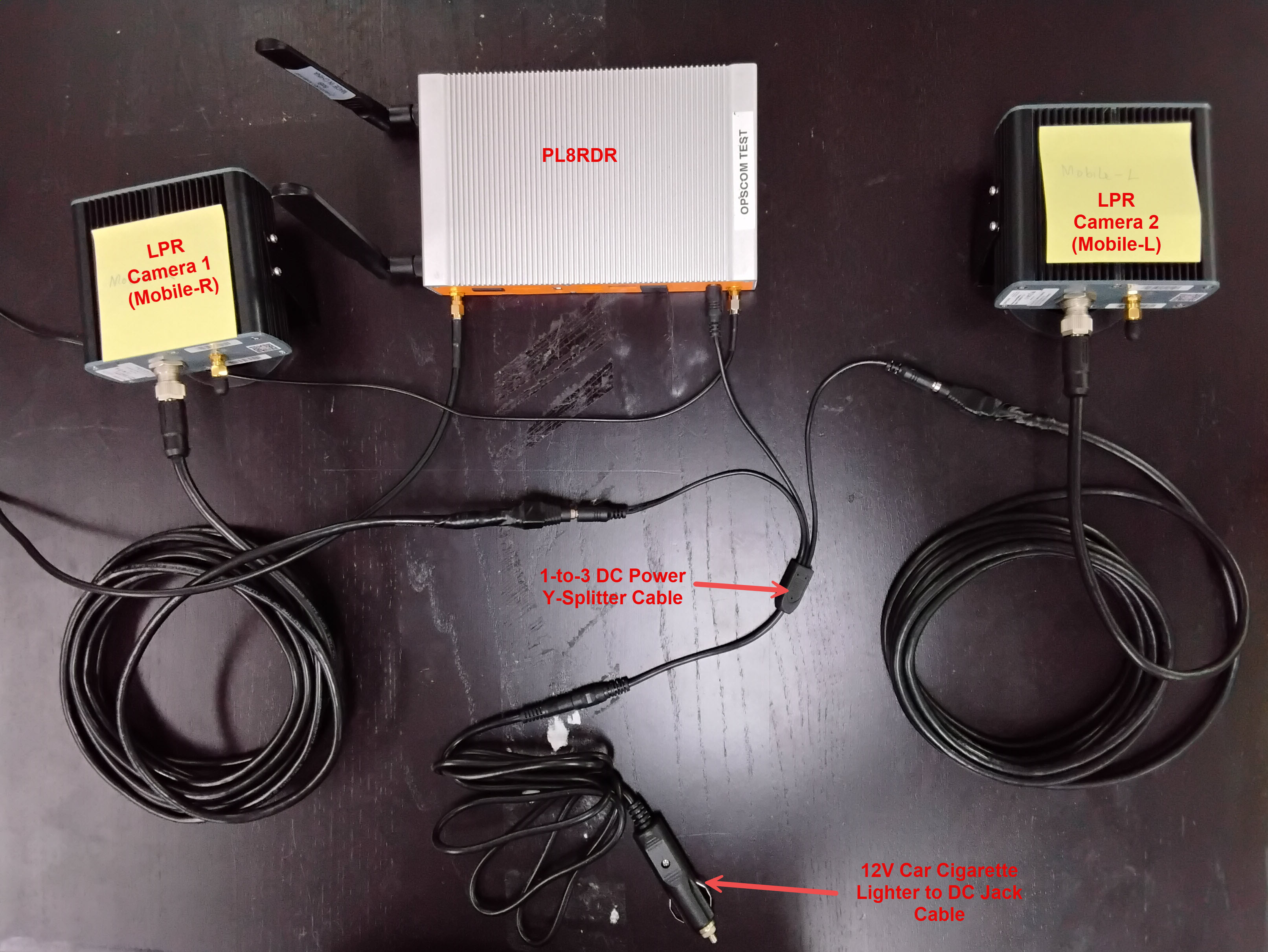
Connecting the Power and Camera
-
Connect the splitter to the primary power cord.
-
Plug the opposite end of the power cord into the wall socket or the vehicle power adapter.
-
Connect one of the split power cords to the LPR data/power cord.
-
Align the pins and attach the cord securely to the Survision camera.
-
Plug the remaining power source directly into the PL8RDR computer.
You will know that the initial power setup is successful when the Survision camera emits a strong, visible light.
Installing the Antennas
The system utilizes two LAN antennas and one OPSCOM wireless connection antenna.
-
Attach the corded LAN antennas to the specific port on the back left of the PL8RDR.
-
Lightly screw the side antennas into their designated ports on the side of the PL8RDR chassis.
-
Gently fold the side antennas into an upright position, ensuring the hinge is facing the correct direction.
-
Mount or place the corded LAN antennas in an elevated location within the vehicle to ensure a strong data signal.
All antennas must be attached correctly and securely. If they are omitted or improperly connected, the device will not establish a connection to the OPSCOM servers and will fail to function as intended.
Positioning the Survision Camera
Proper camera positioning is critical for accurate license plate reads. Installers must physically align the camera and use the software configuration assistant to finalize the setup.
-
Park your enforcement vehicle behind and to the side of a reference vehicle with a clearly visible license plate (simulating driving past it on the street).
-
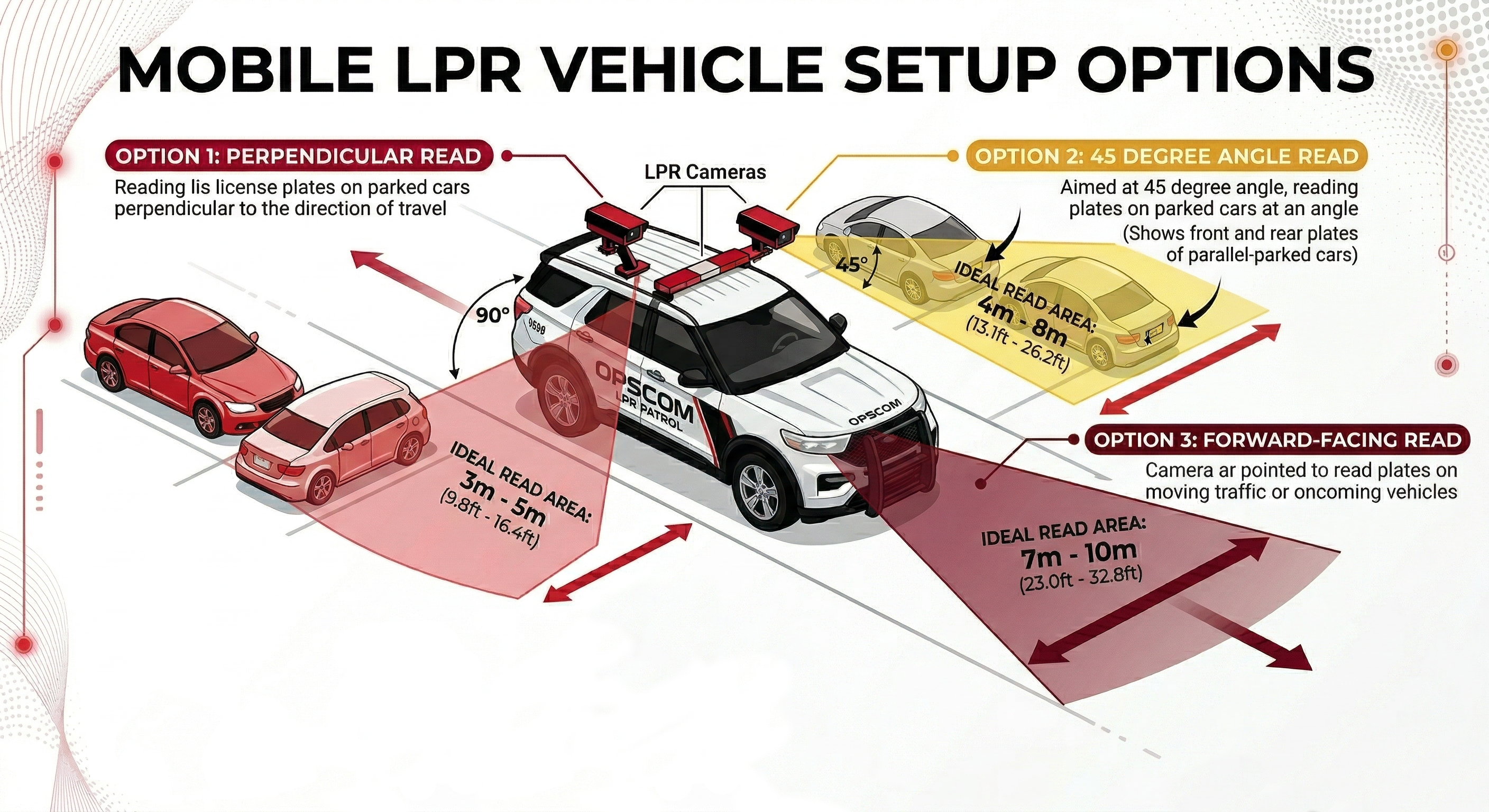
Mount the camera on your vehicle so it is physically between 3 and 8 meters away from the reference plate.
-
Angle the camera so it is offset less than 30 degrees from the plates you are scanning.
-
Connect a mobile device or laptop to the pl8rdr.opscom Wi-Fi network.
-
Open a web browser and enter the camera’s IP address to access the management interface.
-
Click Configuration assistant.
-
Click the Next button to navigate through the first three screens.
-
Adjust the physical camera on your vehicle during the fourth screen until the reference plate is perfectly centered in the green box on your screen.
-
Verify that the lines of text above the camera feed all turn green, indicating the camera is correctly positioned.
-
Click the Next button to proceed.
-
Leave the fields blank on the final screen and click the Finish button.
You may see a system error message after clicking the final button, but you can safely ignore it. The required address is automatically configured on the PL8RDR.
Best Practices and Considerations
-
Secure the hardware appropriately: Ensure the PL8RDR micro-computer is safely stored in the vehicle's trunk or a secure, well-ventilated compartment.
-
Retain the extra antenna: Keep the extra wireless connection T-Bar antenna on hand. While not required for initial setup, it can be utilized later if you experience persistent connectivity issues in low-signal patrol areas.
-
Optimize antenna placement: Make sure to place the corded antennas in an elevated location with a good data signal. Surrounding metal from the vehicle body can interfere with transmission if the antennas are buried too deeply in the trunk or cab.
-
Maintain strict camera angles: Strictly maintain a camera angle of less than 30 degrees off the target plates. Steeper angles will significantly reduce OCR (Optical Character Recognition) read accuracy and result in missed enforcement opportunities.