
Enhanced Admin Security: Multi-Factor Authentication (MFA) - Releasing November 2025
We have recently added a critical security layer for our Admin users: Multi-Factor Authentication (MFA)! This is Phase 2 of our MFA project; in Phase 1, we successfully delivered MFA for all user-side accounts. This next phase provides Primary Admins with three flexible control options (Hidden, Visible, or Required) and enables Admin Users to securely log in using an email-delivered One-Time Password (OTP). This significantly strengthens account protection, addressing a key security request from clients.
MFA is always mandatory for security-sensitive actions:
-
Admin Account Creation
-
Password Changes
You will receive an MFA email code for these actions, regardless of the system setting. If you don't receive the code, your email address may be missing or incorrect—please contact your administrator system admin (Or support, if you cannot reach your system admin) for help.
There are 3 settings for the MFA functionality.
This setting is currently only configurable with the helps of support. If you wish to change the options on your site, contact support@ops-com.com
Here is how the prompt will look for your admin users:
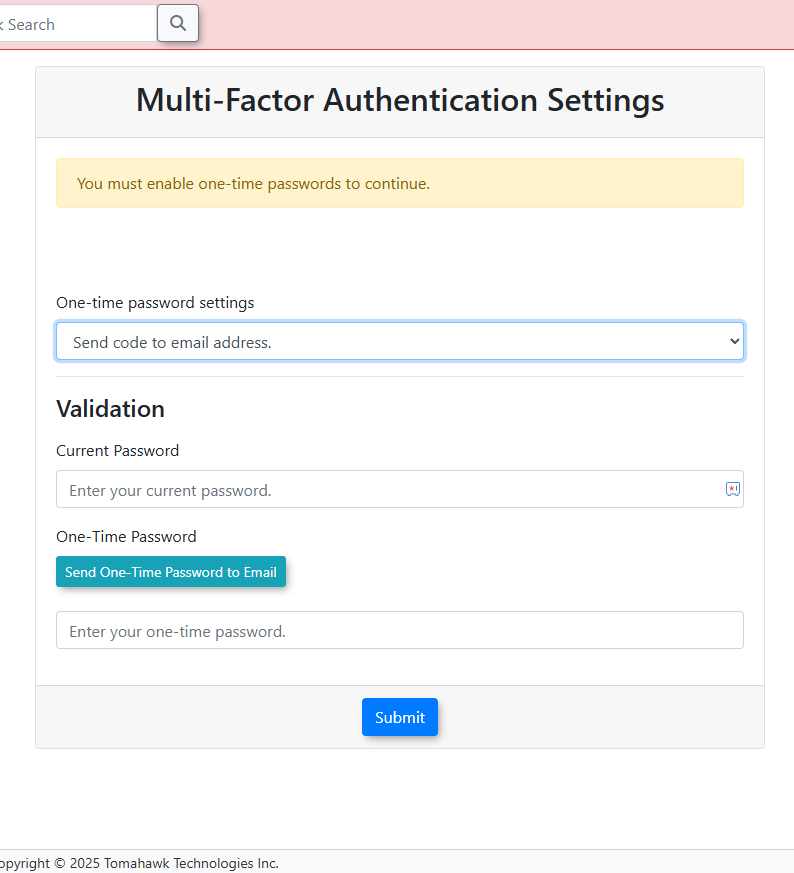
Note: The MFA email is a required security communication, and will be sent out to all users, even if they have unsubscribed from all email categories, on their user profile.